 RoadmapAI
How to Collect Feature Requests From GitHub Discussions
Set up GitHub Discussions for feature requests: enable it, build an Ideas category, triage weekly, and convert accepted ideas into Issues.
GitHub Discussions feature requests are ideas that users post in a repository's Discussions tab, usually in an Ideas category. Others comment and upvote, and maintainers decide later whether to turn the best ones into Issues. If your Issues tab is stuffed with "it would be nice if" posts, this guide is for you.
The short version:
- Enable Discussions on your repository.
- Create an Ideas category (or a "Feature requests" category) with a form.
- Pin a short "how to write a good request" post.
- Triage weekly, using labels and a simple score.
- Convert accepted ideas to Issues, then tell requesters when they ship.
Let's break it down, step by step, with copy-paste assets.
Last updated: November 2026. Written by the RoadmapAI team, which sells a Discord-based feedback tool. I flag where that matters, and the alternatives section stays neutral.
What Are GitHub Discussions Feature Requests?
A feature request is a proposal for something your project does not do yet. A GitHub Discussions feature request is that same proposal posted as a threaded conversation instead of a ticket. People reply, react, and refine the idea in the open. Nobody is assigned, and nothing is promised.
GitHub Discussions is a space for open-ended conversation next to your code. GitHub positions it for questions, ideas, and announcements, which is the mix a feature pipeline needs.
How Discussions differ from Issues
Issues track work. Discussions track conversations. An issue has an assignee, a milestone, and a closed state that means "done" or "won't do." A discussion has categories, replies, upvotes, and optionally a marked answer.
That difference matters for requests, because most requests start fuzzy. Someone writes "add dark mode," and you don't yet know the real problem, the scope, or the cost. A discussion is built for that fuzziness.
When Discussions are the right home for requests
Use Discussions when the idea needs validation, when you expect debate about the approach, or when you want the community to signal demand. Use Issues when the work is scoped and ready to build.
Discussions for ideas, Issues for work. Discussions are the intake and validation layer. Issues are the commitment layer.
I hold this opinion firmly: mixing both in one list is how backlogs rot.
GitHub Discussions vs Issues for Feature Requests
Here is how GitHub Discussions vs Issues compares for request handling.
| Factor | GitHub Discussions | GitHub Issues |
|---|---|---|
| Purpose | Explore and validate ideas | Track scoped, actionable work |
| Voting | Upvotes on posts and polls | Reactions (thumbs up) only |
| Closing | Can be closed or locked; no "done" semantics | Closed as completed or not planned |
| Assignment | None | Assignees and milestones |
| Organization | Categories, pinned posts | Labels, Projects, milestones |
| Conversion | Can become an Issue | Can be transferred between repos |
| Noise level | Higher by design | Should stay low |
| Best for | "Would this be useful?" | "Build this by next release" |
A quick decision tree
Ask three questions in order:
- Is it a bug? Send it to Issues using a bug template.
- Is it scoped, agreed, and ready for someone to build? Make it an Issue.
- Does it still need validation or discussion? Put it in Discussions.
The hybrid model most maintainers use
The pattern that works: ideas enter through Discussions, and only accepted ideas become Issues. If you prefer an Issues-only approach, I wrote up a GitHub Issues feature requests workflow that covers templates and labels. Many teams run both, and that is fine.
How to Enable GitHub Discussions (2-Minute Setup)
Enable it for a repository
You need admin permission on the repository. Per the GitHub Docs page on enabling Discussions, the path is:
- Open the repository on GitHub.
- Click Settings.
- Under Features, tick Discussions.
A Discussions tab appears next to Pull requests. The UI changes now and then, so check the Docs page if a label has moved.
GitHub organization discussions for multi-repo products
If your product spans several repositories, an organization can host its own discussions in a dedicated source repository, so users have one place to post ideas. GitHub documents the setup in its organization discussions guidance. For multi-repo products, I recommend GitHub organization discussions over scattering Ideas categories across five repos.
Troubleshooting: Discussions tab missing
- You lack admin rights. Ask an owner to enable it.
- It is switched off. Recheck Settings, then Features.
- It is a fork. Forks do not carry the setting over. Enable it in the fork's own settings if you have admin rights.
- Organization policy. Owners can restrict features. Ask your org owner.
Set Up the GitHub Discussions Ideas Category
Categories keep ideas apart from support questions, and that separation matters because support noise buries requests. (Our guide on separating support from feature requests goes deeper.)
Recommended category set
- Ideas (or "Feature requests"): proposals and enhancements.
- Q&A: support questions with answer marking.
- Announcements: maintainer-only posts, including release notes.
- Show and tell: community projects.
- Polls (optional): quick votes on a few options.
Choosing the right format for each
GitHub offers several formats: open-ended discussion, question and answer, announcement, and poll. Match them like this:
| Category | Format | Purpose | Who can post |
|---|---|---|---|
| Ideas | Open-ended | Feature proposals | Everyone |
| Q&A | Question / Answer | Support, with a marked answer | Everyone |
| Announcements | Announcement | Releases, roadmap updates | Maintainers only |
| Show and tell | Open-ended | Community showcases | Everyone |
| Polls | Poll | Choose between options | Everyone or maintainers |
Name the category plainly. "Ideas" is the GitHub default and users already know it, so keep it unless your audience expects "Feature requests."
Build a GitHub Feature Request Template With Discussion Category Forms
GitHub discussion category forms let you require structured input, much like issue forms. You define them in YAML files in your repository's .github/DISCUSSION_TEMPLATE/ folder, named after the category slug. Verify the current syntax in the GitHub Docs on discussion category forms before you commit.
A copy-paste YAML template
Save this as .github/DISCUSSION_TEMPLATE/ideas.yml (match the filename to your category slug):
title: "[Idea] "
body:
  - type: markdown
    attributes:
      value: |
        Thanks for the idea. Search existing discussions first and upvote if one matches.
  - type: textarea
    id: problem
    attributes:
      label: What problem are you trying to solve?
      description: Describe the situation, not the solution.
    validations:
      required: true
  - type: textarea
    id: solution
    attributes:
      label: What would you like to see?
    validations:
      required: true
  - type: textarea
    id: alternatives
    attributes:
      label: What have you tried or considered?
  - type: textarea
    id: usecase
    attributes:
      label: Who is affected and how often?
  - type: dropdown
    id: impact
    attributes:
      label: How painful is this today?
      options:
        - Nice to have
        - Slows me down
        - Blocks me
    validations:
      required: true
What each field should capture
- Problem: the real need, and the most useful field on the form.
- Proposed solution: the requester's idea, treated as a hypothesis.
- Alternatives: workarounds, which reveal how urgent the need is.
- Use case and frequency: who is affected and how often.
- Impact: a self-rated severity you can use in scoring.
Pinning guidelines and a "how to write a good request" post
Pin a short post at the top of the Ideas category. The paperless-ng project has a discussion titled "Guidelines on how to make a good feature request," where maintainers ask requesters for a structured proposal with bullet points. Copy that pattern: three or four lines on what a good request contains, a link to search first, and a note that votes inform but do not decide.
How GitHub Discussions Voting Works (and What It Can't Tell You)
Upvotes as a signal
People can upvote discussions, so the most wanted ideas rise in the list. Sort the Ideas category by top votes and you get a first cut at demand. Polls add a structured way to choose among options.
Bias and duplicates
Upvotes are a blunt instrument. They leave out several things you need to know:
- Who voted. A hundred hobbyists and one paying customer look the same.
- Intensity. A casual click counts the same as a blocker.
- Age. Older posts collect more votes simply by existing longer.
- Duplicates. Native Discussions cannot merge two threads and combine their votes, so demand gets split.
Treat votes as one input. I never rank by count alone.
Supplementing votes with qualitative interviews
A Lightdash discussion titled "How do you handle feature requests from users?" shows maintainers describing a useful habit: talk to the requester to understand the need, then add that user feedback to the tracked item. Do the same. Ask in the thread, "What are you doing today instead?" The answer often changes the solution.
A Weekly Triage Workflow
A request process only works if requests get answers. Pick a weekly slot. Thirty minutes is enough for most projects.
Label and status scheme
Labels apply to discussions. Keep the set small:
| Label | Meaning |
|---|---|
needs-info |
Waiting on the requester |
under-review |
Maintainers are evaluating |
planned |
Accepted; will become an Issue |
later |
Good idea, not now |
duplicate |
Points to another discussion |
declined |
Will not build |
Handling duplicates
Link the duplicate to the main thread, label it duplicate, ask the requester to upvote the original, and close the thread. Votes do not merge, so mention the extra interest in the main thread's comments to keep the signal.
How to say yes, not now, and no
Reply templates you can paste:
Yes: "Thanks for this. We are accepting it. I am converting it to an issue so we can track the work, and I will update this thread when it ships."
Not now: "This is a good idea, but it does not fit our current priorities. I have labeled it later and will revisit it next quarter. More detail on your use case helps us rank it."
No: "Thank you for proposing this. We have decided not to build it because [reason]. If your situation changes or you have a different angle, we are glad to look again."
Honest reasons build trust. Silence breeds resentment.
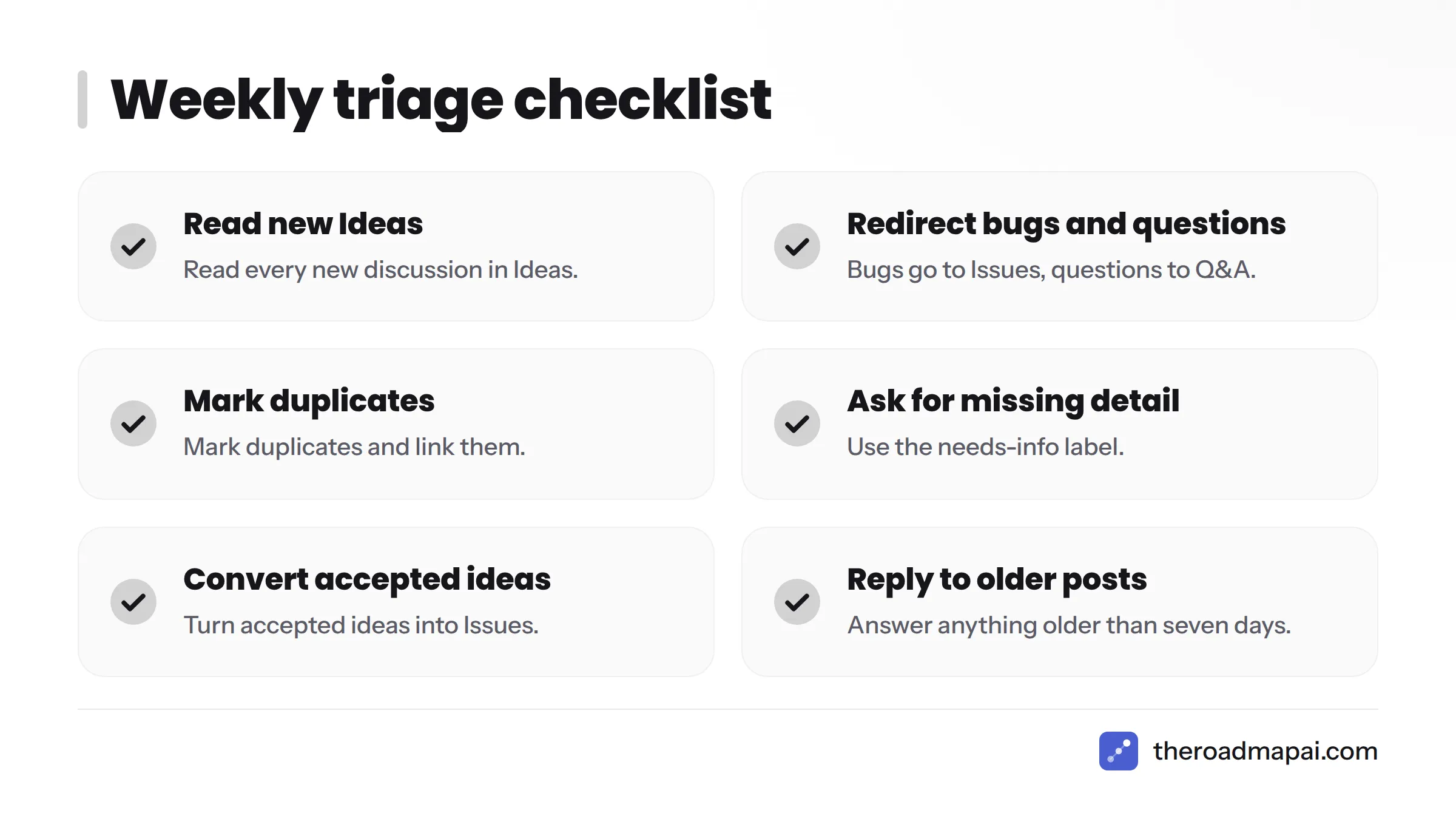
Weekly triage checklist
- Read every new discussion in Ideas.
- Redirect bugs to Issues and questions to Q&A.
- Mark duplicates and link them.
- Ask for missing detail with
needs-info. - Score the top five by votes.
- Convert accepted ideas to Issues.
- Reply to anything older than seven days.
A simple scoring rubric
The RICE framework (reach, impact, confidence, effort) is a common way to rank work. A light version works fine for Discussions:
| Factor | How to score (1 to 3) |
|---|---|
| Reach | Votes plus how many users the idea affects |
| Impact | The requester's impact dropdown answer |
| Confidence | How well you understand the problem |
| Effort | Inverse of build cost (3 = small) |
Add the four numbers. Anything at 10 or above goes to the top of the list. The method is crude on purpose.
Convert a Discussion to an Issue and Build a GitHub Discussions Roadmap
Convert discussion to issue
Maintainers can create an issue from a discussion with the Create issue from discussion option in the discussion sidebar. Carry over the problem statement, the agreed scope, and a link back to the thread. In the discussion, post the new issue number, label it planned, and leave it open for follow-up. Skip the convert step for anything not yet scoped.
For what happens after conversion, our GitHub Issues feature requests workflow covers templates, labels, and sizing.
Moving from Issues to a GitHub Projects board
GitHub Projects can hold your Issues in board or table views. Add columns such as Planned, In progress, and Shipped. Teams that live in Linear can mirror the same flow; see our guide to tracking and triaging Linear feature requests.
Publishing a public roadmap
A board that only maintainers see does little for trust. Make a read-only view public, or publish a public roadmap that shows what is planned, in progress, and shipped. That gives you a GitHub Discussions roadmap that users can actually read.
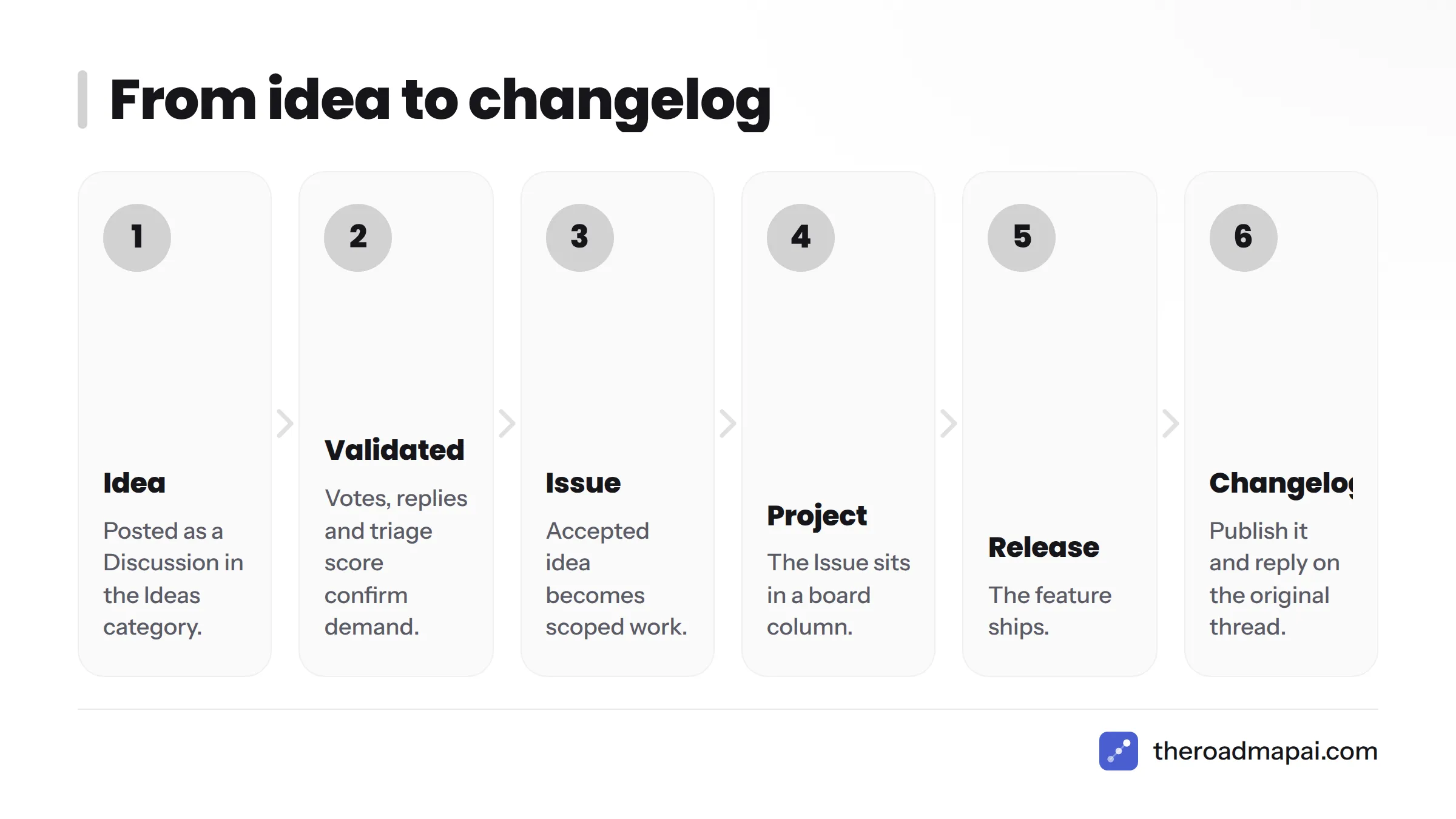
The full flow looks like this:
Idea (Discussion in Ideas) → Validated (votes, replies, triage score) → Issue (scoped work) → Project (board column) → Release → Changelog (and a reply on the original thread)
Close the Loop: Notify Requesters and Publish a Changelog
Most projects skip this step, and it is the one that makes people post a second idea.
Reply on the original discussion when shipped
When the release lands, comment on the original discussion with the version number and a link to the pull request or release notes. Anyone subscribed to the thread gets a notification. Then mark the discussion with a shipped label or close it.
Native notifications reach subscribers only. Requesters who did not subscribe will not hear about the release, so mention them by handle in your final comment.
Changelog practices
Keep a changelog in a consistent format. The Keep a Changelog convention groups entries into Added, Changed, Fixed, and Removed, and pairs well with semantic versioning. Post each release summary in your Announcements category, too. If you want options, see our roundup of changelog tools.
Automate and Analyze Discussions
GitHub Actions for auto-labeling
GitHub Actions can trigger on discussion events. A small workflow can add a needs-triage label to every new discussion in Ideas, so nothing slips through. Check the Actions documentation for the current discussion event syntax before writing your workflow.
Export with the GraphQL API
Discussions are exposed mainly through the GitHub GraphQL API. You can query discussions by category, along with upvote counts, labels, and comment totals, then dump the results to a spreadsheet for scoring. If you are used to the REST API, expect to switch tools here.
A typical analysis pulls the top 50 ideas by votes, flags those with no maintainer reply, and lists the oldest needs-info items. That is a ten-minute script that saves hours of scrolling. For ideas on layering machine help on top, see our look at AI feedback tools.
Embed discussions on your site with giscus
giscus is an open source comment system powered by GitHub Discussions. It maps a page on your website to a discussion, so a comment on your blog or docs becomes a thread in your repository. It suits docs sites that want feedback in one place.
If you would rather see the setup first, GitHub's own video walks through it:
GitHub Discussions Feature Requests Examples From Real Projects
How maintainers describe their process
Two public threads show the pattern clearly:
- Lightdash, "How do you handle feature requests from users?" Maintainers describe talking to the user to understand the need, then attaching that user feedback to the tracked item.
- paperless-ng, "Guidelines on how to make a good feature request." The project asks requesters for a structured proposal with bullet points before it will consider the idea.
I am describing only what those thread titles and snippets show. Read the full threads for details.
What to copy from them
- Ask for the problem before the solution.
- Publish a short guideline and pin it.
- Link user conversations to the item you track.
- Reply even when the answer is no.
Limitations of GitHub Discussions for Feature Requests (and Alternatives)
What native Discussions can't do
I like Discussions, and I also hit walls with them:
- No merging of duplicate threads with combined votes.
- No built-in "notify everyone who asked" when a request ships.
- No way to weight votes by customer type or plan.
- No roadmap view of its own; you need Projects or another tool.
- Your audience must have a GitHub account to take part.
When your community isn't on GitHub
Many communities, game, bot, and SaaS communities especially, live in Discord or Slack. Their feedback never reaches GitHub unless someone copies it by hand. If that sounds like you, read how to collect feature requests from Discord or how to track Slack feature requests. A workable pattern is to keep GitHub as the home for accepted work and funnel other channels into it.
Comparing your options
Disclosure: RoadmapAI makes a Discord-based tool, so weigh my framing accordingly. Here is a neutral side-by-side.
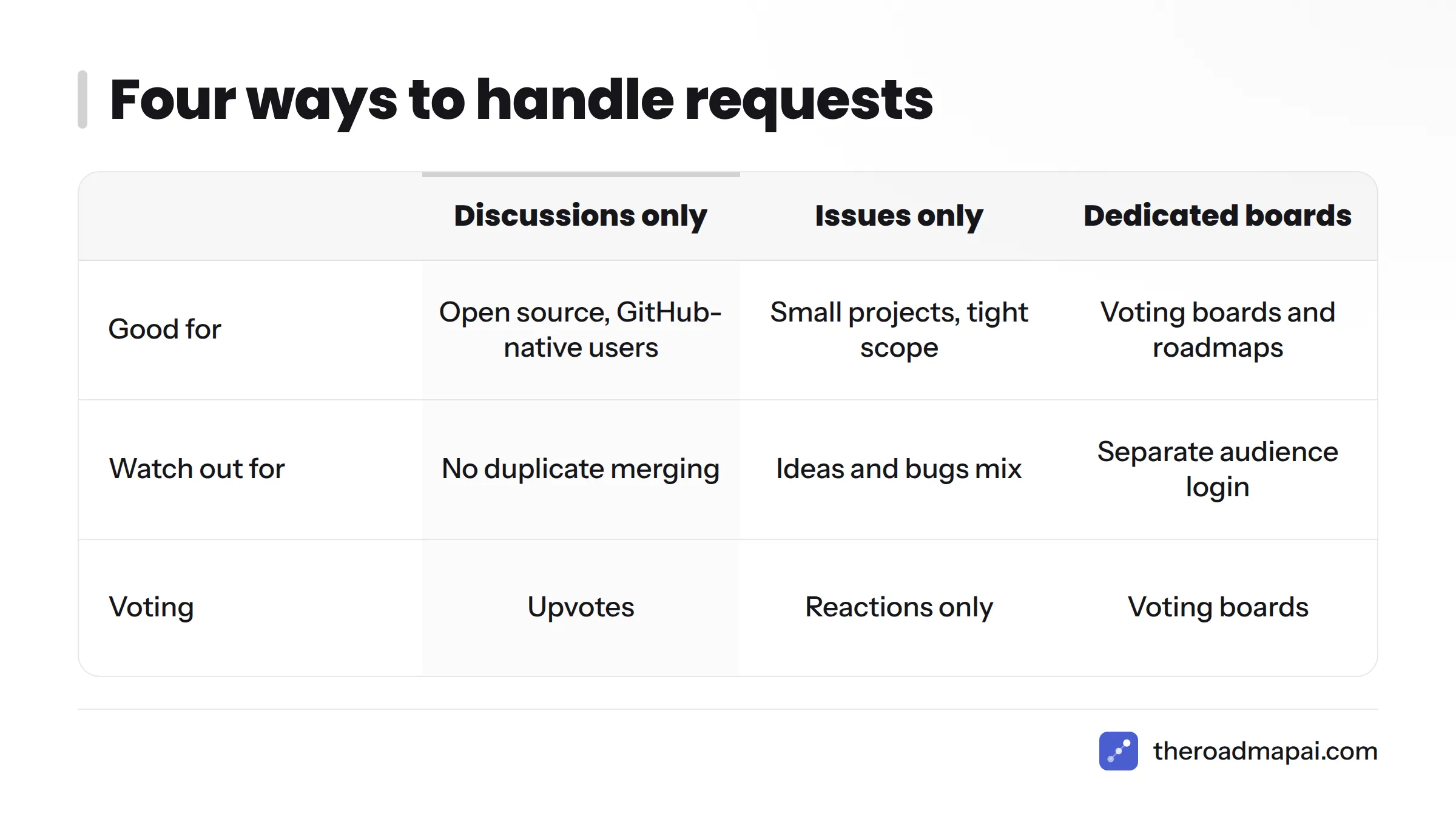
| Approach | Good for | Watch out for |
|---|---|---|
| Discussions only | Open source projects with GitHub-native users | No duplicate merging; GitHub account required |
| Issues only | Small projects, tight scope | Ideas and bugs mix; voting is reactions only |
| Dedicated boards such as Canny or Upvoty | Product teams wanting voting boards and roadmaps | Separate tool and separate audience login |
| Discord-based capture with RoadmapAI | Communities that already live in Discord | Best when Discord is your main channel |
RoadmapAI is my pick when your users chat in Discord. Its Discord feedback bot turns messages into tracked requests with voting, and its feature request tools page shows how capture, tracking, and voting fit together. Plans start from its pricing page, which includes a 7-day free trial. If your community is GitHub-native, Discussions alone may be all you need. If you have both audiences, use both and connect them.
Common Mistakes
- Letting Ideas become a support desk. Redirect questions to Q&A.
- Skipping the form. Free-text requests are hard to compare.
- Ranking by votes alone. Weigh impact and who is asking.
- Converting too early. Unscoped Issues clog the backlog.
- Never replying. Silence kills participation.
- Forgetting to close the loop. Shipped features deserve a comment.
- Ignoring spam. Use moderation tools, lock off-topic threads, and delete spam promptly.
FAQ
Should I use GitHub Discussions or Issues for feature requests?
Use Discussions to gather and validate ideas, and Issues for scoped, actionable work. Discussions suit fuzzy proposals that need debate and votes. Issues suit agreed tasks with owners and milestones. Most maintainers run both and convert accepted ideas from one to the other.
How do I enable GitHub Discussions?
You need admin permission on the repository. Open the repository, click Settings, find the Features section, and tick Discussions. A Discussions tab then appears. Organizations can also host discussions in a dedicated repository. Confirm current labels in the GitHub Docs.
Can users upvote feature requests in GitHub Discussions?
Yes. Users can upvote discussions, so popular ideas rise when you sort by top votes. Upvotes are a rough demand signal. They do not show who voted or how urgent the need is, and duplicate threads split their votes.
How do I convert a discussion to an issue?
Open the discussion, use the Create issue from discussion option in the sidebar, then add the scoped problem statement and a link back to the thread. Post the issue number in the discussion and label it planned so the requester can follow along.
Can I create a feature request template for Discussions?
Yes. Discussion category forms let you define required fields in a YAML file inside .github/DISCUSSION_TEMPLATE/, named for the category. Typical fields are the problem, desired outcome, alternatives, who is affected, and impact. See the YAML example above.
Does GitHub Discussions work at the organization level?
Yes. An organization can enable discussions tied to a source repository, giving multi-repo products one shared place for ideas. That beats scattering Ideas categories across many repositories, and it keeps votes and triage in one list.
How do I track which requests are planned?
Use labels such as planned, later, and shipped on discussions, and add accepted work to a GitHub Projects board. For a view outsiders can read, publish a read-only board or a public roadmap that mirrors those statuses.
What if my users give feedback in Discord instead of GitHub?
Capture it where they already talk, then route accepted items into GitHub. You can copy requests over by hand or use a bot that logs and tallies requests from Discord. Keep one source of truth for accepted work so nothing is tracked twice.
Next Steps
Start small. This week, enable Discussions, create the Ideas category, paste in the form, and pin your guidelines. Book a recurring thirty-minute triage slot. After a month, review your top-voted ideas, convert the ones you will build, and post a shipped comment on the first one. If feedback also arrives through Discord, add that channel next and keep GitHub as the home for committed work.
Sources
- About discussions, GitHub Docs
- Enabling or disabling GitHub Discussions for a repository, GitHub Docs
- Creating discussion category forms, GitHub Docs
- About Projects, GitHub Docs
- GitHub Actions documentation, GitHub Docs
- GitHub GraphQL API documentation, GitHub Docs
- giscus, project site
- Canny, official site
- Upvoty, official site
- RoadmapAI, official site