 RoadmapAI
How to Turn Feedback Emails Into a Product Roadmap
Turn scattered feedback emails into a counted, prioritized roadmap. Follow 7 steps from capture to closing the loop using just an inbox and a spreadsheet.
To turn a feedback email into a roadmap item, run it through seven steps: capture every email in one place, classify it, rewrite the request as a problem, merge duplicates, count unique requesters, score priority, then publish and reply to everyone who asked. That is the whole feedback email to roadmap workflow. The rest of this guide shows how to run each step with nothing more than an inbox and a spreadsheet.
One disclosure up front. RoadmapAI publishes this guide, and we build feedback and roadmap software. You can run this entire process without us, and I will say where a spreadsheet is the right call.
The 7-step pipeline in one list:
- Capture every feedback email in one place.
- Classify each email (request, bug, question, praise).
- Rewrite requests as problems, then merge duplicates.
- Quantify demand by unique requesters.
- Prioritize with a simple score.
- Publish the roadmap.
- Close the loop with the people who emailed.
Why Feedback Emails Don't Become a Roadmap on Their Own
A customer writes, "Would love a dark mode." Two weeks later someone else asks for "a night theme." A third person buries the same wish in message six of a support thread about billing. Nobody connects them, and the idea dies in the inbox.
Emails are anecdotes, and a roadmap needs counts
One email tells you a person has an opinion. Fifteen different people describing the same underlying problem tells you something about your product. Building a product roadmap from customer feedback means converting the first into the second.
Three ways the inbox fails you
- Lost threads. Requests hide inside long support conversations and forwarded chains.
- Duplicate wording. "Export to CSV," "download my data," and "get a spreadsheet of my results" are one request in three costumes.
- Loudest-voice bias. The customer who emails weekly feels like a market. They are one data point.
Atlassian's product roadmap guidance frames a roadmap as a shared, strategy-linked view of where the product is heading. A pile of unsorted emails cannot give you that. A counted, merged list can.
The 7-Step Pipeline at a Glance
Here is the pipeline in table form, with the output you should have after each step.
| Step | Action | Output |
|---|---|---|
| 1. Capture | Route all feedback to one alias or label | One searchable inbox |
| 2. Classify | Tag request, bug, question, or praise | Typed items |
| 3. Rewrite and merge | State the problem, combine duplicates | One row per problem |
| 4. Quantify | Count unique requesters, note segment | Demand numbers |
| 5. Prioritize | Score with a lightweight model | Ranked list |
| 6. Publish | Share approved items as Now/Next/Later | Public or private roadmap |
| 7. Close the loop | Reply to every requester | Updated customers |
Step 1: Capture Every Feedback Email in One Place
You cannot count what you cannot find. Pull feedback into a single spot first. This is the base of any feedback inbox to roadmap setup.
Set up a feedback alias or label
Create an address such as feedback@yourcompany.com that forwards to your team. In Gmail or Outlook, add a label or folder called "Feedback." Then set one rule for the team: if a customer shares an idea anywhere, forward it to the alias. Forwarding takes ten seconds, and it is the habit that makes everything else work.
Backfill the last 90 days
Search your inbox for phrases like "would be great if," "can you add," "wish," "feature," and "it would help." Forward or label the hits from the past 90 days. Ninety days is a heuristic, not a law. It gives you enough volume to see patterns without burying you in stale requests. Facing a backlog of 2,000 old emails? Don't read them all. Backfill 90 days and let older requests resurface when the same person asks again.
What to capture
For every email, record:
- Sender name and email
- Date received
- Plan or customer segment (free, paid, enterprise)
- A link to the original thread
- The exact quote that contains the request
That last field matters. Quotes keep you honest later, when you are tempted to remember what a customer "really meant."
Step 2: Classify Each Email (Request, Bug, Question, Praise)
Not every email belongs on a roadmap. Sorting first keeps bugs and how-to questions out of your product plan, and it is the core of feedback email triage. If your inbox mixes support and ideas heavily, this guide on how to separate feature requests from support goes deeper.
Definitions and quick tests
| Type | Definition | Quick test |
|---|---|---|
| Feature request | The customer wants something the product does not do | "Can it do X?" and the answer is no |
| Bug | The product does not do what it is supposed to do | Behavior contradicts your own docs |
| Support question | The customer cannot figure out something that exists | The answer is already in your product |
| Complaint | A frustration with no specific ask | You must dig to find the cause |
| Praise | Positive signal | Save it for testimonials |
A request that exposes a confusing feature often becomes a usability fix, not a new feature. Tag it as a question first, then note the pattern.
Splitting multi-request emails
One email often holds three asks. Split it into atomic items, one row per ask, all pointing back to the same source thread. Take this message: "Love the app, but I need CSV export, and the dashboard is slow on mobile, and can I invite my accountant?" It becomes three rows: one request, one bug or performance issue, and one permissions request.
Handling vague feedback
"It's clunky" is not a request. It is a symptom. Reply with a short discovery question: "Thanks for the honest note. What were you trying to do when it felt clunky?" The answer is the real item. Until you get it, log the email as "needs follow-up" and keep it out of your counts.
Step 3: Rewrite Requests as Problems, Then Merge Duplicates
Most guides skip this step, and it is where the real value sits.
The problem-statement rewrite
Customers describe solutions. You need problems. Product thinkers working in the Jobs-to-be-Done tradition push the same idea: understand the job the customer is trying to get done, not the feature they proposed.
| Email says | Problem statement |
|---|---|
| "Add a dark mode." | I work at night and the bright screen strains my eyes. |
| "Need CSV export." | I need my data in a spreadsheet to share with my accountant. |
| "Can you add a Slack button?" | My team lives in Slack and misses updates elsewhere. |
| "Make it faster." | Loading my project list takes long enough that I lose focus. |
Writing the problem shows that "download my data" and "export to CSV" are one item. It also leaves room for a better solution than the one the customer imagined.
Merging different wordings into one item
To merge duplicate feature requests, keep one master row per problem. When a new email arrives, search your sheet for the problem, not the phrase. If it matches, add the sender to the existing row. If not, create a new row. A good merge test: would one shipped solution satisfy both people? If yes, merge.
Keep a link to every source email
Every master row should list every source thread. You will need those links to notify requesters (Step 7) and to check context before you build. Tools that handle feature request tracking do the linking automatically. In a spreadsheet, paste the links into one cell.
Step 4: Quantify Demand
Now turn merged rows into numbers.
Unique requesters vs. total mentions
Count people, not emails. One enthusiastic customer who writes five times is one requester. Count mentions and the loudest voice wins every time.
Weighting by segment and strategic fit
Requesters are not equal for your business, and pretending otherwise is a mistake in either direction. Add a column for segment: free, paid, enterprise, or target persona. Then ask whether the request fits the customers you want more of. Ten requests from users outside your target market may matter less than three from the segment you built the product for.
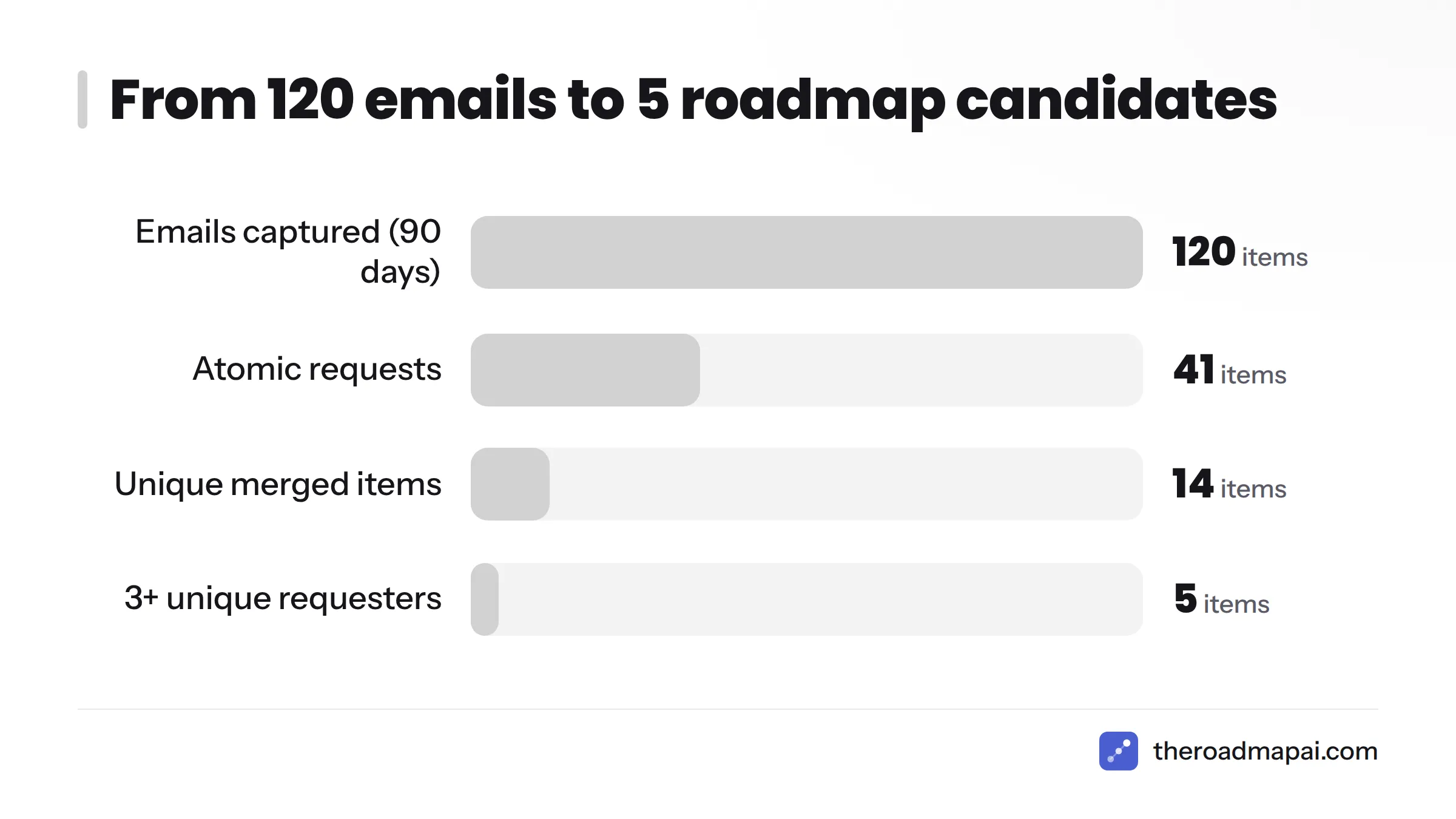
Worked example: 120 emails to 5 roadmap candidates
The numbers below are illustrative, not from a real dataset. They show the shape of the funnel.
| Stage | Count |
|---|---|
| Feedback emails captured in 90 days | 120 |
| Atomic requests after splitting and removing bugs, questions, praise | 41 |
| Unique items after rewriting and merging | 14 |
| Items with 3 or more unique requesters | 5 |
A hundred and twenty emails collapse into five serious candidates. That is the point. Before the funnel, you have noise. After it, you have a shortlist.
Step 5: Prioritize With a Simple Score
Counting tells you demand. Scoring tells you what to do first. This is how to prioritize feature requests from email without a heavy framework.
A lightweight scoring model
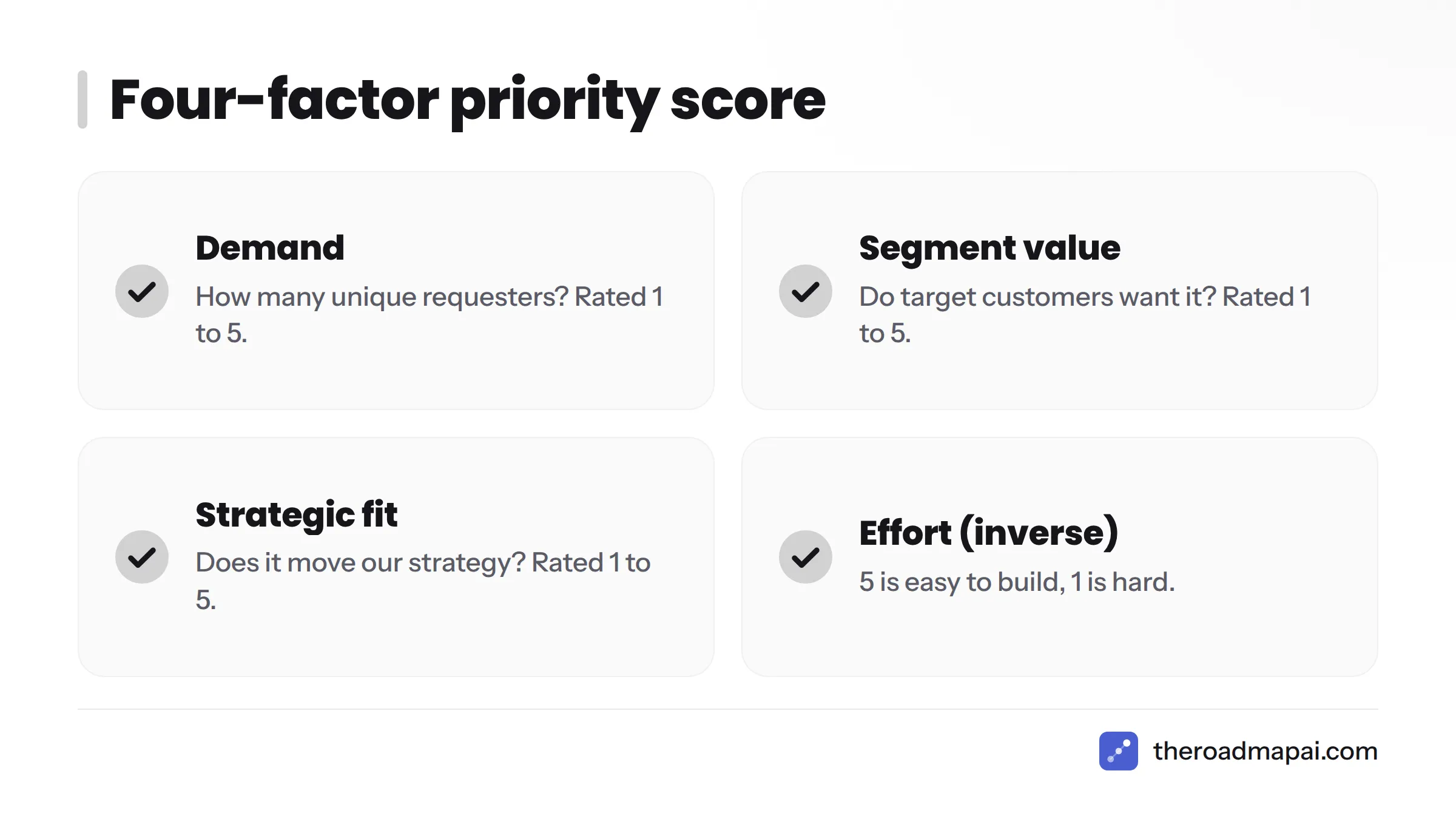
For small teams, I prefer a four-factor score, each rated 1 to 5:
| Factor | Question | Scale |
|---|---|---|
| Demand | How many unique requesters? | 1 (one) to 5 (many) |
| Segment value | Do target customers want it? | 1 to 5 |
| Strategic fit | Does it move our strategy? | 1 to 5 |
| Effort (inverse) | How easy is it to build? | 5 (easy) to 1 (hard) |
Add the four numbers. The highest total goes first. Treat the result as a conversation starter, not a verdict.
A starter tracking sheet needs just these columns: ID, problem statement, type, requesters, count, segment, score, status, and source links. You can build it in any spreadsheet in five minutes.
RICE, ICE, and when they're overkill
RICE (Reach, Impact, Confidence, Effort) came out of Intercom, and the company explains it in its own RICE prioritization write-up. ICE drops Reach. Both work well once you have real usage data. With 14 items and an inbox, they are often more ceremony than help. Start with the four-factor score and graduate when your data justifies it. The Kano model is another useful lens when you want to separate must-haves from delighters.
Decision tree: does this go on the roadmap?
Walk each candidate through these questions in order:
- Is it a real request, not a bug or a question? If no, route it elsewhere.
- Does it fit our strategy and target customer? If no, decline with a reason.
- Do at least three unique people want it? If no, keep it on the watch list. (Three is a starting heuristic, not a universal rule. Raise or lower it with your volume.)
- Is the effort reasonable for the value? If no, park it or break it down.
- If yes to all, promote it to the roadmap.
Step 6: Publish the Roadmap
A roadmap customers cannot see does half the job. Publishing proves you listen.
Now / Next / Later vs. dated roadmaps
Now/Next/Later groups items by confidence rather than calendar. Dates promise things you cannot always deliver. For a small team, I recommend Now/Next/Later every time. Customers forgive "later." They remember a missed date.
What to show and what to keep private
Show the problem and the status (planned, in progress, shipped). Keep the internal scores, individual customer names, and anything under negotiation private. If you quote or credit a customer publicly, get their consent. Under the GDPR, customer emails are personal data, so store only what you need and never publish names without permission.
Moving repeat requesters to a public voting board
Email cannot aggregate. Once the same request keeps arriving, point those people to a board where they can vote on one shared item instead of sending a new email. A public roadmap with voting does the counting for you. Communities on Discord can do the same through a Discord feedback bot, and this guide on how to collect feature requests from Discord walks through that setup.
Step 7: Close the Loop With the People Who Emailed
Most guides stop at "prioritize." To close the feedback loop is to turn a one-time emailer into a loyal customer, because people remember being told what happened.
Feedback email template set
Copy these and adjust the tone to your voice.
1. Acknowledge
Hi [Name], thanks for sharing this. I've logged it as "[problem in one line]" so we can see how many others run into the same thing. I'll update you when there's news.
2. Ask a follow-up
Thanks for the note. To make sure I understand, what were you trying to get done when this came up? A quick example helps us build the right thing.
3. Decline with a reason
Thanks for the suggestion. We've decided not to build this for now because [honest reason, such as focus or fit]. I've kept your note on file, and I'll tell you if that changes.
4. It's planned
Good news: "[item]" is now on our roadmap under [Next]. No date yet, but you're on the list to hear first.
5. It shipped
You asked for "[item]," and it's live today. Here's how to use it:. Thank you for pushing us on this.
Notifying everyone attached to a merged item
This is why you kept every source link. When an item changes status, send the right template to every requester on that row. A short, honest message to ten people beats a polished announcement nobody connects to their own request.
Tying roadmap items to your changelog
Each shipped item should land in a changelog entry that credits the request. Good changelog tools make that a one-click step, and the entry gives you the link for the "it shipped" template.
Manual, Automated, or AI-Assisted: Choosing Your Setup
Pick the lightest setup that works for your volume. Here is how the options compare.
| Setup | Best for | Effort | Cost | Where it breaks |
|---|---|---|---|---|
| Spreadsheet + inbox label | 1 to 50 emails/month | Low | Free | Merging and notifying get tedious past ~50/month |
| Shared inbox + tags + automation | Small teams with support volume | Medium | Low to medium | Counting unique people stays manual |
| Dedicated feedback/roadmap tool | Teams with many repeat requests | Low once set up | Paid | Email is still an input you must route in |
| AI-assisted capture and merging | High volume, multiple channels | Low | Paid | Needs human review of merges |
Spreadsheet + inbox label
Start here. A label, a sheet, and the weekly routine below will carry you a long way. Airtable or Notion can upgrade the sheet when you want filters and views.
Shared inbox + tags + automation
Shared inboxes such as Help Scout or Front let several people tag and assign emails. Automation tools like Zapier or Make can send tagged emails to a sheet. That cuts copy-paste work, though you still dedupe by hand.
Dedicated feedback and roadmap tools
Once repeat requests dominate, a voting board beats email for counting. RoadmapAI is built around that idea. It captures requests from Discord, merges duplicates into single items with votes, lets you approve what goes public, and publishes a roadmap. It also has an MCP server so compatible AI assistants can work with your feedback, and Slack, Intercom, and Zendesk connections are listed as coming soon. To be clear, RoadmapAI does not have a direct email integration today. If your feedback arrives only by email, a spreadsheet is the honest starting point, and you can forward repeat requesters to a shared board later. When you are ready to compare, see RoadmapAI pricing.
AI-assisted capture and merging
Large language models cluster similar requests and draft problem statements well. They do not know your strategy. Let AI propose merges, then approve them yourself. For a wider look at the category, see these AI feedback tools. If part of your audience chats in Slack, the same pattern applies to Slack feature requests.
Once an item is approved, hand it to engineering. Dev teams can track feature requests in Linear or follow a GitHub Issues feature requests workflow so the roadmap and the build queue stay linked.
Common Mistakes and Troubleshooting
| Symptom | Likely cause | Fix |
|---|---|---|
| Every request looks different | Customers describe solutions | Rewrite as problem statements before merging |
| One big customer pushes a pet feature | Revenue pressure overrides data | Log it, count it as one requester, weigh by segment, and explain the decision honestly |
| Emails are too vague | No discovery question asked | Send template 2 and hold the item out of counts |
| Backlog of 2,000 old emails | Perfectionism | Backfill 90 days only |
| Team forgets to log | No habit or alias | Make forwarding to the alias a team rule; review weekly |
| Counts feel inflated | Counting mentions | Count unique people only |
| Customers stop emailing | Nobody replies | Close the loop on every item, including "no" |
Two more traps. First, do not promise dates in replies. Say "planned" and mean it. Second, do not let the backlog rot. Archive anything with no new requesters in six months, and reopen it if someone asks again. Watch for recency bias too, where the last email you read feels like the most important one. Your sheet protects you from that.
Weekly 30-Minute Routine and Checklist
Run this once a week. Put it on the calendar so it survives busy weeks.
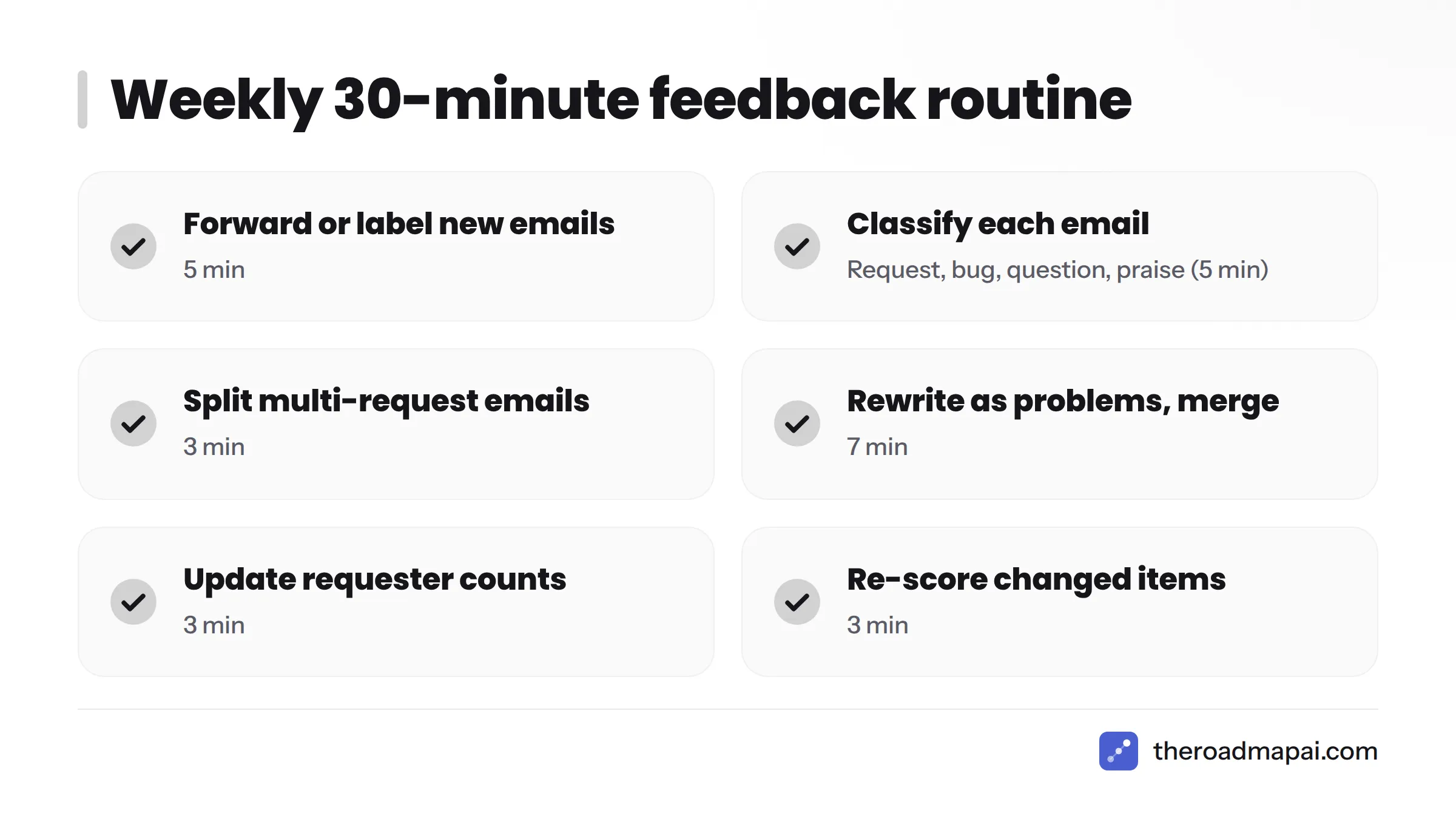
- Forward or label every new feedback email (5 min)
- Classify each one: request, bug, question, praise (5 min)
- Split multi-request emails into separate rows (3 min)
- Rewrite new requests as problems and merge duplicates (7 min)
- Update unique requester counts and segments (3 min)
- Re-score items whose counts changed (3 min)
- Send acknowledgment or follow-up replies (4 min)
- Once a month: update the public roadmap and notify requesters of status changes
Frequently Asked Questions
How do I turn customer feedback emails into a product roadmap?
Collect emails in one place, classify each as a request, bug, or question, rewrite requests as problems, merge duplicates, count unique requesters, score priority, publish approved items, and reply to everyone who asked. Order matters because counts only make sense after merging.
How many requests should I get before adding something to the roadmap?
A common starting heuristic is three unique requesters, combined with strategic fit. It is not a universal law. Raise the bar when your volume is high, and lower it when a request closely matches your target customer and strategy.
How do I organize feature requests that come in by email?
Use a feedback alias or inbox label, then log each request in a sheet with one row per problem. Track requesters, segment, score, status, and links to every source thread. One row per problem keeps counts honest.
Should I reply to every feedback email?
Yes, at least with a short acknowledgment. A reply shows people you listen and invites follow-up detail. It does not need to be long. Use the templates above, and update requesters again when the status changes.
How do I handle an email with several requests in it?
Split it into atomic items, one row per request, each linked to the same source email. Each item then merges and scores on its own. Bugs and questions go to their own queues instead of the roadmap.
Can AI sort feedback emails into feature requests?
Yes. AI can classify emails, draft problem statements, and propose duplicate merges quickly. Review its suggestions, because it does not know your strategy or which customers matter most. Treat AI as a fast first pass, not the decision maker.
Should my roadmap be public?
For most small products, yes. A public product roadmap shows customers you listen and cuts repeat emails. Show problems and statuses, skip internal scores and names, and avoid hard dates you may miss.
How do I tell customers a requested feature shipped?
Email everyone attached to the merged item, using the "it shipped" template. Link to the changelog entry and a short how-to. Personal notes to requesters land better than a general announcement alone.
Spreadsheet or a tool for tracking email feedback?
Start with a spreadsheet if you get under roughly 50 feedback emails a month. Move to a dedicated tool when merging, counting, and notifying take more time than building. Repeat requesters are your signal to move them to a voting board.
What if a big customer demands a feature few others want?
Log it as one requester, weigh it by segment, and check fit with your strategy. Then talk to them about the problem behind the request. If it serves your target market, it will score well. If not, decline kindly and explain why.
Next Steps
You now have a feedback email to roadmap workflow you can start today. Create the alias, backfill 90 days, build the sheet, and run the 30-minute routine this week. Emails are anecdotes and counts build roadmaps, so merge first and decide second. When repeat requests start piling up, move those requesters to a board where they can vote on theroadmapai.com and let the counting happen automatically.