 RoadmapAI
How to Collect Feature Requests in Microsoft Teams
Submit and vote on Microsoft Teams feature requests the right way. Get a channel routing table, exact clicks for desktop and mobile, and a request template.
You can submit and vote on Microsoft Teams feature requests at the Microsoft Feedback Portal (aka.ms/TeamsFeedback), or from inside the app with Help > Give feedback. That is the short answer. The longer one matters, because Microsoft runs several feedback doors, and an idea dropped into the wrong one lands where nobody triages it.
I have watched people post feature ideas in Q&A threads for years, then wonder why nothing happens. This guide fixes that. You get a routing table, exact clicks for desktop, web, and mobile, a request template, a status-check workflow, and a bonus section for teams that need to collect feature requests inside Teams for their own product. Last verified: November 2026.
Where to Send a Microsoft Teams Feature Request
Where do I submit a Microsoft Teams feature request? Use the Microsoft Teams feedback portal at aka.ms/TeamsFeedback to post a new idea or upvote an existing one. You can also open Teams and choose Help > Give feedback. Microsoft Q&A moderators say forums are not the best place to suggest new features.
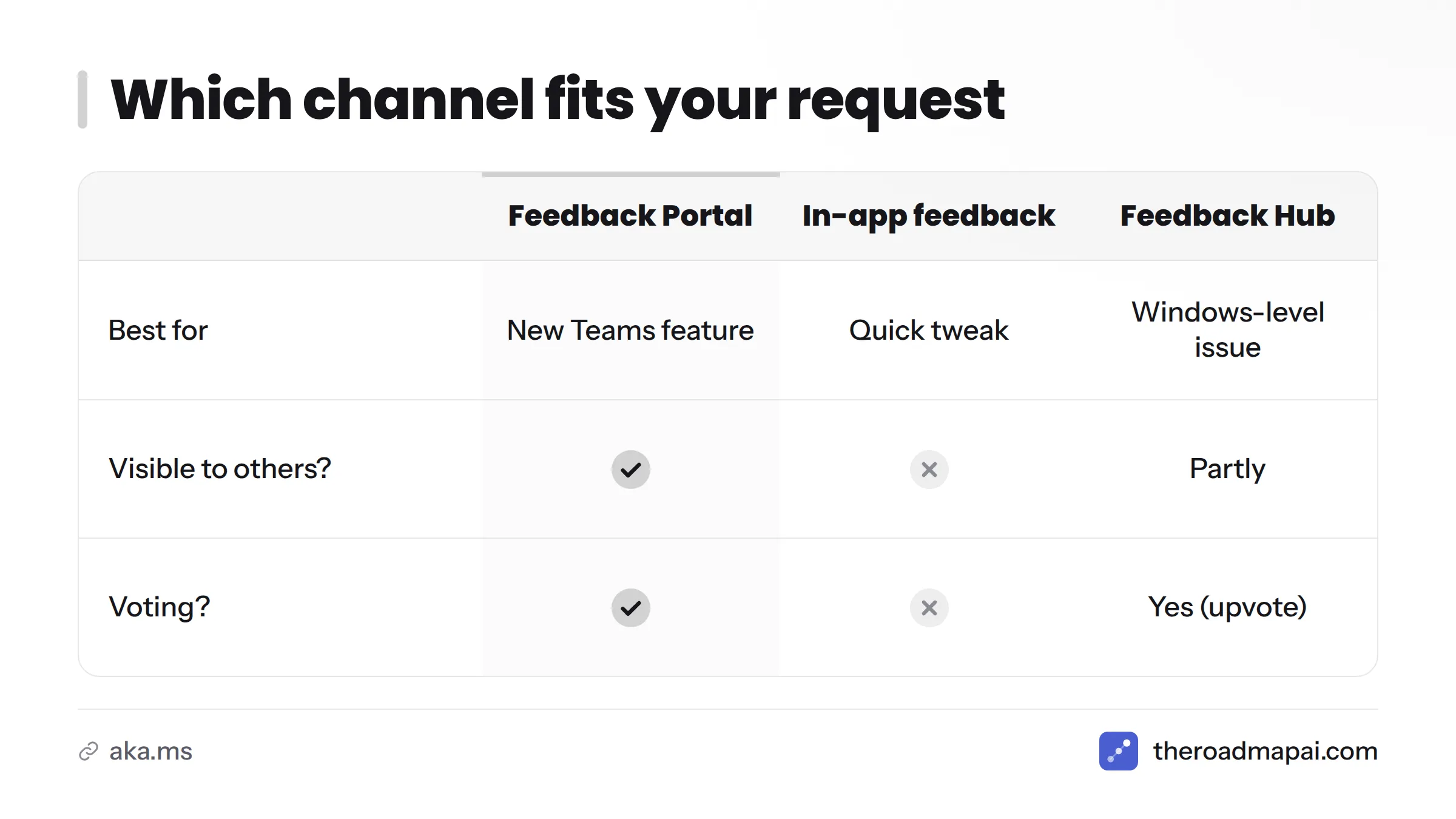
Here is the router. Find your request type, then use the matching door.
| What you want to request | Best channel | Visible to others? | Voting? |
|---|---|---|---|
| A new Teams feature (chat, meetings, calling, channels) | Microsoft Feedback Portal (aka.ms/TeamsFeedback) | Yes | Yes |
| A quick tweak or small annoyance | In-app Help > Give feedback | No (goes to Microsoft) | No |
| A Windows-level issue or suggestion | Microsoft Feedback Hub on Windows | Partly | Yes (upvote) |
| Microsoft 365 admin console or Teams admin center change | Feedback link in the admin center, or the Feedback Portal | Varies | Varies |
| Outlook or Forms behavior tied to Teams | The feedback route for that product | Varies | Varies |
| Teams app or bot platform request | Microsoft developer channels (Developer Community, Microsoft Learn docs) | Yes | Yes |
| Enterprise-wide priority | Account team, Microsoft partner, or support contract | No | No |
| A broken feature | Support ticket or Q&A, not the idea portal | No | No |
Microsoft reshuffles its tooling from time to time, so product-specific routes can change. Treat every "Varies" row as a cue to look for the feedback link inside that product.
Method 1: Submit and Vote on the Microsoft Feedback Portal
The Microsoft Feedback Portal is Microsoft's idea-and-vote system. If you remember UserVoice, the third-party service many software vendors once used for this, think of the portal as its stand-in for Microsoft products. People searching for "Microsoft Teams user voice" or "Microsoft Teams ideas" are usually looking for this portal. Votes show demand, and demand gives product teams a reason to look.
Find existing ideas first
Duplicates dilute votes. Ten people posting the same idea create ten ideas with one vote each, when one idea with ten votes would have been far stronger.
- Open aka.ms/TeamsFeedback and sign in with your Microsoft account.
- Search with the plain words a colleague would use, such as "meeting," "BCC," or "autocorrect."
- Try two or three synonyms. Users write idea titles, not editors.
- If you find a match, upvote it and add a comment describing your own scenario.
Submit a new idea step by step
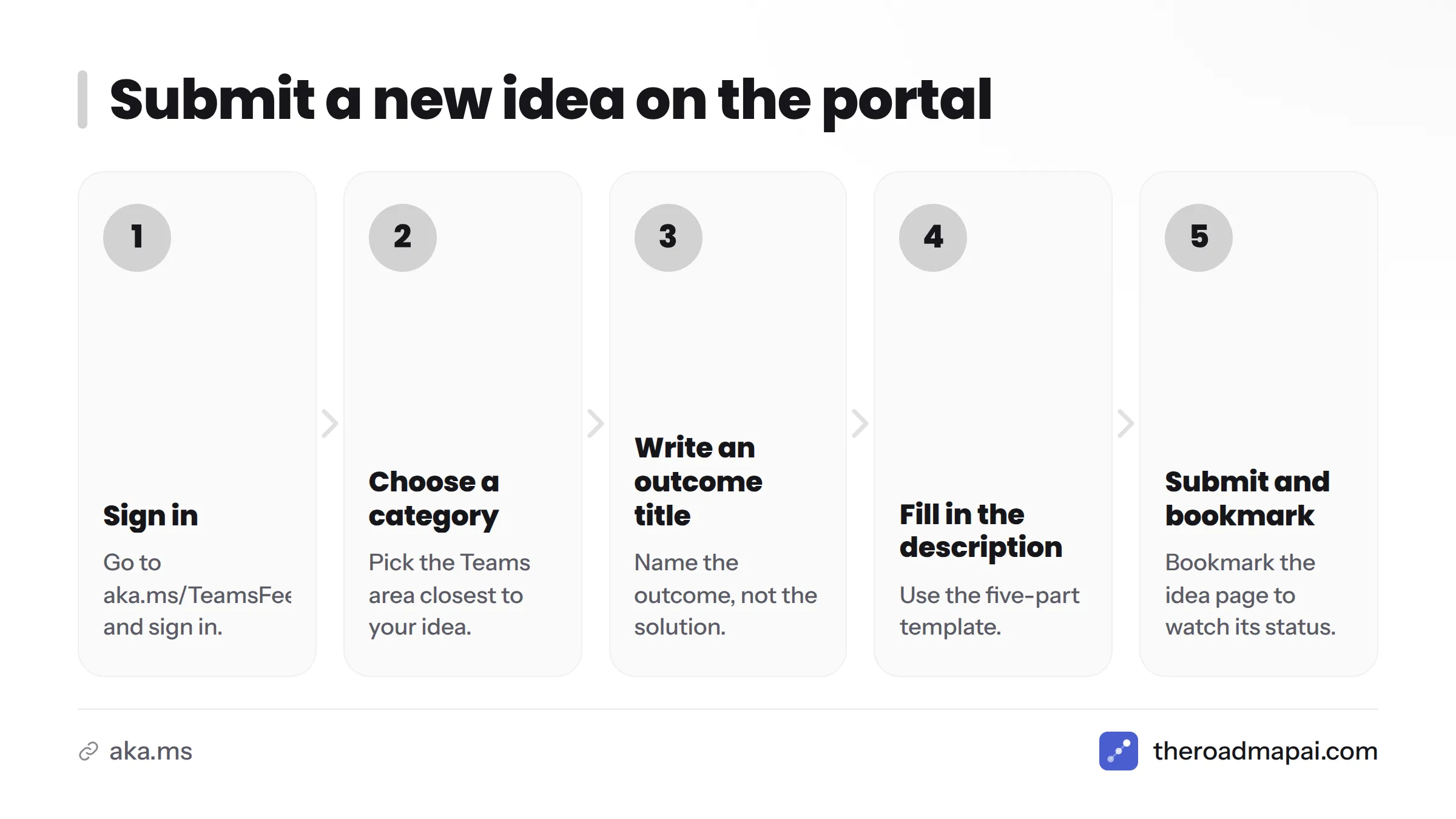
- Sign in at aka.ms/TeamsFeedback.
- Choose the Teams category or area closest to your idea.
- Write a title that names the outcome, not the solution.
- Fill in the description using the five-part template below.
- Submit, then bookmark the idea page so you can watch its status.
How voting works
Each signed-in user can vote on the ideas they want. More votes make an idea easier to defend in a prioritization meeting. Microsoft has not published a vote threshold that guarantees review, so treat any claim of a magic number as unverified.
Method 2: Send Feedback From Inside Teams
In-app feedback is the fastest route. It also attaches useful context, which helps when your request is really a bug in disguise.
Desktop (Windows and Mac)
- Open Teams.
- Select the Settings and more (three dots) menu next to your profile picture.
- Choose Help (labels shift slightly between client versions), then Give feedback or Report a problem.
- Describe what you want. Tick the option to share diagnostic data only if you are comfortable with it.
- Send.
Teams on the web
Open Teams in your browser, use the same three-dot menu or the Help icon, and look for the feedback option. The wording closely matches the desktop client.
Mobile (iOS and Android)
Open the menu in the top corner, go to Settings, then look for Help and feedback or a similar entry. On many phones, shaking the device also triggers the feedback prompt, though that depends on your app version and settings.
When the feedback option is missing
If the option is greyed out or gone, your organization probably restricted it. Admins control feedback through Teams policies in the Teams admin center. Ask your IT team to turn it on, or send your idea through the web portal, which does not depend on the Teams client policy.
Method 3: Other Channels and When to Use Them
Microsoft Feedback Hub on Windows
Microsoft Feedback Hub is the Windows app for feedback. Use it when the problem sits in the operating system, such as audio drivers or notifications, and not in Teams itself.
Microsoft Q&A and Tech Community
Microsoft Q&A is built for questions with answers. Moderators there routinely point feature ideas to the Feedback Portal, and one moderator reply on a Q&A thread says plainly that forums are not the best place to suggest new features. Tech Community works well for announcements and discussion, but it is not a triage queue. Post there to talk it over, then file the idea in the portal.
Admin center and Microsoft 365 admin console requests
Tenant-level asks, such as new reporting columns or policy controls, belong with admin-focused feedback. For a Teams admin feature request or a wider Microsoft 365 feature request, look for the feedback link inside the admin center, or file the idea in the portal and mention your admin role. Admins also have a support ticket channel for issues that block business work.
Outlook, Forms, and other connected apps
A request like "add BCC, CC, or FYI fields to Teams meeting requests" touches both Outlook and Teams. A public idea of that kind exists on Microsoft's community idea pages. When a request spans two products, post it where the user action happens, then name the other product in the text.
Developer platform and app-building requests
If you build Teams apps, bots, or Adaptive Cards, send platform requests through Microsoft's developer channels and the documentation feedback links on Microsoft Learn. Include the SDK version and a minimal code scenario.
Account team, partner, or support escalation
Large customers can raise priorities through their account team, a Microsoft partner, or a Unified support contract. I would not promise this changes the outcome. It does put your business case in front of a person who can carry it internally.
A note on email: I found no published email address for Microsoft Teams feature requests email submissions, and I would not trust one that someone hands you. Stick to the portal, the in-app option, or your account team.
Decision Tree: Which Channel Should You Use?
Let's break it down. Walk through these questions in order:
- Is something broken or behaving differently than documented? Yes: file a bug through in-app Report a problem or a support ticket. No: continue.
- Could you or your admin change it with a setting? Yes: check the admin center policies first. No: continue.
- Does it affect only Windows (drivers, OS notifications)? Yes: use Feedback Hub. No: continue.
- Are you building a Teams app or bot? Yes: use the developer channels. No: continue.
- Is it a new capability others would want too? Yes: post or upvote at aka.ms/TeamsFeedback. No: send a quick in-app note.
- Is it a business-critical need for a large tenant? Yes: do step 5, then escalate through your account team.
How to Write a Feature Request That Gets Votes
A request wins votes when strangers read it and think, "That is my problem too." Vague wishes never get there.
A five-part template
- Problem: What can't you do today?
- Who: Your role and team size (for example, "IT admin, 4,000 seats").
- Workflow: The steps you take and where they break.
- Workaround: What you do instead, and what it costs you.
- Ask: The outcome you want, stated without dictating the design.
Weak vs. strong example
| Weak | Strong | |
|---|---|---|
| Title | "Fix meeting invites" | "Add BCC/CC/FYI recipient fields when scheduling Teams meetings" |
| Body | "Invites are annoying. Please improve." | "As an executive assistant, I schedule 20 meetings a week. I need to add observers who should see the invite but not be marked as required. Today I add them as optional attendees, which confuses them. A distinct FYI field would solve it." |
| Result | Hard to upvote, hard to triage | Clear scenario others can recognize |
The BCC/CC/FYI idea is a real public request tagged to Teams Meetings on Microsoft's community idea pages, which makes it a good model of specific, role-based phrasing.
Bug, feature, or setting? A quick triage checklist
- Did it ever work? If yes, it is probably a bug.
- Does Microsoft documentation say it should work? If yes, it is a bug or a rollout gap.
- Is there a policy or toggle in the admin center? If yes, it is a setting.
- Does it not exist anywhere in the product? Then it is a feature request.
Teams that run their own products face the same sorting problem. This guide on separating support tickets from feature requests walks through the logic.
How to Check Whether a Feature Is Already Planned or Shipped
Check before you post. It takes five minutes and saves you from asking for something already rolling out.
- Microsoft Teams roadmap: The public Microsoft 365 Roadmap lists features in development, rolling out, or launched. Filter by product (Microsoft Teams) and status.
- Teams release notes: Microsoft publishes client version history and what changed on Microsoft Learn. Search for your keyword.
- Message Center: Admins see upcoming changes and rollout timing in the Message Center inside the Microsoft 365 admin center.
Long-requested features do ship. Teams autocorrect, which users asked for over several years, was reported as arriving in December 2025. Check the Roadmap for current rollout details before you rely on it in your tenant.
The usual lifecycle looks like this:
| Stage | What it means | Where you see it |
|---|---|---|
| Idea | You or others post a request | Feedback Portal |
| Votes | Demand builds | Idea page |
| Review | Microsoft evaluates (internal, timing unverified) | Status label, if used |
| Roadmap | Feature appears as planned or in development | Microsoft 365 Roadmap |
| Release | Feature rolls out, often in stages | Release notes, Message Center |
What Happens After You Submit
I will be straight with you. Microsoft does not publish how long review takes, who reads each idea, or how votes weigh against internal priorities. Anyone who claims otherwise is guessing.
What you can reasonably expect:
- Other users can see your idea and vote on it.
- Status labels, where used, show whether an idea is under review, planned, or completed.
- Many requests stay open for a long time. Some get merged with similar ideas.
- Shipping can take months or years, and the shipped feature may not match your exact wording.
Votes and clear scenarios improve your odds. They do not create a commitment.
Troubleshooting Common Problems
- I can't find the portal. Type aka.ms/TeamsFeedback into your browser address bar. Sign in with a work or personal Microsoft account.
- The Give feedback option is greyed out. An admin policy likely disabled it. Ask IT, or use the web portal.
- My request seems ignored. Add scenarios to the idea, rally colleagues to vote, and check the Roadmap. Silence is common and does not mean nobody read it.
- My idea was merged or closed. Read the merge note, then upvote the surviving idea and add your scenario as a comment.
- Sign-in loops. Try a private browser window, or sign out of other Microsoft accounts first.
- It turned out to be a bug. Move it to in-app Report a problem or a support ticket.
Bonus: Collect Feature Requests in Microsoft Teams for Your Own Product
Disclosure: RoadmapAI, the publisher of this site, sells a feedback tool. This section is separate from the Microsoft guidance above.
Maybe you landed here for the opposite reason. Your customers or colleagues send ideas in Teams chats, and you need to turn them into something trackable. Here is a manual setup that works with tools you likely already have.
A manual setup with Forms, Lists, Planner, and Power Automate
- Create a dedicated Teams channel called "Feature Requests."
- Build a Microsoft Forms form with fields for problem, role, workaround, and urgency, and pin it in the channel.
- Create a Microsoft Lists list with columns for title, requester, status, and votes.
- Use a Power Automate flow to add each form response to the list and post a summary card to the channel.
- Use Planner or your issue tracker for accepted items.
- Review the list weekly and update statuses so people see movement.
If requesters are in the EU, keep GDPR in mind: tell people how you store their name and message, and delete data on request.
Where Teams falls short for request tracking
- No automatic duplicate detection, so the list fills with near-identical rows.
- No public voting page for customers outside your tenant without extra guest-access setup.
- No built-in "notify everyone who asked" when you ship.
- Chat messages scroll away, so ideas get buried.
Alternatives by platform
If your community lives elsewhere, these guides cover the same problem: track feature requests in Slack, collect feature requests from Discord, and workflows for Jira, Linear, and Zendesk. For a wider look at tooling, see this roundup of AI feedback tools for product teams.
| Teams + Forms + Lists | Dedicated feedback tool (such as RoadmapAI) | |
|---|---|---|
| Setup time | An afternoon of building flows | Minutes |
| Duplicate handling | Manual | Built in |
| Public voting | Hard outside your tenant | Yes |
| Status updates to requesters | Manual | Automatic |
| Cost | Included with Microsoft 365 licenses you already pay for | Paid plans; RoadmapAI pricing starts at $19/mo with a 7-day free trial |
My opinion: the manual route is a fine start for an internal team of ten. Once outside users want to vote and see progress, a purpose-built feature request tool with a public product roadmap saves hours every week. You can learn more about RoadmapAI on the homepage.
Checklist: Before You Hit Submit
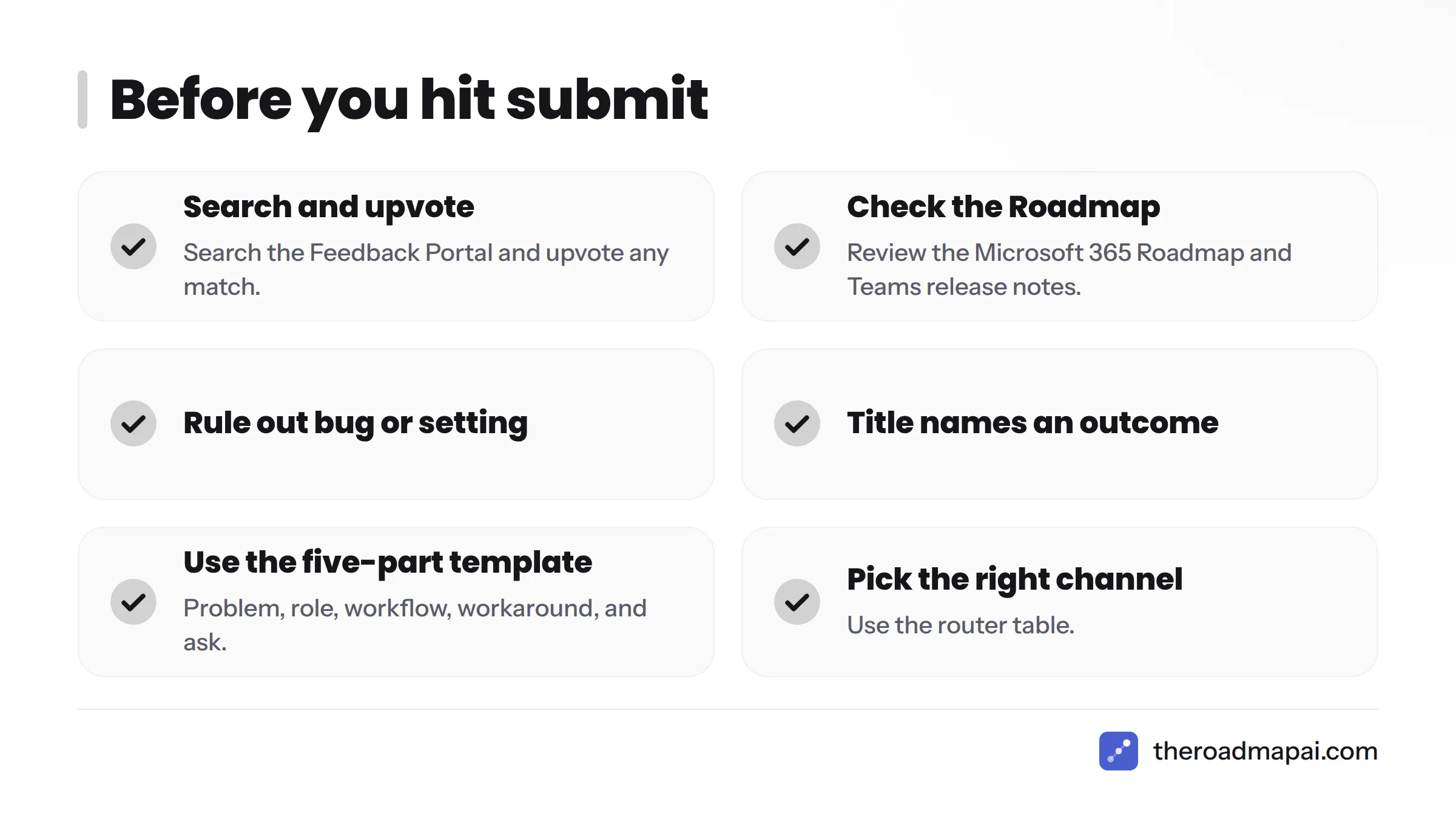
- I searched the Feedback Portal and upvoted any match.
- I checked the Microsoft 365 Roadmap and Teams release notes.
- I confirmed it is not a bug or an admin setting.
- My title names an outcome, not a vague complaint.
- I included problem, role, workflow, workaround, and ask.
- I stated my platform (desktop, web, mobile) and client version.
- I picked the right channel from the router table.
- I will share the idea link with colleagues so they can vote.
FAQ
Where do I submit a feature request for Microsoft Teams? At the Microsoft Feedback Portal (aka.ms/TeamsFeedback), or in Teams through Help > Give feedback.
What is aka.ms/TeamsFeedback? A short link to Microsoft's feedback portal for Teams, where users post ideas and vote on others.
How do I vote on existing Teams feature requests? Sign in to the portal, search for the idea, and select the vote or upvote control on it.
Why is the Give feedback option missing? Your admin likely disabled it with a feedback policy. Ask IT to turn it on, or use the web portal.
Does Microsoft read Teams feature requests? Microsoft has not published details of its internal review process, so I cannot verify who reads each idea. Votes and clear scenarios give your request the best chance.
How long does it take for a requested feature to ship? There is no published timeline. Some requests ship after years, and many never do.
Is UserVoice still used for Teams? Microsoft moved its feedback to its own Feedback Portal, so use aka.ms/TeamsFeedback instead of a UserVoice page.
Can I request a feature through Microsoft Q&A or Tech Community? You can discuss there, but moderators direct feature ideas to the Feedback Portal.
Can admins submit feedback on behalf of their organization? Admins can submit through admin center feedback links and the portal, and enterprise customers can also raise priorities through their account team.
Can I collect feature requests from my own users inside Teams? Yes. Use a dedicated channel with Microsoft Forms, Lists, and Power Automate, or a dedicated feedback tool if you need public voting.
Next Steps
Getting Microsoft Teams feature requests noticed comes down to three moves: pick the right door, write a request that strangers can see themselves in, and check the Roadmap and release notes so you never ask for what already exists. Open aka.ms/TeamsFeedback, search for your idea, and cast your vote. If nothing matches, post it using the five-part template.


