 RoadmapAI
How to Manage Feature Requests in Jira Without the Mess
Submit a feature request to Atlassian or manage requests for your own product with Jira Product Discovery, JSM, and Jira Software. Includes a template.
You can submit a feature request for Jira itself at jira.atlassian.com, where Atlassian runs public projects for each product. If you want to manage Jira feature requests for your own product, the short answer is this: use Jira Product Discovery for ideas, Jira Service Management for outside intake, and Jira Software for delivery. This guide covers both paths with a step-by-step setup, a copy-paste template, a triage routine, and honest limits. Let's break it down.
Quick answer: where do Jira feature requests go?
Two different jobs hide behind the phrase "Jira feature requests," and mixing them up wastes time.
- Path 1: You want a change to Jira or another Atlassian product. Use the public Jira projects on jira.atlassian.com, often called JAC. Search, vote, or file a new suggestion.
- Path 2: You want to manage requests for your own product. Pick a container inside your Jira site (Jira Software, Jira Product Discovery, or Jira Service Management) and build one clean pipeline from intake to shipped.
Most of this article covers Path 2, because that is where teams lose the most time. Path 1 comes first since it takes five minutes.
How to submit a feature request to Atlassian
The short answer: go to jira.atlassian.com, search the relevant product project for an existing request, and vote on it. If nothing matches, log in with an Atlassian account and create a new suggestion in that project. Describe the problem and your use case, and leave out sensitive data, because these projects are public.
Atlassian says the same on its own tracker pages. The Confluence Cloud project on jira.atlassian.com (Atlassian) states that you need an account to log in, and it warns that the instance is public and must not contain sensitive information.
Find and vote on an existing request first
Atlassian products carry years of accumulated suggestions. Before you write anything:
- Open jira.atlassian.com and pick the project for your product (Jira Cloud, Confluence Cloud, Jira Service Management, and so on).
- Search with two or three plain-language keywords, not your exact wording.
- Open the closest match and read the comments. Many requests already contain workarounds.
- Click Vote on the issue, and add yourself as a watcher to get status changes.
Voting beats filing a duplicate. Duplicates split the signal, and that hurts you as the requester.
Create an account and file a new suggestion
If no match exists, sign in with your Atlassian account and use Create in the right project. Choose the suggestion or improvement issue type the project offers. Atlassian's project pages link to its usage guidelines for filing effective issues, so skim those once.
Write a request that gets traction
Requests that describe a problem get further than requests that describe a solution. Use this shape:
- Problem: what you are trying to do and what blocks you.
- Who is affected: your role, team size, and how many users.
- Frequency: daily, weekly, once per release.
- Current workaround: what you do today and why it falls short.
- Impact: time lost, money lost, or work you can't do.
What not to post: JAC is public
Treat every field as visible to the internet. Leave out customer names, internal URLs, screenshots with data, API tokens, and anything covered by an NDA. If a request needs private context, Atlassian Support is the better channel.
Before you submit, check this list:
- I searched at least three keyword variations
- I voted on any close match instead of filing a duplicate
- My title names the problem in one line
- I described the use case and the workaround
- I removed all private or customer data
What counts as a feature request in Jira (and what doesn't)
A feature request asks for new or improved behavior in a product. It is not a defect and not a how-do-I question. Jira has no single built-in "feature request" object, so where it lives depends on the tool you pick.
Feature request vs bug vs support question vs idea vs insight
| Term | Meaning | Where it lives in Jira |
|---|---|---|
| Feature request | Someone asks for new or changed behavior | A custom issue type or a JSM request type |
| Bug | The product does not work as designed | Jira Software issue type: Bug |
| Support question | Someone needs help using an existing feature | JSM request type or your help desk |
| Idea | A candidate solution or opportunity your team tracks | Jira Product Discovery idea |
| Insight | A piece of evidence (quote, ticket, link) attached to an idea | Jira Product Discovery insight |
| Story / Epic / Task | Delivery work your team commits to | Jira Software |
The practical rule: requests are inputs, stories are commitments. Keep them in different places, or at least in different issue types. If support tickets keep landing in your idea pile, our guide on how to separate feature requests from support shows the routing logic.
Which Jira tool should you use for feature requests?
You have four realistic options inside the Atlassian ecosystem. Here is each one in plain terms.
Jira Software (issue type and backlog)
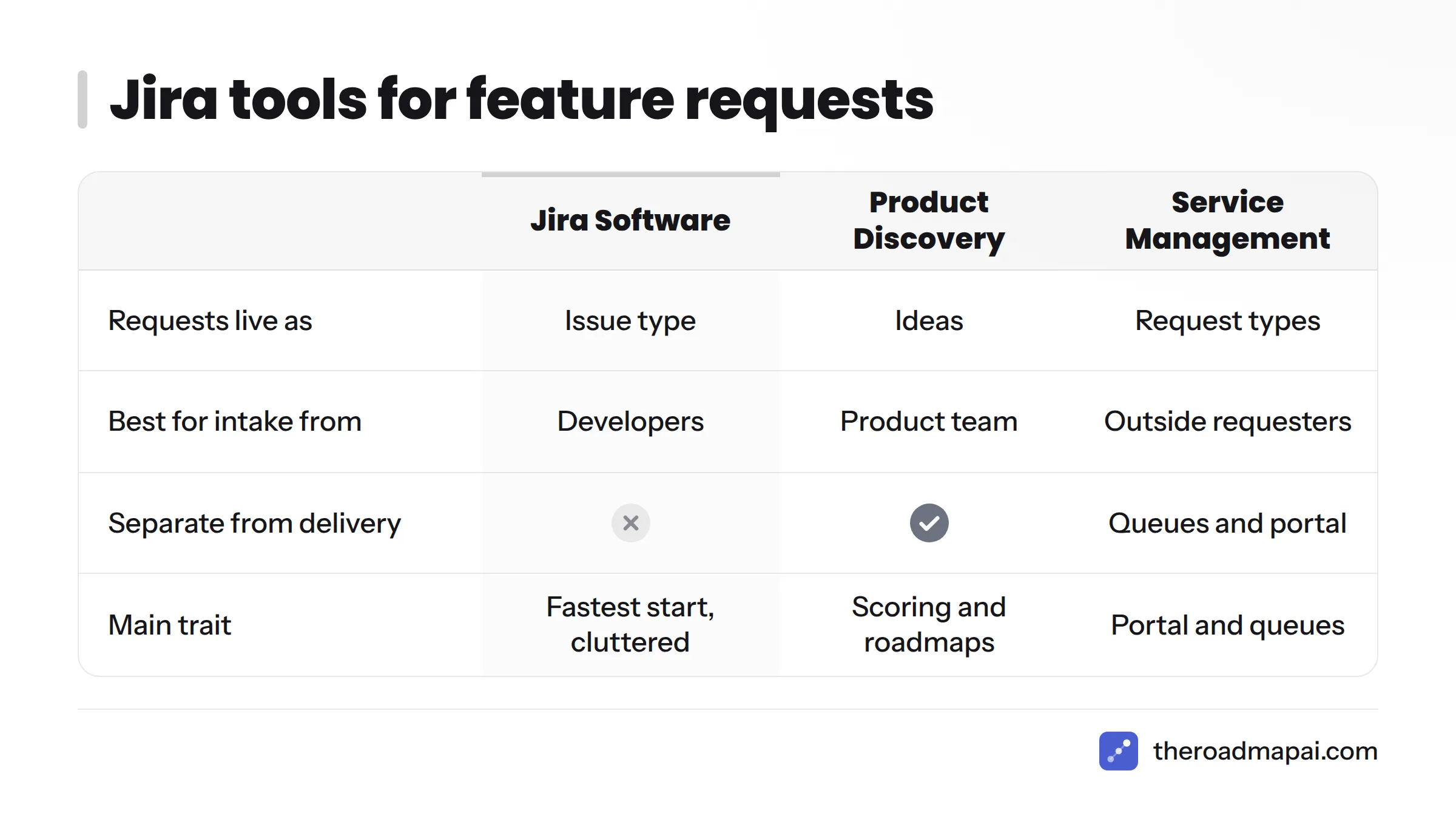
Add a "Feature Request" issue type to a Jira Software project. It is the fastest start, and developers already work there. The cost is clutter: requests share a backlog with bugs, tasks, and stories, and everyone with project access sees them.
Jira Product Discovery (ideas, insights, scoring)
Jira product discovery feature requests live as ideas. Jira Product Discovery (Atlassian) captures ideas, attaches evidence as insights, scores ideas, and builds roadmap views. It keeps discovery separate from delivery, which solves the clutter problem. Stakeholders can contribute, but the tool is built for your product team, not for customers to browse and vote.
Jira Service Management (request types, portal, queues)
Jira service management feature requests work well when intake comes from outside your product team. Jira Service Management (Atlassian) gives you a portal, request types, and queues, which suits internal staff, support, or customers. A practitioner thread on the Atlassian Community about tracking incoming internal feature requests describes this exact pattern: a JSM queue for feedback, plus a dedicated Slack channel such as #product-feedback. Check Atlassian's pricing for agent licensing before you commit, since outside requesters and agents are treated differently.
Jira Forms and automation for intake
A Jira feature request form lets non-developers submit structured requests without learning Jira. Pair a form with an automation rule and you can set labels, components, and assignees on arrival. This is the lightest way to let sales or support file requests.
Comparison table
| Jira Software | Jira Product Discovery | Jira Service Management | Forms + automation | |
|---|---|---|---|---|
| Best for | Small teams, quick start | Product teams prioritizing ideas | Outside or internal intake | Non-dev contributors |
| Intake | Create issue | Ideas, plus insights from tools | Portal and request types | Form submissions |
| Voting | Native votes field | Scoring and impact fields | Limited | None native |
| Prioritization | Manual fields, ranking | Scoring and views | Queues and SLAs | Depends on target project |
| Customer visibility | Project permissions | Team and stakeholders | Portal for requesters | Form link only |
| Licensing | Per user | Separate product, per creator | Per agent | Included with the host project |
Verify plans and prices on Jira pricing (Atlassian), since they change.
Decision tree
- Solo founder or team of fewer than 10, with requests coming from you and teammates? Jira Software with a Feature Request issue type, plus a form.
- Product team that needs scoring and a roadmap view? Jira Product Discovery for ideas, Jira Software for delivery.
- Requests arriving from customers or other departments who are not Jira users? A Jira Service Management portal feeding Jira Product Discovery or Jira Software.
- Customers who want to vote and see status publicly? Jira alone falls short here. See the community section below.
How to set up a Jira feature request workflow (step by step)
Here is how to track feature requests in Jira, in six steps:
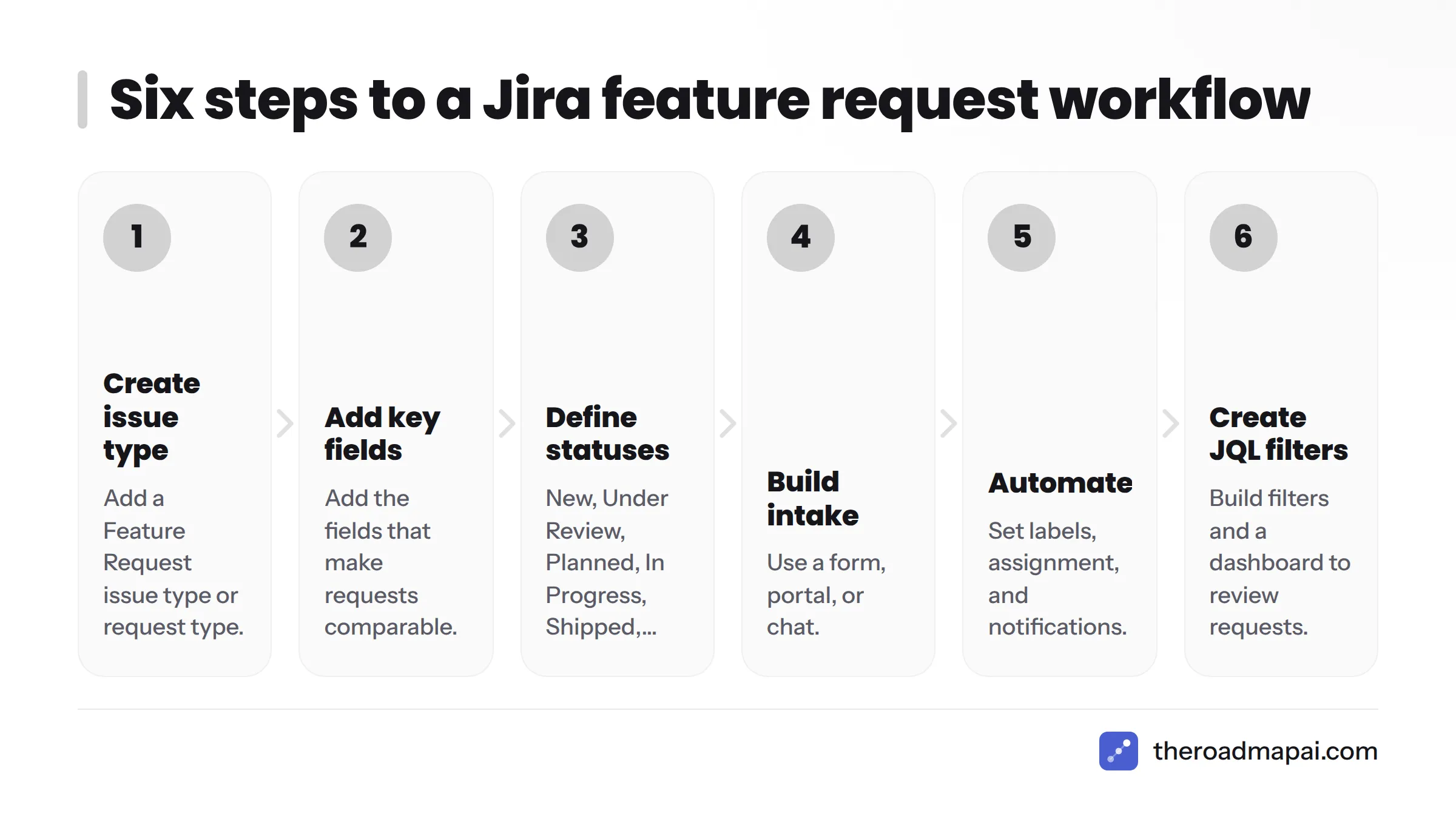
- Create a Feature Request issue type or request type.
- Add the fields that make requests comparable.
- Define a status workflow.
- Build intake through a form, portal, or chat.
- Automate labels, assignment, and notifications.
- Create JQL filters and a dashboard.
Step 1: Create a Feature Request issue type or request type
In Jira Software, go to Project settings > Issue types and add "Feature Request." In Jira Service Management, go to Request types and create one with the same name. In Jira Product Discovery, ideas already play this role.
Step 2: Add the fields that matter
Keep the field list short. People skip long forms.
- Summary (the problem in one line)
- Description (problem, use case, workaround)
- Requester or source (customer, team, channel)
- Product area (use Components or a custom field)
- Customer segment or account tier
- Source link (ticket, chat message, email)
- Labels for themes
Step 3: Define statuses
A good Jira feature request workflow needs six statuses and no more:
New > Under Review > Planned > In Progress > Shipped, plus Declined as an exit from Under Review.
Each status should tell the requester something. "Declined" needs a reason field, because silence is what makes people stop submitting.
Step 4: Build intake
Pick the channel your requesters already use:
- Jira Forms for internal teams.
- JSM portal for customers and other departments.
- Slack or email through an automation or integration that creates the issue. Our guides to Slack feature requests and feedback email to roadmap show how this looks.
Step 5: Automate labeling, assignment, and notifications
Start with these Automation for Jira rules:
- On create: if the summary contains certain keywords, add a label and set the assignee to the triage owner.
- On transition to Shipped: comment on the issue and notify the reporter and watchers.
- Stale check: if a request sits in New for 14 days, post a reminder to the triage owner.
Step 6: Create JQL filters and dashboards
Three filters cover most needs, and together they give you a working Jira feature request list:
project = FR AND issuetype = "Feature Request" AND status = New ORDER BY created ASC
project = FR AND status = "Under Review" ORDER BY votes DESC
project = FR AND status = Shipped AND resolved >= -30d
Put them on a dashboard as gadgets: a new-request queue, a most-voted list, and a recently shipped list.
Status lifecycle at a glance:
| From | To | Trigger |
|---|---|---|
| New | Under Review | Weekly triage picks it up |
| Under Review | Planned | Scored and accepted |
| Under Review | Declined | Rejected with a reason |
| Planned | In Progress | Linked work starts |
| In Progress | Shipped | Linked release goes out |
A copy-paste Jira feature request template
Use this as your issue description template, form layout, or portal request type.
| Field | Prompt | Sample entry |
|---|---|---|
| Summary | One line, problem first | Cannot export reports to CSV |
| Problem | What are you trying to do? | Finance needs monthly usage data in spreadsheets |
| Who | Role and how many people | 4 finance users, 2 team leads |
| Frequency | How often it comes up | Every month, plus ad hoc |
| Current workaround | What you do today | Copy values by hand, about 40 minutes |
| Impact | Cost of not having it | Delays month-end close by a day |
| Source link | Where the request came from | Link to ticket or chat message |
| Segment | Customer tier or team | Business plan |
And a quick triage checklist:
- Is it a feature request, a bug, or a support question?
- Does a similar request already exist?
- Is the problem clear without a call?
- Is the source linked?
- Are the product area and segment set?
How to triage and prioritize feature requests in Jira
Jira feature request management comes down to a steady routine, a way to merge duplicates, and a scoring method you actually use.
Weekly triage routine
Set a fixed 30-minute slot each week and work the "New" filter oldest first. For each item, pick one of four outcomes: merge as a duplicate, ask for more detail, move to Under Review, or decline. Nothing leaves the meeting without an owner and a status.
Handling duplicates without losing demand
Closing a duplicate throws away the signal unless you preserve it. Do this instead:
- Pick the best-written request as the master.
- Link the duplicate to it using the "duplicates" link type.
- Add the duplicate's requester as a watcher on the master, and note their segment in a comment.
- Update a "request count" field on the master. In Jira Product Discovery, attach the duplicate as an insight instead.
- Close the duplicate with a comment pointing to the master.
Scoring: RICE, value vs effort, JPD scoring
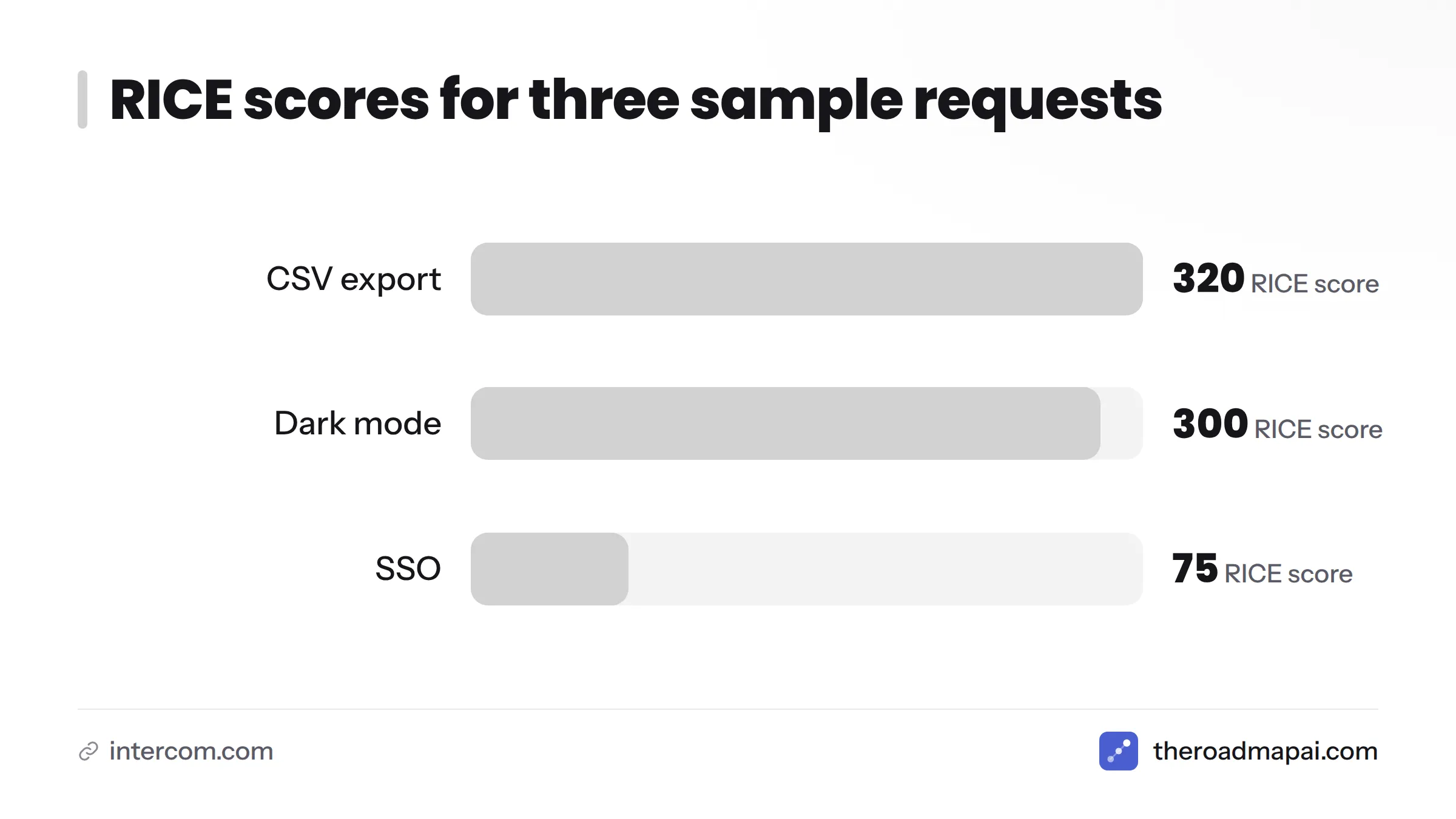
RICE: Simple prioritization for product managers (Intercom) describes a scoring method created by the team at Intercom. It multiplies Reach by Impact by Confidence, then divides by Effort. Jira Product Discovery lets you build scoring from number fields on ideas, and in Jira Software you can add the same fields to the issue.
| Request | Reach (users/qtr) | Impact (0.25-3) | Confidence | Effort (person-months) | RICE |
|---|---|---|---|---|---|
| CSV export | 400 | 1 | 80% | 1 | 320 |
| Dark mode | 1,200 | 0.5 | 100% | 2 | 300 |
| SSO | 150 | 3 | 50% | 3 | 75 |
These numbers are illustrative, not benchmarks. The point is that a 1,200-user request can lose to a 400-user request once effort enters the math. If RICE feels heavy, use a simple 2x2 of value against effort and start with high value, low effort.
Jira feature request voting and its limits
Jira feature request voting relies on the native Votes field on Jira Software issues. Users click the thumbs-up on an issue to vote. It works for small groups, but the limits are real:
- Voters need a Jira account and access to the project.
- Votes show counts, not who the customer is or how much they pay.
- There is no public board that customers can browse without logging in.
For customer-weighted demand, add a segment field and count by account, not just by vote.
How to link requests to ideas, epics, and delivery work
Linking in Jira Product Discovery (insights and linked issues)
In Jira Product Discovery, an idea holds your decision and insights hold the evidence. Delivery issues in Jira Software link to the idea so the idea shows progress. Attach each request, ticket, or customer quote as an insight, then link the idea to an epic once you commit.
Troubleshooting: request added as insight not showing as a linked issue
An Atlassian Community thread from August 2024 described this problem: a feature request was added to an idea as an insight but did not appear as a linked issue. The cause is usually a mix-up between two concepts. An insight is evidence stored on the idea. A linked issue is a delivery issue connected through issue links. Fix it this way:
- Confirm whether you want evidence or a delivery link. If it is evidence, the insight is correct and will not appear under linked issues.
- If you need a delivery link, open the idea and add the Jira issue under its delivery or linked issues section.
- Check that the project holding the issue is connected to your Jira Product Discovery project and that you have permission to see it.
- Refresh, then check the issue's own "Linked issues" panel for the reverse link.
Traceability from request to release
A good chain looks like this: Request > Idea (with insights) > Epic > Stories > Release. Use one link type consistently, such as "implements," so a JQL query can walk the chain and show which shipped work came from which requests.
How to close the loop with the people who asked
Closing the loop is where most Jira setups quietly fail. People submit once, hear nothing, and stop.
Status updates and automation
Build one automation rule: when a request moves to Planned, Shipped, or Declined, post a comment and notify the reporter. In JSM, requesters get email notifications through the portal. In Jira Software, only users with accounts get notified, so external customers need a manual message or a separate tool.
Changelogs and release notes
Publish what shipped in a Confluence page or a changelog tool, and link it from the issue. Reuse the requester's own wording so they recognize their request.
Public roadmaps: what Jira does and doesn't support
Jira Product Discovery has roadmap views you can share with stakeholders. Jira does not give you a native public board where anonymous customers submit, vote, and watch status change. If you need that, you have three honest options: use a JSM portal with limited visibility, publish a manual roadmap page, or add a public roadmap tool outside Jira.
Common problems with Jira feature requests (and fixes)
| Problem | Why it happens | Fix |
|---|---|---|
| Requests clutter the dev backlog | Same project and board as delivery | Move intake to Jira Product Discovery or a separate FR project |
| Duplicates split the signal | No dedupe step | Weekly merge routine, link and count |
| Non-dev users can't submit | Jira is intimidating, permissions block them | Jira Forms or a JSM portal |
| Wrong people see requests | Loose project permissions | Review permission scheme and issue security |
| Requesters never hear back | No notification rule | Automation on status change |
| Insight not showing as linked issue | Evidence vs delivery mix-up | See the troubleshooting steps above |
| Customer data in requests | Free-text fields | Keep personal data minimal, in line with General Data Protection Regulation, Regulation (EU) 2016/679 (EUR-Lex) |
When Jira alone isn't enough: collecting requests from Discord and communities
I run a product with an active chat community, and this is the gap I see most. Jira handles delivery well. It was never built to listen to a chat server.
Why chat-based feedback gets lost
Requests in Discord or Slack arrive as casual messages in the middle of other conversations, and they scroll away within hours. The same idea shows up five times in five wordings. Nobody copies them into Jira, so your backlog reflects whoever is most diligent, not what your users want.
Pushing community requests into Jira
You have three routes:
- Manual: a teammate copies messages into a Jira form. Cheap, but it breaks down quickly.
- Automation: a webhook or integration creates issues from tagged messages. Our guide on Zapier feature requests shows the routing pattern.
- AI capture: software reads the channel, detects requests, and groups similar ones.
For related setups, see how teams handle Linear feature requests, GitHub Issues feature requests, and Zendesk feature requests.
Where a tool like RoadmapAI fits
Full disclosure: RoadmapAI publishes this article, so I have a stake here. RoadmapAI is built for communities that live in Discord. An AI agent reads your server, separates feature requests from bugs and chatter, merges duplicates into votes, and publishes approved items to a public voting roadmap. Nothing goes public until you approve it. The bot replies in-thread, can notify people when a request ships, and offers an MCP server. Slack, Intercom, and Zendesk support is listed as coming soon. Our guide on how to collect feature requests from Discord walks through the process, and the Discord feedback bot page shows how it works. To compare more options, see the pages on feature request tools and AI feedback tools.
On cost, RoadmapAI pricing starts at $19 per month with a 7-day free trial. That is often less than adding agent seats just to collect public votes.
Honest trade-offs: RoadmapAI does not claim a Jira integration, and it does not replace Jira delivery. The workable pattern is to let a community tool collect, merge, and rank demand, then have a person copy the winning requests into Jira Product Discovery or Jira Software for planning and delivery. If your users are not in chat communities and you already run JSM, you may not need it.
Frequently asked questions
How do I submit a feature request for a Jira or Atlassian product?
Go to jira.atlassian.com, choose the project for your product, search for an existing request, and vote on it. If none exists, sign in with an Atlassian account and create a new suggestion that describes the problem, use case, and workaround.
Where can I see and vote on existing Jira feature requests?
On jira.atlassian.com, open the project for the product you use, search the issues, and click Vote on the one that matches. Add yourself as a watcher to follow updates.
What is JAC and why is it public?
JAC is Atlassian's public Jira instance for tracking feedback on its cloud products. It is public so customers can see, search, and vote on the same requests. That is also why you must not post sensitive data.
What is the best way to track feature requests in Jira for my own product?
Use a dedicated Feature Request issue type or Jira Product Discovery, add a short set of fields, run six statuses, and review a filtered list every week.
What is the difference between Jira Product Discovery and Jira Software for feature requests?
Jira Software holds delivery work such as stories and bugs. Jira Product Discovery holds ideas, evidence, and scoring before you commit. Using both keeps requests out of your dev backlog.
When should I use Jira Service Management for feature requests?
Use it when requests come from people outside your product team, such as customers or other departments, and you want a portal, queues, and email notifications.
How can non-developers submit feature requests in Jira?
Give them a Jira Form or a JSM portal request type. Both hide Jira's interface and create a structured issue behind the scenes.
Does Jira have voting, and how does it work?
Yes. Jira Software issues have a Votes field that logged-in users can click. It counts votes but does not show customer value or support anonymous public voting.
How do I handle duplicate feature requests in Jira?
Choose one master request, link duplicates to it, record the requester and segment, update a count, and close the duplicate with a pointer to the master.
Can I build a public roadmap that customers can vote on from Jira?
Not natively. Jira Product Discovery offers shareable roadmap views for stakeholders, but a public voting board for customers needs a JSM portal workaround or an outside tool.
Next steps for your Jira feature request setup
- Submitting to Atlassian is simple: search, vote, then file at jira.atlassian.com, and never post private data.
- For your own product, pick the container first: Jira Software for small teams, Jira Product Discovery for ideas and scoring, Jira Service Management for outside intake.
- Run six steps: issue type, fields, statuses, intake, automation, JQL.
- Merge duplicates in a way that keeps the demand count.
- Notify requesters when work ships, or they stop sending ideas.
- If your users live in Discord, add a collection layer and keep Jira for delivery.
Start today: create the Feature Request issue type, paste in the template above, and book your first 30-minute triage. Then pick one automation rule and ship it this week.
Sources
- Confluence Cloud project, jira.atlassian.com (Atlassian)
- Jira Product Discovery (Atlassian)
- Jira Service Management (Atlassian)
- Jira pricing (Atlassian)
- Atlassian Community
- Atlassian Support
- RICE: Simple prioritization for product managers (Intercom)
- General Data Protection Regulation, Regulation (EU) 2016/679 (EUR-Lex)