 RoadmapAI
How to Turn App Store and Google Play Reviews Into Feature Requests
Learn to pull feature requests out of App Store and Google Play reviews with a 7-step, 30-minute weekly workflow, example classifications, and reply templates.
App store review feature requests are suggestions for new functionality that users write inside App Store or Google Play reviews, often phrased as "wish it had" or "would be 5 stars if." They differ from bug reports and support questions, and the useful ones get extracted, tagged, merged, and prioritized. This guide covers those user-written requests. It does not cover Apple's App Review submission process, which is a different thing entirely.
I have watched small teams ignore this signal for months, then discover the same ask repeated in thirty reviews. Here is what you will get:
- A clear way to tell requests from bugs, support questions, and praise
- A 7-step workflow you can run in 30 minutes a week
- Example reviews with classifications, a tag list, and a scoring table
- A sample LLM prompt, reply templates, and a closing-the-loop script
- Troubleshooting for low volume, non-English reviews, and review bombs
Let's break it down.
What Counts as a Feature Request in an App Review
A feature request in a review is any line where a user tells you what the app should do that it does not do today. Sometimes it is blunt ("Please add dark mode"). Often it hides inside a compliment ("Love it, but I wish it had bulk export").
Looking for Apple's submission review? That process is covered in Apple's App Review documentation. Nothing below applies to it.
Feature requests vs bug reports vs support questions
Teams mix these three up constantly, and the mix-up wrecks roadmaps. The table below is the quickest way to sort them. For a closer look at the split, read how to separate feature requests from support.
| Type | What the user says | Signal phrases | Action |
|---|---|---|---|
| Feature request | The app lacks something | "wish it had," "please add," "missing," "would be 5 stars if" | Normalize, merge, score |
| Bug report | Something is broken | "crashes," "won't load," "stopped working after update" | Send to engineering triage |
| Support question | The user cannot find or use something that exists | "how do I," "can't figure out," "where is" | Reply with help, then check whether the UI hides the feature |
| Praise | The user is happy | "love," "best app," "saved me hours" | Log as a retention signal |
A support question is sometimes a disguised feature request. If ten people cannot find a setting that exists, you have a discoverability problem worth tracking.
Why reviews are useful but noisy
Reviews are public, unprompted, and tied to a real install. Prospects also read them before they download. Apple's ratings and reviews documentation notes that ratings influence download decisions, so prospects see your replies too.
Reviews are also messy. They run short, they run emotional, and they skew toward people who feel strongly. My view: treat them as a signal source, not a database. Pull the requests out, then consolidate them with every other channel you have.
Where to Find Feature Requests in App Store and Google Play Reviews
Both stores give you a console, filters, and an API. Details change, so check the official pages before building anything on top of them.
App Store Connect ratings and reviews
In App Store Connect, the Ratings and Reviews section lists reviews by territory and version and lets you post a public developer response. For automation, Apple's App Store Connect API exposes customer reviews and response endpoints. Apple's Help documentation on ratings and reviews covers the console view.
Google Play Console
In the Google Play Console, the Ratings and reviews area lets you filter by rating, language, app version, and device, and reply to individual reviews. For scripted pulls, the Google Play Developer API includes a reviews resource. Google's Play Console Help explains reading and replying.
Apple vs Google at a glance
| Question | App Store Connect | Google Play Console |
|---|---|---|
| Read reviews in a UI | Yes, by territory and version | Yes, with rating, language, version, device filters |
| Public reply | Yes | Yes |
| API access | App Store Connect API | Google Play Developer API |
| Best for bulk work | API or a scheduled export | API or a scheduled export |
Verify current export options and limits in each console, since both vendors change them. If you cannot find a built-in CSV export for your account, the APIs are the dependable route.
Other channels worth pairing with reviews
Reviews are one channel. Your users also talk on Reddit, in Discord, and by email. For the full picture, see Reddit product feedback and the feedback email to roadmap workflow.
How to Spot a Feature Request Inside a Review
Phrases that signal a request
Scan for these patterns:
- "I wish it had..."
- "Would be 5 stars if..."
- "Missing..." or "Needs..."
- "Please add..."
- "Why can't I...?"
- "Other apps let you..." (a competitor comparison)
- "Only thing missing is..."
Splitting mixed-intent reviews
One review can hold two or three intents. Split it into one row per intent, keeping the same quote and rating. A review that says "Crashes on launch since the update, and I'd love a widget" becomes a bug row and a request row.
Why 3 and 4-star reviews often hold the best requests
One-star reviews tend to come from anger: a crash, a billing surprise, a removed feature. Three and four-star reviews tend to come from people who like the product and want it to improve. In my experience, that is where the constructive asks live. Treat this as a working heuristic to test against your own data, not a proven rule.
Example reviews, classified
These are illustrative samples, not real customer data.
| # | Review text | Type | Extracted request |
|---|---|---|---|
| 1 | "Great app but wish it had bulk export." | Request + praise | Bulk export |
| 2 | "Would be 5 stars if you added CSV download." | Request | CSV export |
| 3 | "Crashes every time I open settings." | Bug | None |
| 4 | "How do I change my email?" | Support | None (check discoverability) |
| 5 | "Love the design. Needs dark mode though." | Request + praise | Dark mode |
| 6 | "Used to sync with my calendar, now it doesn't." | Bug (regression) | None |
| 7 | "Other apps have a Mac version. Why not you?" | Request | Mac app |
| 8 | "Best app ever!!!" | Praise | None |
| 9 | "Update broke login, and also please add widgets." | Mixed: bug + request | Home screen widget |
| 10 | "Too expensive for what it does." | Pricing complaint | None (log under pricing) |
| 11 | "Can't find where to export. Is it missing?" | Support, possible request | Clearer export entry point |
| 12 | "Please add Face ID." | Request | Biometric login |
Rows 1, 2, and 11 point at the same need. That is why merging matters.
Decision tree: request, bug, support, praise, or mixed
Ask these in order:
- Is something that should work broken? Bug.
- Does the feature exist, but the user cannot find or use it? Support (and a discoverability flag).
- Does the user describe functionality that does not exist? Request.
- Is there only sentiment with no ask? Praise or complaint.
- Did more than one answer apply? Mixed. Split into rows.
A 7-Step Workflow to Turn App Reviews Into Feature Requests
Set aside 30 minutes a week. This is the sequence for turning app reviews into feature requests you can act on:
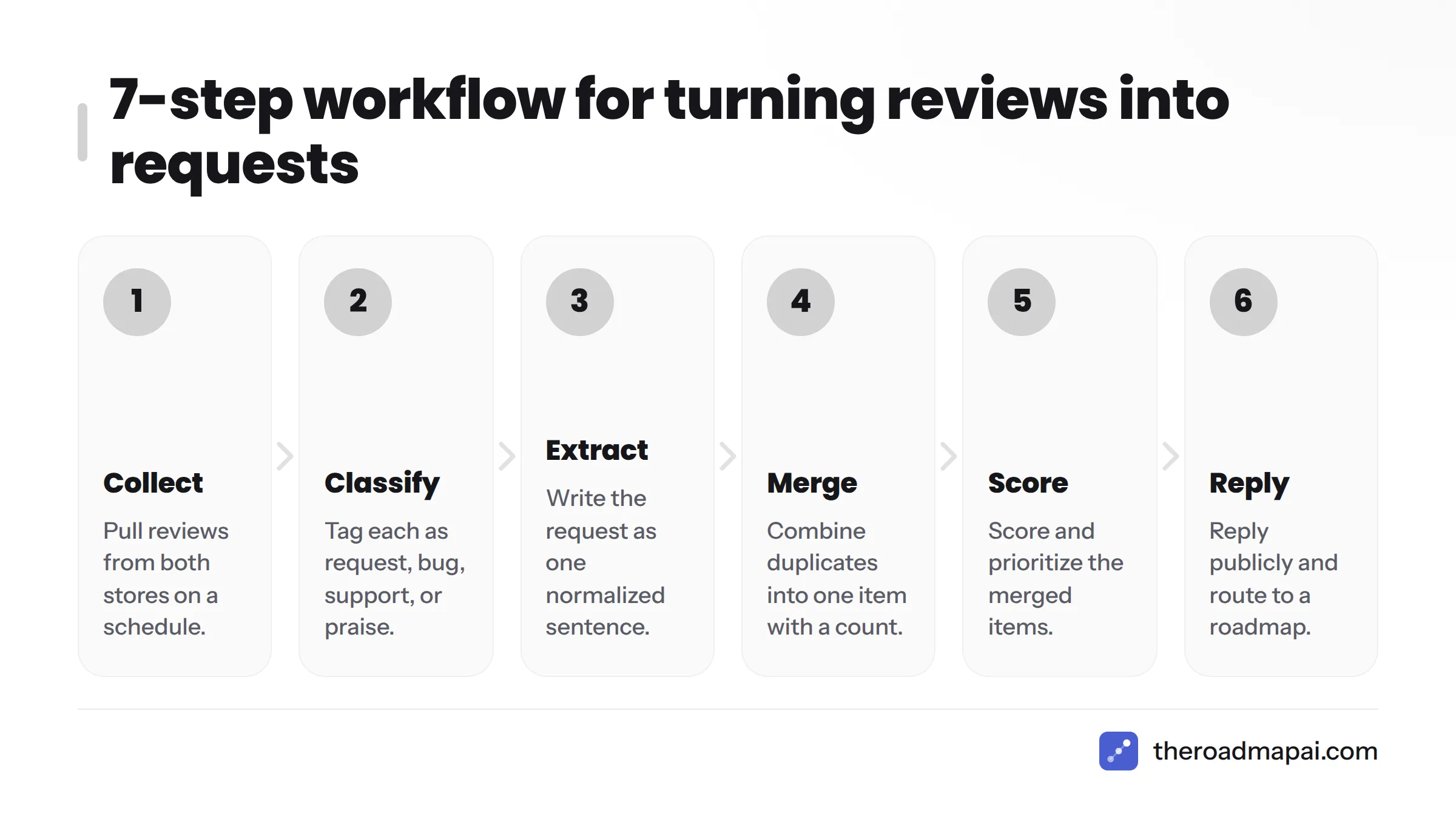
- Collect reviews from both stores.
- Classify each as request, bug, support, or praise.
- Extract the request as one normalized sentence.
- Merge duplicates into one item with a count.
- Score and prioritize.
- Reply publicly and route to a roadmap.
- Close the loop when it ships.
Step 1: Collect reviews from both stores on a schedule
Pull new reviews weekly. Beginners can copy them from each console into a spreadsheet. More technical teams can script the App Store Connect API and Google Play Developer API on a schedule. Use these columns: date, store, rating, version, locale, quote, type, normalized request, theme, votes, status.
Step 2: Classify each review
Use the decision tree above. Tag the type and, for requests, the theme (for example, "export" or "login").
Step 3: Extract the request in one normalized sentence
Write requests as "User wants to [do X]." Skip solutions. "Wants bulk export of data" beats "add a CSV button to the top right."
Step 4: Merge duplicates into one item with a count
"CSV download," "bulk export," and "get my data out" are one item. Keep a vote count and link each source quote. One review equals one vote, which is weak evidence by itself. Counts become meaningful only after merging.
Step 5: Score and prioritize
The scoring section below walks through the math.
Step 6: Reply publicly and route to a roadmap
Reply to the review, then add the request to a single list. If you keep a public roadmap, point the reviewer there.
Step 7: Close the loop when it ships
Tell people. More on that below.
Feature Request Tagging for App Reviews, Plus a Scoring Template
Recommended tags
Keep the tag set small so you actually use it:
- Type: request, bug, support, praise, pricing
- Theme: export, login, sync, notifications, design, performance, integrations, onboarding
- Segment: free, paid, new user, long-time user (if you can infer it)
- Status: new, merged, planned, in progress, shipped, declined
Scoring with RICE or impact/effort, adjusted for review signals
RICE scoring, popularized by Intercom, multiplies Reach by Impact by Confidence and divides by Effort. For review-derived requests, adjust the inputs with review signals:
- Reach: merged vote count, plus matching requests from other channels
- Impact: your estimate of how much it moves retention or conversion
- Confidence: raise it when requests come from many versions and locales, lower it when one loud user wrote five reviews
- Effort: engineering estimate in person-weeks
- Recency nudge: weight the last 90 days higher than older votes
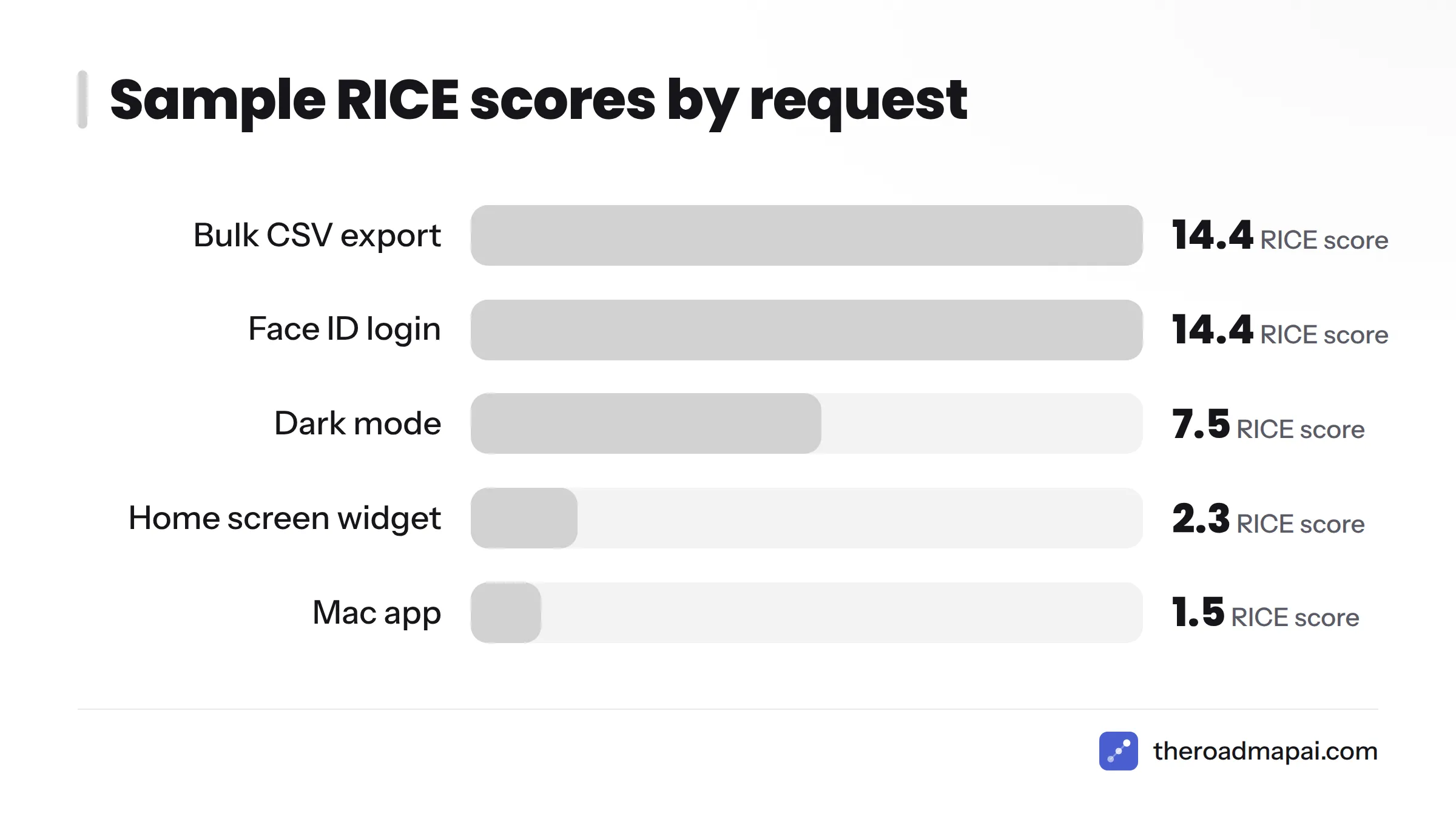
Illustrative scoring example (sample numbers only):
| Request | Votes (Reach) | Impact (1-3) | Confidence | Effort (weeks) | RICE |
|---|---|---|---|---|---|
| Bulk CSV export | 18 | 2 | 0.8 | 2 | 14.4 |
| Dark mode | 25 | 1 | 0.9 | 3 | 7.5 |
| Home screen widget | 9 | 2 | 0.5 | 4 | 2.3 |
| Face ID login | 6 | 3 | 0.8 | 1 | 14.4 |
| Mac app | 12 | 3 | 0.5 | 12 | 1.5 |
The formula is Reach x Impact x Confidence / Effort. Dark mode has the most votes but ranks lower, because its impact is modest and its effort is higher.
A common question: how many reviews justify building something? No universal number exists. A better test asks two things. Does the merged count, combined with other channels, clear your score threshold? And does the request fit your product direction?
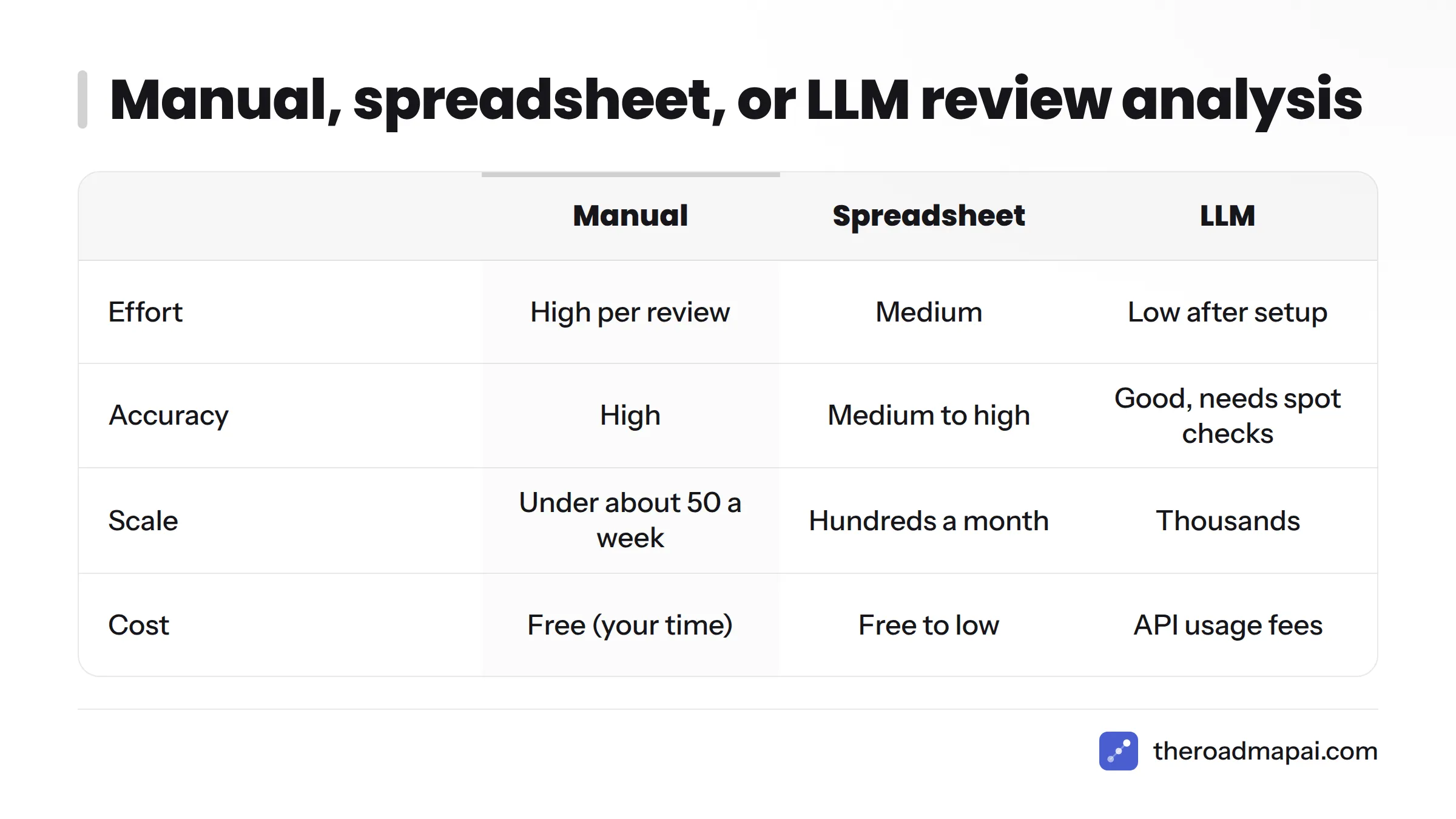
Manual, Spreadsheet, or AI: Which Approach Fits?
| Approach | Effort | Accuracy | Scale | Cost | Best for |
|---|---|---|---|---|---|
| Manual reading | High per review | High | Under about 50 reviews a week | Free (your time) | New apps, early products |
| Spreadsheet with filters | Medium | Medium to high | Hundreds a month | Free to low | Small teams with a routine |
| LLM classification | Low after setup | Good, needs spot checks | Thousands | API usage fees | Apps with steady volume |
| Review analytics tools | Low | Varies by tool | High | Subscription | Teams wanting dashboards |
For a wider view of the category, see these AI feedback tools.
Using an LLM for app review analysis and sentiment
Can AI classify reviews as feature requests accurately? Usually well on clear text, worse on sarcasm and very short reviews. The same prompt can also return sentiment, which makes it a workable starting point for app review sentiment analysis. Always spot-check a sample. Here is a starting prompt:
You classify app store reviews. For the review below, return JSON only.
Split mixed reviews into separate items.
Schema:
{"items":[{"type":"request|bug|support|praise|pricing",
"normalized_request":"User wants to ... (empty if not a request)",
"theme":"short label",
"confidence":0.0-1.0}]}
Rules: do not invent requests. If the review has no ask, use praise or pricing.
Review (rating: {rating}, locale: {locale}): "{text}"
Three design choices matter here. JSON keeps the output machine-readable. The split rule handles mixed intent. The "do not invent" rule cuts hallucinated asks. Check reviewer data against GDPR rules before sending text to any third-party service. The official GDPR portal is a good starting reference.
Review analytics tools
This category generally pulls reviews through the store APIs, tags topics, and shows sentiment over time. Features differ widely, so test any tool against a week of your own reviews before paying.
Consolidating review requests with community feedback
Here is where I will be clear about fit. RoadmapAI does not read App Store or Google Play reviews. It handles the step after: it detects feature requests in Discord, merges duplicates into votes, and publishes approved items to a public roadmap. Slack, Intercom, and Zendesk integrations are listed as coming soon. Its MCP server lets an AI assistant add items, so you can paste in requests you extracted from reviews and keep them in the same list as community asks. That is the practical path for app review feedback to roadmap.
Why bother? A request seen in twelve reviews and forty Discord messages is a different decision than either number alone. RoadmapAI is built to hold that combined list, and its feature request tools page shows how capture, tracking, and voting work. If your community lives in Discord, read how to collect feature requests from Discord and see the Discord feedback bot. Teams that route support through other tools can also look at guides for Zendesk, Slack, and Linear.
How to Respond to App Store Reviews That Contain Feature Requests
Yes, reply publicly. Prospects read replies, and the reviewer sees you listened.
Reply templates
Use three sentences: thank, acknowledge, point forward.
Template 1 (request, no promise): "Thanks for the kind words, and for the idea. Bulk export is on our list of requests we are tracking. You can follow and vote on it here:."
Template 2 (support question that hides a request): "Thanks for flagging this. Export lives under Settings > Data. We hear that it is hard to find, and we are noting that as feedback."
Template 3 (mixed bug and request): "Sorry about the login problem. Our team is looking into it. We have also added widgets to our request list. Details here:."
What not to do
- Do not promise dates or features you have not committed to.
- Do not argue with the reviewer.
- Do not gate reviews, meaning do not ask only happy users to rate you and route unhappy ones elsewhere. Apple's App Store Review Guidelines set rules on rating prompts, and Google publishes its own policies, so read both.
- Do not ask someone to change their rating in a way the store policy forbids.
Prompt cadence: Apple's documentation advises spacing rating prompts a week or two apart and prompting after the user has shown engagement. Use
AppStore.requestReviewon iOS and the Google Play In-App Review API on Android, and send feature ideas to a feedback board, not to the review prompt.
A related question: can users update a review after you reply or ship? Yes. Reviewers can edit their own reviews, and in the stores' consoles a developer reply typically notifies them. Confirm current behavior in each store's help pages, and never pressure anyone to edit.
Closing the Loop: Telling Reviewers Their Request Shipped
Most teams skip this step, and users remember it.
Release notes and changelog wording
Name the request in plain language. Weak: "Improvements and bug fixes." Better: "You asked for bulk export. You can now export all your data as CSV from Settings > Data." Keep a public changelog so every shipped item has a permanent home.
Updating a public reply and notifying requesters
Follow this timeline:
- Day 0: Review arrives. You reply and add it to the list.
- Weeks later: Item moves to planned, then in progress on your public roadmap.
- Ship day: Add a release note, then post a follow-up in the same review thread if the store allows editing your reply.
- After ship: Notify voters from other channels, such as Discord.
Follow-up template: "Update: bulk export shipped in version 4.2. Thanks for pushing us on this."
Troubleshooting Common Problems
Low review volume
Combine channels. Reviews plus Reddit, email, and Discord give you enough signal to work with. Prompt engaged users for ratings at positive moments, within the store rules above.
Non-English reviews
Filter by locale in each console. Translate with an LLM or translation tool, then normalize into your single-language request sentence. Keep the original quote in your sheet.
Fake, spam, or review-bomb reviews
Spikes right after a release or a news story look suspicious. Tag them separately and do not count them as votes. Report policy violations through the store's reporting tools.
Vague or sarcastic reviews
"Great, another update that fixes nothing" has no usable ask. Tag it as sentiment and move on. Low confidence scores from an LLM make a useful flag for human review.
One loud user vs many quiet ones
Count unique reviewers, not reviews. One person leaving five reviews is one vote.
Weekly Routine Checklist (30 Minutes)
- Pull new reviews from App Store Connect and Google Play Console (5 min)
- Classify each: request, bug, support, praise, pricing (8 min)
- Split mixed reviews into separate rows
- Normalize each request into one sentence (5 min)
- Merge duplicates and update vote counts (4 min)
- Re-score the top five items (3 min)
- Post public replies to new request reviews (4 min)
- Update status and changelog for anything shipped
- Hand bugs to engineering and support questions to docs
FAQ
What are app store review feature requests?
They are suggestions for new functionality that users write inside App Store or Google Play reviews. They are different from Apple's App Review process, which checks app submissions. Teams extract, merge, and prioritize them to guide the roadmap.
How do I find feature requests in my reviews?
Open Ratings and Reviews in App Store Connect and Google Play Console. Filter by rating, version, and locale. Scan for phrases like "wish it had" and "please add." For scale, pull reviews through each store's API.
Can I export App Store reviews to a spreadsheet?
Check your console for an export option first, since availability can change. If none exists, pull reviews through the App Store Connect API or Google Play Developer API and write the results to a CSV file.
How do I tell a feature request from a bug report?
A bug is something that should work but does not. A request is functionality that does not exist. If a feature exists but the user cannot find it, treat it as a support question and flag discoverability.
Should I reply publicly to a review that asks for a feature?
Yes. Thank the reviewer, acknowledge the idea without promising a date, and link to where they can follow or vote. Prospects read your replies, so a calm response helps conversion too.
How do I merge duplicate requests worded differently?
Normalize each request into one sentence, then group by need rather than wording. "CSV download" and "bulk export" become one item. Keep a count of unique reviewers and link the source quotes.
Can AI classify app reviews accurately?
It does well on clear text and struggles with sarcasm and very short reviews. Use a structured JSON prompt, include a confidence field, and spot-check a sample each week.
How often should I prompt for ratings?
Apple's guidance is to space prompts a week or two apart and to ask after the user has engaged with the app. Avoid review gating, and route feature ideas to a feedback board instead.
How do I combine review requests with Discord, email, and support requests?
Keep one master list. Add review-derived items by hand, script, or MCP, and let community channels feed the same list. A single public roadmap then shows users what is planned and shipped.
What do developers on Reddit recommend?
Threads on app store review feature requests on Reddit vary, but common themes are a weekly review routine, tagging in a spreadsheet, and pointing reviewers to a public board. Treat anecdotes as ideas to test, not proof.
Put All Your Requests in One Place
Reviews give you the loudest, noisiest signal. Your community supplies the rest. Extract what you can from the stores, then consolidate it with feature request tools so duplicates become votes and approved items reach a public roadmap. Next steps: try it with the 7-day free trial.
Sources
- Apple Developer: App Review
- Apple Developer Documentation: Requesting App Store reviews
- Apple Developer Documentation: App Store Connect API
- App Store Connect Help: View ratings and reviews
- Apple Developer: App Store Review Guidelines
- Google Play Console
- Google for Developers: Google Play Developer API
- Google Play Console Help: Read and reply to reviews
- Android Developers: Google Play In-App Review API
- Intercom: RICE, Simple prioritization for product managers
- GDPR.eu: General Data Protection Regulation resource