 RoadmapAI
How to Track Feature Requests in Zendesk Tickets
Stop good ideas dying in your support queue. Set up fields, tags, triggers, and macros to track Zendesk feature requests and close the loop in 2026.
Zendesk feature requests mean two different things. For most teams, they are the product ideas customers drop into support tickets. For others, they are the ideas you send to Zendesk about its own product. This guide covers both. The ticket workflow comes first, because that is where most requests get lost.
I have watched good ideas die in support queues more than once. A customer writes "it would be great if...", an agent replies kindly, the ticket closes, and the idea disappears. Here is how to stop that, step by step. Last verified: November 2026.
Direct answer: To track feature requests in Zendesk, classify each ticket with a request-type field, add a consistent feature tag, point duplicates at one canonical request, count unique requesters in Explore, and hand the ranked list to your roadmap or issue tracker. Then tell every requester when it ships.
Quick answer: the 5-step system
- Classify. Mark the ticket as Bug, Feature request, How-to, Billing, or Other.
- Tag. Add
feature_requestplus one feature tag such asfr_export_csv. - Merge. Point duplicate wordings at one canonical request.
- Count. Report on unique requesters per tag, not ticket volume.
- Close the loop. Notify everyone on the list when the feature ships.
Jump to tracking requests from tickets or to submitting a request to Zendesk itself.
Which Zendesk Feature Requests Do You Mean?
Requests your customers send you through Zendesk
You run Zendesk Support or Zendesk Suite. Customers email, chat, or fill in a form, and product ideas hide inside those conversations. This is the main use case, and it is the one most teams handle badly.
Requests you send to Zendesk about the product
Maybe you want Zendesk to add a field condition, a macro option, or an admin shortcut. Zendesk collects this feedback in the Zendesk Community, where admins post "Feature Request:" threads and others vote and comment. I cover the exact path below.
Why Feature Requests Get Lost in Zendesk Tickets
Zendesk is great at resolving conversations. It was not built to be a product backlog. Here is why requests slip through.
Tickets are conversations, not backlog items
A ticket closes when the customer gets an answer. A feature request has to stay open for months. These two lifecycles collide, and the ticket always wins.
Different wording, same request
One customer asks for "CSV download." Another wants "spreadsheet export." A third says "get my data out." Without a naming rule, you end up with three items instead of one item with three votes.
Bugs, how-tos, and requests share one queue
An agent reads "this doesn't do X." Is that a broken feature, a missing one, or a misunderstanding? If agents guess differently, your data turns to noise. Other helpdesks have the same problem, and I wrote about how to separate feature requests from support in Intercom.
No native voting or public roadmap
Zendesk Support has no built-in voting board or public roadmap for your own product, and tickets are not votes. You need a counting method and a place to publish status. The rest of this guide builds both.
How to Track Feature Requests in Zendesk (Step by Step)
A small team can set up this Zendesk feature request workflow in about 30 minutes, as long as someone has admin access. If you want click-by-click screens, Zendesk's own documentation covers custom ticket fields, tags, triggers, and macros. Menu names change, so check them as you go.
Step 1: Add a Zendesk feature request custom field
Create a drop-down custom ticket field in Admin Center and name it Request type. Add these values:
- Bug
- Feature request
- How-to
- Billing
- Other
Make it required when an agent solves a ticket. A field beats free-form tags for classification because it forces one choice and shows up cleanly in reports. Tags then carry the detail.
Step 2: Define a Zendesk feature request tag taxonomy
Good Zendesk ticket tags for feature requests work in two layers. One broad tag marks the type, and one specific tag names the feature. Keep every tag lowercase with underscores, since Zendesk tags cannot contain spaces.
| Tag pattern | Example | Owner |
|---|---|---|
feature_request |
feature_request |
Support lead |
fr_<area>_<feature> |
fr_export_csv |
Product manager |
fr_status_<state> |
fr_status_planned |
Product manager |
fr_shipped |
fr_shipped |
Product manager |
fr_internal |
fr_internal |
Support lead (internal asks only) |
The fr_ prefix sorts every request tag together and keeps them apart from your other tags. Publish the approved feature tags in a shared document, and let only the product manager add new ones.
Step 3: Automate with triggers
Triggers handle the repetitive work. Two are enough to start.
- Trigger A, tag sync. Conditions: Request type is Feature request. Action: add the tag
feature_request. - Trigger B, acknowledgment. Conditions: ticket is updated, tags contain
feature_request, and tags do not containfr_acknowledged. Actions: add the tagfr_acknowledgedand notify the requester with your logging message.
The "does not contain" condition keeps the customer from getting the same email twice.
Step 4: Give agents a Zendesk feature request macro
A Zendesk feature request macro can set the field, add tags, and insert a reply in one click. Build one per common request area, or one general version.
Sample reply macro text:
Thanks for the suggestion. I have logged your request for {{feature name}} with our product team. I can't promise a date, but I will email you when there is an update. If you can tell us what you are trying to get done, that helps us a lot.
Asking about the underlying job gives product the context behind the request, not just the proposed solution. Give the macro a searchable name, like FR - Log request - general.
Step 5: Build a Feature Requests view
Create a shared view with the condition "Tags contain feature_request", grouped by tag and sorted by last update. Product managers can scan it weekly without asking support for a summary.
Step 6: Merge duplicates into one canonical request
Pick a canonical item for each idea. You have three options:
- Master ticket. Keep one internal ticket per feature, and reference its ID in a private note on each related ticket.
- Linked issue. Create one Jira or Linear issue and paste its ID into a custom text field on each ticket.
- Side conversation. Use a side conversation to bring in the product team without exposing the customer thread.
Skip Zendesk's native ticket merge for this. Merging closes the source tickets into one and hides requesters from your reports. For feature requests, you want many tickets pointing at one item, not one ticket swallowing the rest.
Step 7: Build a Zendesk feature request report in Explore
Use Zendesk Explore to build the report:
- Metric: Unique requesters (count distinct).
- Attribute rows: Ticket tags, filtered to tags starting with
fr_. - Filters: Request type = Feature request, last 90 days.
- Extra breakdowns: Requester organization, and plan if you store it in a field.
Add a second tab showing the same data by month so you can spot rising requests. Explore capabilities depend on your plan, so confirm your tier supports the attributes you need.
Decision tree: bug, how-to, or feature request?
Agents classify faster when they ask the same questions in the same order:
- Did it work before, or is it documented to work this way? Yes: Bug.
- Can the customer already do this with existing features? Yes: How-to. Send the guide.
- Is the customer asking for behavior your product does not offer? Yes: Feature request.
- Is it about invoices, plans, or payments? Yes: Billing.
- None of the above? Other. Escalate if unsure.
Some tickets are both, like a how-to the customer could not find plus a real gap. Pick the dominant one and add a private note.
Agent triage checklist
- Request type field set
- One
fr_feature tag added from the approved list - Customer asked what they are trying to achieve
- Canonical item ID noted on the ticket
- Reply macro sent, with no date promised
- Internal asks tagged
fr_internal
Prioritizing Zendesk Feature Requests With Real Demand Data
Count unique requesters, not tickets
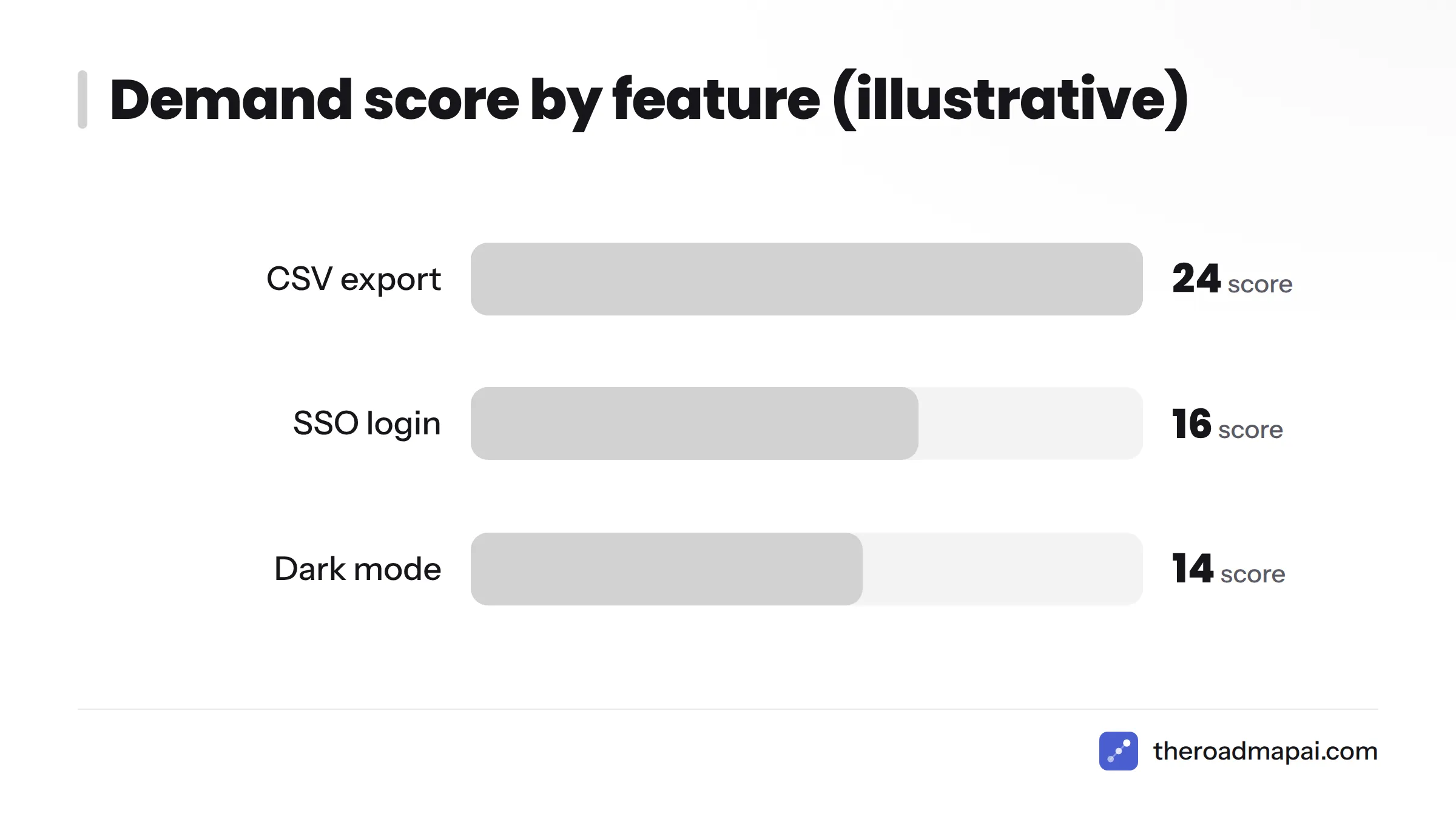
One frustrated customer can write ten tickets. Ten customers writing once each is stronger evidence. Count distinct requesters, and distinct organizations where you can.
Weight by segment, plan, or revenue
Requests do not all carry the same business weight. Store plan or account tier on the organization, then report by that field. A request from three enterprise accounts may outrank one from thirty free users, depending on your strategy. Set that rule in advance, not per request.
A simple scoring formula
Start with this formula:
Demand score = unique requesters x segment weight x recency factor
- Segment weight: free = 1, standard = 2, enterprise = 4 (adjust to your pricing).
- Recency factor: 1.0 if requested in the last 30 days, 0.7 for 31 to 90 days, 0.4 for older.
If you prefer a known framework, RICE prioritization, published by Intercom's product team, adds reach, impact, confidence, and effort. Use demand score to build the shortlist and RICE to rank it.
Worked example (illustrative numbers, not real data):
| Feature | Unique requesters | Avg. segment weight | Recency | Score |
|---|---|---|---|---|
| CSV export | 12 | 2 | 1.0 | 24 |
| Dark mode | 20 | 1 | 0.7 | 14 |
| SSO login | 4 | 4 | 1.0 | 16 |
Dark mode has the most requesters, but CSV export wins once segment and recency enter the math. A flat ticket count would have picked the wrong item.
Sending Zendesk to Jira and Other Engineering Backlogs
A ranked list does nothing if engineers never see it. Pick one hand-off method and stick with it.
Zendesk to Jira feature requests
Atlassian publishes a Jira integration for Zendesk Support that lets agents create and link Jira issues from a ticket. Linked issues keep a trail from the customer conversation to the work item. It suits teams that already plan in Jira.
Zendesk to Linear
Linear supports customer-request workflows that link support tickets to issues. For the triage side, see how to track and triage requests in Linear. Check Linear's documentation for the current Zendesk connection options before you commit.
Zapier, webhooks, or the API
For custom routing, Zendesk exposes a REST API and webhooks. You can send tagged tickets to a spreadsheet, a database, or a board. If you prefer no code, this walkthrough shows how to route requests with Zapier. A GitHub-based team can adapt a GitHub Issues workflow the same way.
Weekly export for small teams
Run your Feature Requests view, export to CSV, and paste new rows into a tracking sheet each Friday. It is manual, but it holds up under about 20 requests a week. Mind GDPR if the export contains personal data, and limit who can open the sheet. The GDPR text is published on EUR-Lex.
Hand-off method comparison
| Method | Effort | Sync | Best for |
|---|---|---|---|
| Jira app | Medium (admin setup) | Two-way link | Teams planning in Jira |
| Linear link | Medium | Link and status | Product-led startups |
| Zapier or webhook | Medium to high | One-way, custom | Custom routing |
| Weekly export | Low | None (manual) | Small teams, early stage |
Where Should the Source of Truth Live?
Tickets are evidence. The source of truth is the single list that says what was requested, by whom, and where it stands. Getting Zendesk feedback into a product roadmap depends on choosing that list deliberately.
| Option | Strengths | Weaknesses | Best for |
|---|---|---|---|
| RoadmapAI | Captures from Discord and chat, AI-assisted deduplication, voting, public roadmap, changelog, MCP server | Zendesk integration is coming soon, so ticket data needs a manual or Zapier step today | Teams whose users also live in community channels |
| Zendesk tags only | No new tool, fast to start | No voting, no public status, weak for long-term tracking | Under ~50 active requests |
| Spreadsheet | Flexible, free | Manual upkeep, no requester notifications | Early-stage teams |
| Jira or Linear | Engineers already live there | Customer-facing context is thin, no public voting | Delivery tracking |
| Canny, Upvoty, Productboard | Voting boards, roadmaps, insights | Another tool to run and pay for | Dedicated feedback programs |
I am biased here, since RoadmapAI is my product, so weigh that. My honest view: tags alone work until you need to show customers what is coming. After that, a board pays for itself. For more options, see the roundup of AI feedback tools.
When Zendesk alone is enough
Stay in Zendesk if you have a small product, a handful of recurring asks, and one person reviewing the view weekly. The system above covers you.
When to add a voting board or public roadmap
Add one when customers keep asking "is this planned?", when you have more than a few dozen distinct requests, or when sales needs to see status. A public roadmap answers those questions without a ticket.
Capturing requests from Discord, Slack, and email alongside Zendesk
Your customers rarely stick to one channel. If part of your audience hangs out in Discord, you can collect feature requests from Discord with a Discord feedback bot. Slack teams have a parallel path for Slack feature requests, and email has a feedback email to roadmap workflow. Helpdesk-style tools work similarly, as in Crisp Chat feature requests. RoadmapAI's Zendesk integration is listed as coming soon, so it is not available yet.
Closing the Loop: Tell Customers When Their Request Ships
Most support teams never go back to the customer. That wastes a real chance, because a "you asked, we built it" email can turn a complaint into loyalty.
Keep the requester list attached to the item
For every canonical request, record the ticket IDs or requester emails. In a Jira or Linear issue, put them in a custom field or comment. In a spreadsheet, add a column. Lose the list and you lose the ability to notify anyone.
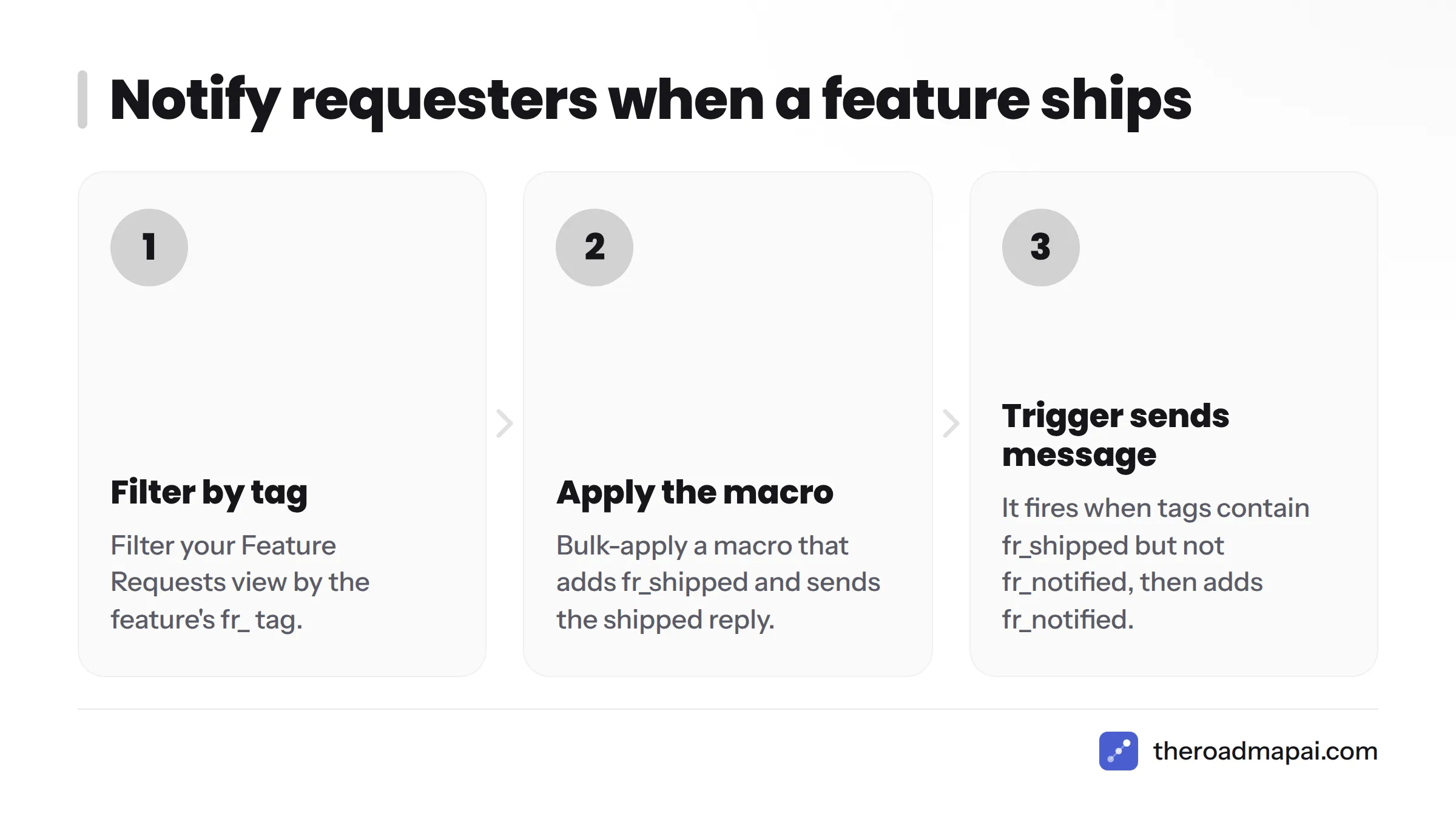
Macro and trigger pattern for "shipped" notifications
- When a feature ships, filter your Feature Requests view by its
fr_tag. - Bulk-apply a macro that adds the tag
fr_shippedand sends the shipped reply. - A trigger with conditions "tags contain
fr_shipped" and "tags do not containfr_notified" sends the message and addsfr_notified, which prevents repeats.
Closed tickets cannot be reopened and updated. Create a follow-up ticket from the closed one, or send the message through your email tool using the exported requester list.
Publishing a changelog entry
Write one public note for the release and link it from every shipped reply. Good changelog tools make this a two-minute job and give new customers a record of momentum.
Sample reply wording
Acknowledged: "Thanks for the idea. We have logged it and will share news when we have it."
Under review: "Good news: the team is now reviewing your request for {{feature}}. No date yet, but we are looking at it seriously."
Shipped: "You asked for {{feature}}, and it is live today. Here is how to use it: {{link}}. Thank you for helping shape the product."
Keep dates out of the first two. If you must give one, say "we are aiming for," and review it often.
How to Submit a Feature Request to Zendesk Itself
Zendesk Community product feedback topics
Zendesk runs a public community with product feedback areas, and Zendesk Community feature requests are the main public route. Search before you post. If someone already asked, vote and add your use case in a comment instead of starting a duplicate thread. That search also tells you whether a Zendesk feature has been requested already.
Contacting Support or your account team
On a paid plan, you can also raise the request through Zendesk Support or your account representative, especially when it touches a contract or a large rollout. Ask them to log it against your account.
How to write a request that gets traction
Use this format when you submit a feature request to Zendesk:
- Problem: What are you trying to do, and what blocks you?
- Current workaround: How do you cope today?
- Frequency: How often does it happen, and for how many agents?
- Impact: What does it cost in time, errors, or customers?
- Suggested outcome: One sentence, held loosely.
Verify first. Zendesk can change where and how it accepts product feedback. Confirm the current channels in Zendesk's official help center before you post.
Common Mistakes and Troubleshooting
| Problem | Why it happens | Fix |
|---|---|---|
| Tag sprawl | Agents invent tags | Approved list; only the product manager adds tags |
| Agents forget to tag | Tagging is manual | Required field on solve, plus macros |
| Counting tickets, not people | Default Explore counts tickets | Use distinct requesters |
| Over-promising dates | Agents want to please | Macro wording that bans dates |
| Internal asks mixed with customer asks | Sales or CS files tickets on behalf of users | fr_internal tag; filter it from demand counts |
| Requests buried in long threads | The ask appears in message 14 | Ask agents to add a private summary note |
| Never reporting back | No owner for notifications | Assign a weekly "shipped" review |
Setup Checklist and Downloadable Template
30-minute minimum setup
- Create the Request type field (5 minutes)
- Write the tag list and share it (5 minutes)
- Add the tag-sync trigger (5 minutes)
- Create the log-request macro (5 minutes)
- Build the Feature Requests view (5 minutes)
- Schedule a weekly 30-minute review (5 minutes)
Advanced setup for large teams
- Separate tag prefixes per brand in multi-brand accounts.
- Organization-level fields for plan and ARR, used in Explore weighting.
- An API job that syncs tagged tickets to your backlog tool nightly.
- A shared taxonomy review every quarter to retire stale tags.
Tracking sheet template
Copy these columns into a spreadsheet to start: Feature name, Canonical tag, Status, Unique requesters, Organizations, Segment weight, Recency factor, Demand score, Linked issue ID, First requested, Last requested, Shipped date, Customers notified (Y/N).
Want one place where requests, votes, and status live together? See RoadmapAI pricing for plans and the free trial.
Frequently Asked Questions
What does "Zendesk feature requests" mean?
It means either the product ideas your customers send you through Zendesk tickets, or the ideas you send to Zendesk about its own software. Most teams that use Zendesk need the first: a way to capture, count, and route customer ideas.
How do I track feature requests in Zendesk tickets?
Add a Request type field, tag each ticket with feature_request and a specific fr_ tag, link duplicates to one canonical item, and report on unique requesters in Explore. Review the list weekly and send ranked items to your backlog.
How do I tag a ticket as a feature request?
Use a macro that sets the Request type field to Feature request and adds feature_request plus a feature tag such as fr_export_csv. A trigger can add the broad tag automatically when the field is set.
Should I use a custom field or tags?
Use both. The custom field classifies the ticket type with one required choice, and tags carry the specific feature name. The field keeps reports clean, while tags let you count each feature separately.
How do I count how many customers asked for the same feature?
Build an Explore report with distinct requesters as the metric and ticket tags as the rows, filtered to fr_ tags. Counting requesters instead of tickets stops one repeat writer from inflating a request.
Does Zendesk have a built-in voting board or public roadmap?
Not for your own product in Zendesk Support. Tags and reports can track demand, but customer voting and public status need a separate tool or a custom setup. Check Zendesk's current documentation for any change.
How do I send Zendesk feature requests to Jira?
Use Atlassian's Jira integration for Zendesk Support to create and link Jira issues from tickets. Put the canonical issue ID on every related ticket so you can find all requesters later.
How do I notify customers when their requested feature ships?
Keep the list of requesters on the canonical item, filter tickets by the feature tag when it ships, and apply a macro that sends the shipped reply. Add a notified tag to prevent duplicate emails, and link a public changelog entry.
Where do I submit a feature request to Zendesk itself?
Post in the product feedback topics of the Zendesk Community, after searching for an existing thread. You can also contact Zendesk Support or your account rep. Verify current channels in Zendesk's help center first.
When should I move from Zendesk tags to a dedicated feedback tool?
Move when customers keep asking what is planned, when you track dozens of distinct requests, or when sales and product need shared status. Tags are fine for small lists, but boards handle voting and public updates better.