 RoadmapAI
How to Automate Feature Request Capture With Zapier, Make or n8n
Build a Zapier feature request workflow in 15 minutes: trigger, filter, AI classify, store, notify. Includes the prompt, cost math, and where it breaks.
You can automate feature request capture in Zapier with four moving parts. A trigger watches the source (Discord, Slack, email, or a form). A filter drops the noise. An AI step labels what is left. An action writes a record to Notion, Google Sheets, Linear, or Trello, then pings the requester. That is the whole pattern, and a working version takes about 15 minutes to build.
I'll show you the build, the prompt, the cost math, and the exact points where it breaks. If you landed here hoping to ask Zapier itself for a new feature, jump to the short pointer near the end. Everyone else, let's break it down.
TL;DR: Zapier handles capture and routing well. It does not understand meaning, so it cannot merge "dark mode please" with "add a night theme." Build the Zap below, learn its ceiling, then decide whether a purpose-built tool saves you time.
Disclosure: RoadmapAI publishes this article and sells a Discord-native feedback product. I cover it in one clearly marked section and keep the rest vendor-neutral.
Quick Answer: What a Zapier Feature Request Workflow Looks Like
A feature request workflow is the path a suggestion takes from the moment someone types it to the moment you ship (or decline) it. With Zapier feature request automation, you build that path as a Zap: a trigger starts the run, then actions move and transform the data.
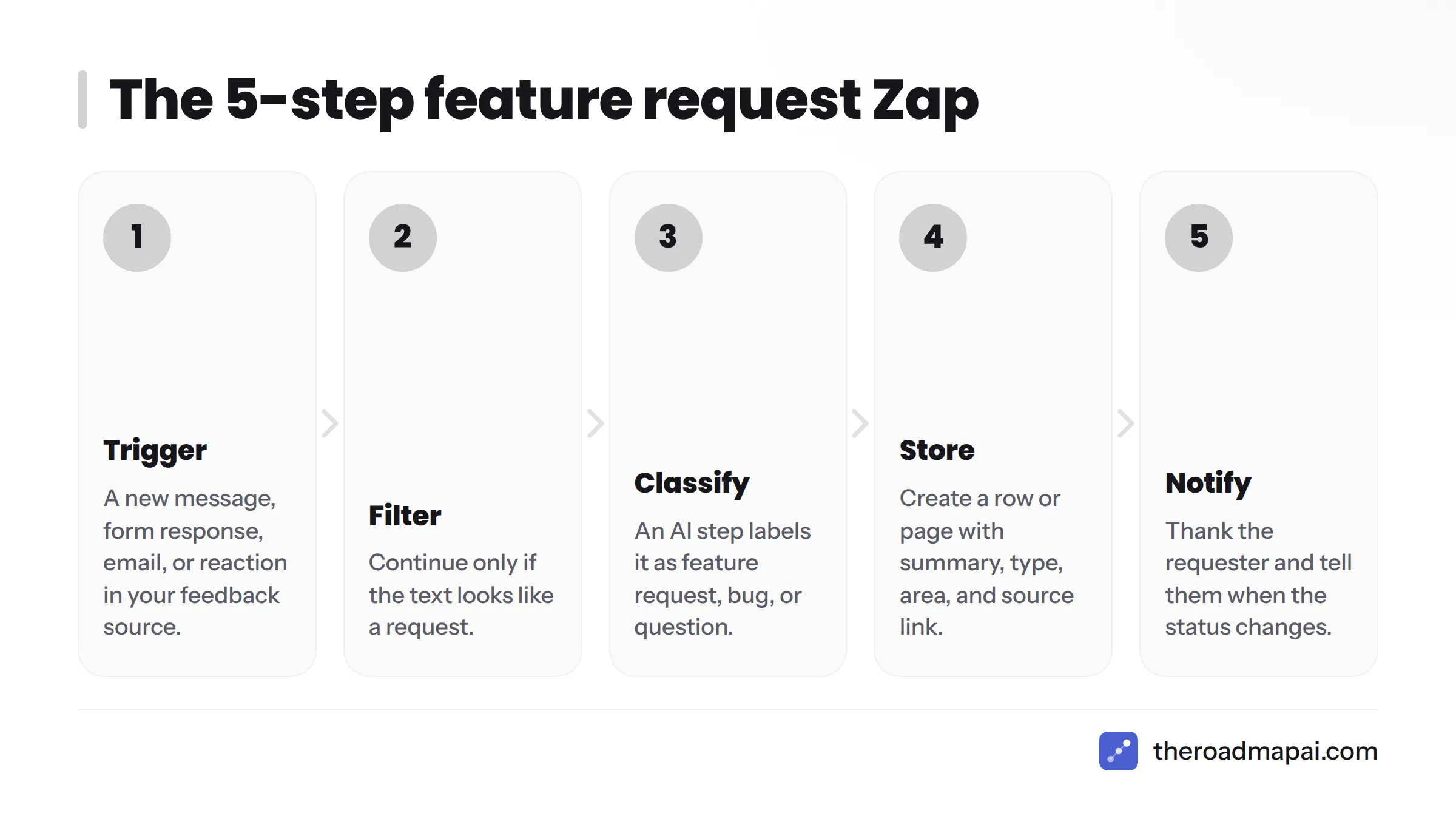
How do you automate feature requests with Zapier? Pick a trigger from the place requests appear, filter out irrelevant messages, classify the rest with an AI step, create a record in your tracker (Notion, Sheets, Linear, or Trello), and notify the requester. Each step maps to a Zapier building block, and the first version takes about 15 minutes.
The 5-step pattern (trigger, filter, classify, store, notify)
- Trigger: a new message, form response, email, or reaction in your feedback source.
- Filter: continue only if the text looks like a request (length, keywords, channel).
- Classify: an AI step labels it as feature request, bug, or question and returns structured fields.
- Store: create a row or page in your database with the summary, type, product area, and source link.
- Notify: thank the requester and, later, tell them when the status changes.
Picture the flow left to right. Sources feed one trigger layer, the trigger layer feeds the filter, the filter feeds the AI classifier, and the classifier writes to the database. The database then feeds notifications and a roadmap view.
What Zapier does well and where it falls short
It does well:
- Connects thousands of apps without code. Zapier advertises 8,000+ app integrations, though the exact count changes over time.
- Offers Filter, Paths, and Formatter steps for logic and cleanup.
- Includes AI by Zapier for classification and summarizing.
It falls short on:
- Meaning-based deduplication. Zap lookups match exact values, not ideas.
- Voting. There is no built-in way for users to upvote a record.
- Cost at volume. Every action step in a run can consume a task.
- Chat triggers. Some sources have limited or no native triggers (more on Discord below).
Before You Build: Choose Your Sources and Destination
Decisions you make now save rework later. Pick where requests come from and where they will live before you open the Zap editor.
Where feature requests come from
Most teams have four to six streams: a community chat (Discord or Slack), a support inbox or helpdesk, a public form, direct email, and social replies. Each stream offers different trigger options. The table below shows what to expect. Trigger availability changes, so confirm in the Zap editor before you commit.
| Source | Typical Zapier trigger | Instant or polling | Main caveat |
|---|---|---|---|
| Slack | New message posted to channel, New reaction added | Instant | Public channels need the app invited; threads need extra handling |
| Discord | Limited native triggers; often webhook or bot-based | Varies | Reading all messages needs a bot with the right intents |
| Email by Zapier (inbound address), Gmail new email | Instant / polling | Signatures and quoted replies pollute the text | |
| Google Forms | New response in spreadsheet | Polling | Delay of several minutes on lower plans |
| Typeform | New entry | Instant | Field mapping per form |
| Intercom / Zendesk | New conversation or ticket | Instant / polling | Mixes bugs, billing, and requests |
Instant triggers run the moment an event arrives. Polling triggers check on a schedule, so expect delays. Zapier explains the difference in its trigger documentation.
Picking a destination
| Destination | Best for | Watch out for |
|---|---|---|
| Google Sheets | Fast, free start; easy filtering | No real workflow, easy to get messy |
| Notion | Rich pages, views, relations | Slower for large volumes |
| Airtable | Structured data, forms, views | Record limits by plan |
| Linear | Engineering-owned triage (Linear feature requests have their own best practices) | Floods the engineering backlog if unfiltered |
| Trello | Simple boards for small teams | Weak reporting |
| GitHub Issues | Open source projects (see this GitHub Issues feature requests workflow) | Public by default |
My opinion: start in Notion or Airtable, not Linear. Keep raw requests in a holding database and promote only vetted ones to engineering. Your developers will thank you.
Step-by-Step: Build Your First Feature Request Zap (15 Minutes)
This feature request Zap template uses a Slack channel as the source and Notion as the destination. The same skeleton works for forms or email. Swap the trigger and keep the rest.
Before you start, gather:
- A Zapier account with access to AI by Zapier (check your plan)
- A Notion database with columns: Title, Summary, Type, Area, Urgency, Source URL, Requester, Status
- A Slack channel such as #feature-requests
Step 1. Set the trigger
Create a new Zap and choose Slack: New Message Posted to Channel. Connect your workspace and select the channel. Send a test message so Zapier pulls sample data (text, user, timestamp, permalink).
Step 2. Filter out noise
Add a Filter by Zapier step. Continue only if:
- Text length is greater than 25 characters, and
- The message is not from a bot, and
- It is not a thread reply (if you want top-level posts only).
This is the cheapest step you will add. Filtered runs generally do not use tasks for the steps after the filter, which is why filtering early saves money. Check Zapier's task definition for the current rules.
Step 3. Classify with an AI step
Zapier AI feature request triage starts here. Add AI by Zapier (or an OpenAI or Anthropic Claude action) and paste this prompt. Replace the field in braces with the mapped message text.
You triage product feedback. Read the message and return ONLY valid JSON
with these keys:
- "type": one of "feature_request", "bug", "question", "praise", "other"
- "summary": one sentence, max 20 words, written as the desired outcome
- "area": the product area mentioned (e.g. "billing", "mobile", "integrations"), or "unknown"
- "urgency": "low", "medium", or "high" based on the user's stated impact
- "confidence": a number from 0 to 1

If the message mixes several asks, summarize the most important one.
Do not invent details that are not in the message.

Message: {{message_text}}
Here is an illustrative input and output:
| Input message | AI output |
|---|---|
| "Any chance you could add CSV export to the reports page? I do this by hand every week." | {"type":"feature_request","summary":"Export reports as CSV","area":"reports","urgency":"medium","confidence":0.93} |
| "Export button throws a 500 error." | {"type":"bug","summary":"Fix server error on export button","area":"reports","urgency":"high","confidence":0.9} |
I wrote these examples to show the format. They are not measured results. Test the prompt on 20 to 30 of your real messages before you trust it.
Add a Formatter or code step to parse the JSON into separate fields, or use the AI step's structured output option if your plan offers it.
Step 4. Create the record and map fields
For Zapier Notion feature requests, add a Notion: Create Database Item action. Map:
- Title to
summary - Type to
type - Area to
area - Urgency to
urgency - Source URL to the Slack permalink
- Requester to the Slack user name
- Status to a fixed value, "New"
Add a Filter or Path before this step so only feature_request items with confidence above 0.6 land in the database. Send the rest to a "Needs review" view.
Prefer Linear? Zapier Linear feature requests follow the same shape. Swap the Notion action for a Linear issue-creation action and map the same fields. Because Linear feeds engineers directly, keep the confidence cutoff strict, or send everything to a holding database first.
Step 5. Acknowledge the requester
Add a Slack: Send Channel Message (as a thread reply) saying the request is logged, with a link to the record. People who get a reply keep contributing. People who get silence stop.
Test and publish checklist
- Trigger test returns real sample data
- Filter passes a request and blocks a short "lol"
- AI output parses into separate fields
- Notion record has every field filled
- The bot does not trigger on its own thread reply (this causes loops)
- Zap history shows the run succeeded
- Turn the Zap on, then watch the first ten live runs
Capture Feature Requests From Discord With Zapier
Discord is where many product communities live, and it is the trickiest source. Here is the honest picture of Zapier Discord feature requests.
What the Discord triggers can and cannot do
Zapier's Discord integration has historically focused on sending messages and managing channels, and its options for reading every new message have been limited. Reading message content from a server generally requires a bot with the Message Content privileged intent, which Discord documents in its developer documentation. Check the current Discord integration page in Zapier to see which triggers exist today.
Common workarounds:
- Run a small bot (or an existing one) that posts qualifying messages to a Webhooks by Zapier catch hook.
- Use a mirror channel in Slack and trigger from there.
- Use a reaction-based flow, where a moderator adds an emoji to the message.
Channel-based capture vs reaction-based capture
| Method | Pros | Cons |
|---|---|---|
| Dedicated #feature-requests channel | Simple; every message is a candidate | People post chatter there too; requests outside the channel are missed |
| Emoji reaction by a mod | Human judgment, low noise | Depends on moderators; slow |
| Keyword filter (words like "wish", "please add") | Cheap | Misses intent, catches jokes |
Why keyword filters miss intent
"It would be great if exports worked offline" contains no trigger word. "Please add a way to make me stop crying over this UI" contains one. Keywords measure vocabulary, not meaning, and in a large community that gap grows fast. For the manual approach, read how to collect feature requests from Discord. If you want chat handled natively, a Discord feedback bot skips the webhook plumbing.
Capture Requests From Slack, Email, and Forms
Slack, with a reaction or channel trigger
Slack is the easiest chat source in Zapier. Use New Message Posted to Channel for a dedicated channel, or New Reaction Added with a specific emoji (say, a clipboard) so teammates can flag requests posted anywhere. For setup variations, see this guide to Slack feature requests.
Email-to-request parsing
Create an address with Email by Zapier and forward customer emails to it, or watch a shared inbox with Gmail. Before the AI step, add a Formatter step to strip signatures and quoted replies. They add tokens and confuse classification. The feedback email to roadmap workflow covers the manual side.
Google Forms and Typeform intake
Forms give you the cleanest data because the fields are already structured. Google Forms writes to a Sheet, and Zapier polls that Sheet, so expect a delay. Typeform offers an instant trigger. Add a required "What are you trying to do?" field. It produces better context than "What feature do you want?"
Intercom and Zendesk: separating support from feature requests
Helpdesk tools mix everything together. Pull new conversations, run the classification step, and create a request record only for the feature_request type. Tag the original ticket too, so support sees it was logged. For the reasoning, see how to separate support from feature requests.
Separate Feature Requests From Bugs and Questions
Can Zapier tell a feature request from a bug? Not by itself. Zapier's Filter and Paths steps match text rules. Add an AI step with a clear prompt and it can classify well enough for triage, but keep a human review lane for low-confidence results.
A reusable classification prompt
Use the prompt from Step 3. Three habits make it better:
- Force JSON output with a fixed list of allowed values.
- Ask for a confidence score and route low scores to review.
- Paste two or three example messages from your own community into the prompt.
Routing with Paths
Add Paths by Zapier after the AI step:
- Path A, feature_request: create a record in the request database.
- Path B, bug: create an issue in your bug tracker (Linear, Jira, or GitHub Issues).
- Path C, question: reply with a help-center link or notify support.
- Path D, anything else: log to a review sheet.
Paths may require a paid plan, and each path's actions can count as tasks, so check your plan limits.
Handling Duplicate Feature Requests in Zapier
Can Zapier detect duplicate feature requests? Only exact matches. Zapier can search a database for an identical value and update a record instead of creating one, but it does not compare meaning. Spotting that two differently worded requests are the same takes embeddings or a similarity step outside the standard Zap actions.
Why exact-match dedupe breaks
"Dark mode," "night theme," and "please add a darker UI" are one idea and three strings. A Find Record step looking for "dark mode" finds one and misses two. You end up with three records, three half-counted votes, and a roadmap that undersells demand.
Find-or-create patterns
Here is a basic pattern that works for exact or normalized matches:
- Have the AI step output a short, normalized
canonical_title(for example, "Dark mode"). - Add Notion: Find Database Item (or Airtable or Zapier Tables) searching that title.
- If found, update the record and increment a
Votesnumber. - If not found, create a new record with Votes set to 1.
Turn on the Zapier setting that lets a search step continue when nothing is found, so the Zap can branch to the create path.
This catches a lot when the AI stays consistent, and the canonical title instruction helps. It still fails on near-synonyms.
Semantic dedupe via embeddings (advanced)
For real meaning-based matching:
- Send each new request to an embeddings API such as OpenAI embeddings through a webhook or code step.
- Store the vector in a vector database or a table that supports similarity search.
- Query for the nearest neighbor. If similarity exceeds a threshold you tune (start near 0.85 and adjust), merge. Otherwise create.
It works, but you now maintain a small service. Accuracy depends on your threshold, and you will want a human to audit merges for the first few weeks.
Counting votes on a single item
Keep one canonical record with a Votes count and a linked list of source messages or requesters. Avoid counting by rows. A rollup in Notion or Airtable over a "Mentions" table gives the cleanest tally.
Close the Loop: Notify Requesters When Features Ship
Capture is half the job. Telling people you shipped what they asked for is what turns a requester into a loyal user.
Status-change triggers
Add a second Zap: Notion: Updated Database Item (or Airtable: Updated Record) filtered to Status = "Shipped." Then loop through the stored requesters and message each one by Slack DM, email, or a Discord post. Status triggers on many tools use polling, so notifications may arrive minutes after the change.
Feeding a changelog
Another action in the same Zap can append the shipped item to a release notes page or post it to an announcements channel. If you prefer dedicated software, compare changelog tools. To show demand and progress publicly, a public roadmap beats a spreadsheet link.
What It Costs: Zapier Task Usage for Feedback Capture
Pricing and plan limits change, so treat the numbers below as a method, then check Zapier's pricing page for current rates.
How tasks are counted per Zap run
Per Zapier's task usage documentation, a task is generally counted for each successful action step that runs. Triggers do not count. Built-in tools such as Filter and Paths have their own rules, so confirm in the docs. With the Step 1 to 5 build above and the filter ahead of the paid steps:
- Messages that fail the filter use roughly zero action tasks.
- Messages that pass use about three to four tasks (AI step, parse step, create record, reply).
Worked examples at 100, 500, and 2,000 messages a month
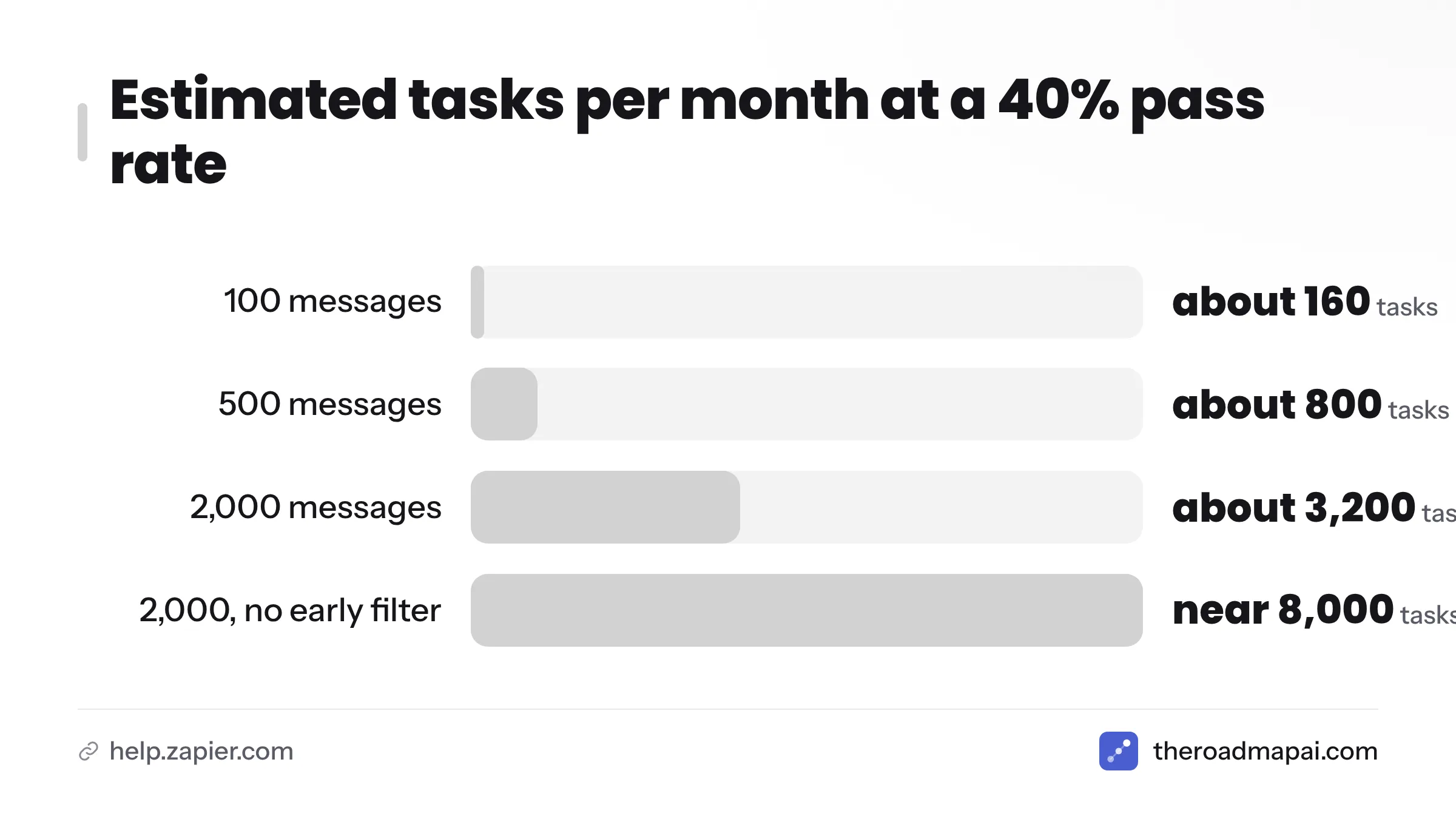
These are illustrative calculations. They assume 4 tasks per passing message, and your pass rate will differ.
| Monthly messages | Filter pass rate | Passing messages | Estimated tasks |
|---|---|---|---|
| 100 | 40% | 40 | about 160 |
| 500 | 40% | 200 | about 800 |
| 2,000 | 40% | 800 | about 3,200 |
Now compare with no early filter at 2,000 messages. Every message runs 4 steps, so you land near 8,000 tasks. Filtering early cuts usage by more than half in this example.
Ways to cut task usage
- Filter first. Put the cheapest rejection rule before any paid step.
- Digest instead of instant. Collect messages and classify them in one daily batch.
- Skip the reply step for low-confidence items.
- Merge steps. Ask the AI to return all fields in one call.
Zapier vs Make vs n8n for Feature Request Automation
All three can run this workflow. They differ in how they charge, where you host them, and how technical you need to be. Verify current details on each vendor's site, since plans change.
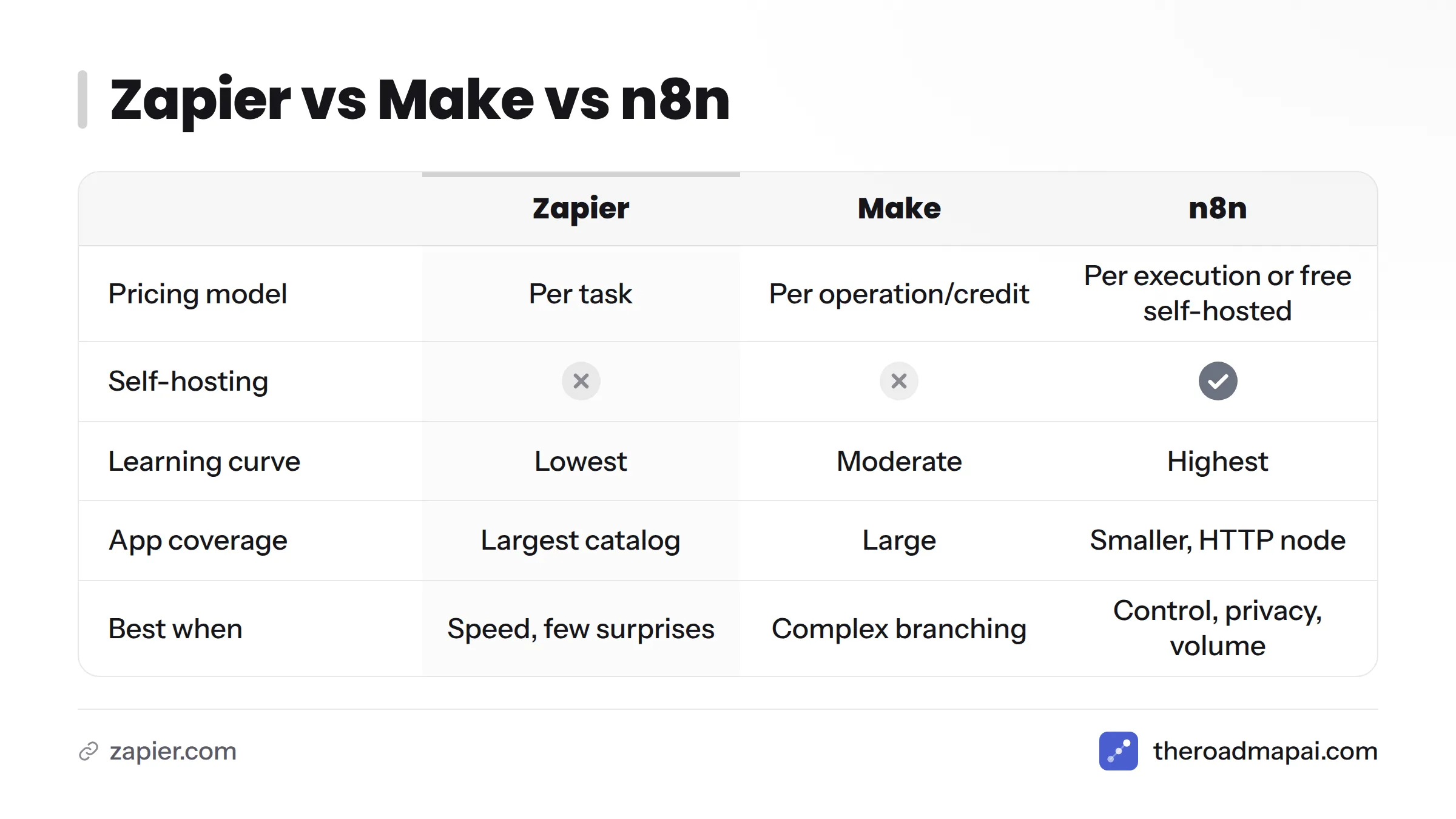
| Zapier | Make | n8n | |
|---|---|---|---|
| Pricing model | Per task (action steps) | Per operation/credit | Per workflow execution (cloud) or free self-hosted community edition |
| AI steps | AI by Zapier, plus OpenAI and Claude apps | OpenAI and other AI modules | AI nodes, agent features, and LangChain nodes |
| Self-hosting | No | No | Yes |
| Learning curve | Lowest | Moderate (visual scenarios) | Highest (more technical) |
| App coverage | Largest catalog | Large | Smaller, with HTTP node for gaps |
| Best for feedback when | You want speed and few surprises | You want complex branching at lower per-step cost | You want control, privacy, or heavy volume |
Sources for the table: Zapier pricing, Make pricing, and the n8n documentation.
When to choose each
- Choose Zapier if your team is non-technical and you value setup speed.
- Choose Make if your flow has many branches and you want to watch data move visually.
- Choose n8n if user messages must stay on your own servers, or you plan to run thousands of executions.
If you want a visual comparison of Zapier vs Make vs n8n for feedback capture, this video walks through the three platforms side by side.
Using Zapier MCP and AI Agents With Your Request Backlog
The Model Context Protocol is an open standard that lets AI assistants call external tools in a consistent way. Zapier MCP exposes your Zapier actions to MCP-compatible assistants, and Zapier Agents lets you build agent-style automations.
Letting an assistant list, add, and update requests
For Zapier MCP feature requests, expose actions such as "Notion: Find Database Item," "Create Database Item," and "Update Database Item." Then you can ask an assistant, "List the top five unshipped requests tagged integrations," or "Add this email as a request." Keep write permissions narrow and log what the agent changes, because an assistant can misread a vague prompt. For a wider look at where this is heading, see these AI feedback tools.
Troubleshooting Common Zapier Feedback Automation Problems
| Symptom | Likely cause | Fix |
|---|---|---|
| Zap creates duplicate records | Trigger fired twice, or the Zap replies in the same channel it watches | Exclude bot messages in the filter; add a find-or-create step |
| Records appear minutes late | Polling trigger | Switch to an instant trigger or webhook if available |
| Discord messages never trigger | No native message trigger, or missing bot permissions | Use a bot with the Message Content intent posting to a webhook |
| Fields arrive blank | Test data lacked the field, or the mapping points to the wrong step | Re-run the test and remap from the latest step |
| AI returns text instead of JSON | Prompt too loose | Demand "ONLY valid JSON," list allowed values, test again |
| Zap halts with a rate limit error | Burst of messages hits the destination API | Add a delay step or batch with a digest |
| Task usage spikes | Filter sits after the paid steps | Move the filter to step 2 |
Quick checklist when a Zap misbehaves:
- Open Zap history and read the failed step.
- Compare the trigger sample to the real data.
- Check app connection permissions.
- Replay the run after the fix.
When to Stop Using Zaps: DIY vs a Purpose-Built Feature Request Tool
A Zap chain is a fine starting point. It stops being fine when you spend more time repairing it than reading requests. Use this decision guide:
| Question | If yes | If no |
|---|---|---|
| Do you get under about 100 requests a month? | A Zap is enough | Keep reading |
| Do you need meaning-based duplicate merging? | Dedicated tool | Zap with find-or-create may work |
| Do users need to vote on requests? | Dedicated tool | Zap is fine |
| Do you want a public roadmap that updates itself? | Dedicated tool | A Notion page can do |
| Does your community live in Discord? | Dedicated, Discord-native tool | Zap with Slack or forms |
If you answered "dedicated tool" twice or more, the DIY route will cost you more in upkeep than it saves.
Where RoadmapAI fits for Discord communities
Full disclosure again: this is our product, so weigh it accordingly. RoadmapAI is built for the gaps listed above. It detects requests from conversation context instead of keywords, merges duplicates into votes, publishes a public roadmap, and includes an MCP server for assistants. Nothing goes public until the owner approves it. You can read how the feature request tool works, and it offers a 7-day free trial. For Discord communities, I think it beats a webhook-and-Zap build, because the hard parts (intent detection, dedupe, voting) are built in rather than bolted on. You can also keep Zapier in the mix for pushing finished items into other tools.
Pricing context
According to the RoadmapAI pricing page, plans are Starter at $19 per month, Growth at $29 per month, and Scale at $49 per month, plus a Lifetime option at a $99 one-time payment. Compare that flat price with the task math above. A DIY build at 2,000 messages a month can use thousands of tasks plus your own maintenance hours, while a flat plan keeps the bill predictable. Check the page for current terms, since plans can change. Find out more on the RoadmapAI homepage.
Want to Request a Feature From Zapier Itself?
If you meant the other reading of this topic, here is the short version. Post your idea in the Zapier Community, where staff and other users see and discuss suggestions, or contact Zapier support through your account's help menu. Describe the job you are trying to do, not just the button you want. Specific use cases get more attention than one-line wishes.
Frequently Asked Questions
Can Zapier capture feature requests automatically?
Yes. Use a trigger from your source (Slack, a form, email, or a Discord webhook), filter noise, classify with an AI step, and create a record in your tracker.
Does Zapier have a Discord trigger for new messages?
Zapier's Discord options for reading messages have been limited, so many teams use a bot that posts to a Webhooks by Zapier catch hook. Check the current Discord integration in the Zap editor.
How do I send feature requests from Discord to Notion with Zapier?
Send qualifying messages to a webhook catch hook, run the classification step, then use Notion's Create Database Item action with mapped fields.
Can Zapier tell the difference between a feature request and a bug?
Not on its own. Add an AI step that returns a type label, then use Paths to route requests, bugs, and questions to different places.
Can Zapier detect duplicate feature requests?
Only exact matches, through search-then-update steps. Meaning-based duplicates need embeddings or a dedicated tool.
How many Zapier tasks does feedback capture use?
Roughly three to four per message that passes your filter, based on the build in this guide. Messages stopped by an early filter use almost none. Confirm with Zapier's task documentation.
Is Make or n8n better than Zapier for feedback automation?
Make suits complex branching and n8n suits self-hosting and high volume. Zapier is the fastest to set up. See the comparison table above.
How do I notify users when their requested feature ships?
Build a second Zap triggered by a status change to "Shipped," then message each stored requester and post to your changelog.
Can I self-host a feature request automation?
Yes, with n8n's self-hosted edition. Zapier and Make are cloud services.
Is it GDPR-safe to send user messages through automation and AI steps?
It can be, but you need a lawful basis, a data processing agreement with each vendor, and a plan for deletion requests. Review the GDPR overview and your vendors' terms, and talk to a qualified adviser about your situation.
Next Steps: Build the Starter Zap, Then Measure
Zapier gets feature requests out of scattered chats and into one place quickly. It stumbles on meaning, voting, and cost at scale. Build the starter Zap, measure how much cleanup it needs, and let the numbers tell you when to move on.
Your checklist:
- Pick one source and one destination
- Build the five-step Zap with the filter in step 2
- Test the AI prompt on 20 to 30 real messages
- Add find-or-create to catch exact duplicates
- Add a "Shipped" notification Zap
- Estimate monthly tasks before you scale
- Reassess once duplicates or volume outgrow the Zap
Sources
- Zapier: App integrations directory
- Zapier: Pricing
- Zapier Help Center: Zap triggers and how they work
- Zapier Help Center: How is task usage counted in Zapier
- Zapier Help Center: Add conditions to your Zap with Paths
- Zapier: AI by Zapier
- Zapier: Zapier MCP
- Zapier Community
- Discord Developer Documentation: Gateway privileged intents
- Model Context Protocol
- OpenAI Platform Docs: Embeddings guide
- Make: Pricing
- n8n Documentation
- GDPR.eu: General Data Protection Regulation overview
- RoadmapAI: Pricing