 RoadmapAI
How to Track Feature Requests From Crisp Chat
Turn Crisp chat feature requests into a tracked pipeline: tag, log, merge, prioritize, and close the loop so no customer idea gets lost in your inbox.
Your customers are telling you what to build, and they are doing it inside Crisp right now. The catch is that a live chat inbox exists to close conversations, not to count demand. A strong idea from a paying customer lands between a password reset and a "thanks, you're awesome," and then it vanishes. This guide turns Crisp chat feature requests into a tracked, voted, and communicated pipeline in five steps: tag, log, merge, prioritize, and close the loop. If you came here to ask Crisp itself for a feature, jump to the section for that.
Disclosure: RoadmapAI publishes this guide. RoadmapAI has no Crisp-native integration today, and I will say so wherever it matters. Last updated November 2026.
How to track feature requests from Crisp chat
To track feature requests from Crisp chat, tag every request-type conversation, log it in one shared list, merge duplicates into a single item with a vote count, score the items, and notify requesters when something ships. That is the whole Crisp feature request workflow in one sentence. Here it is in five steps:
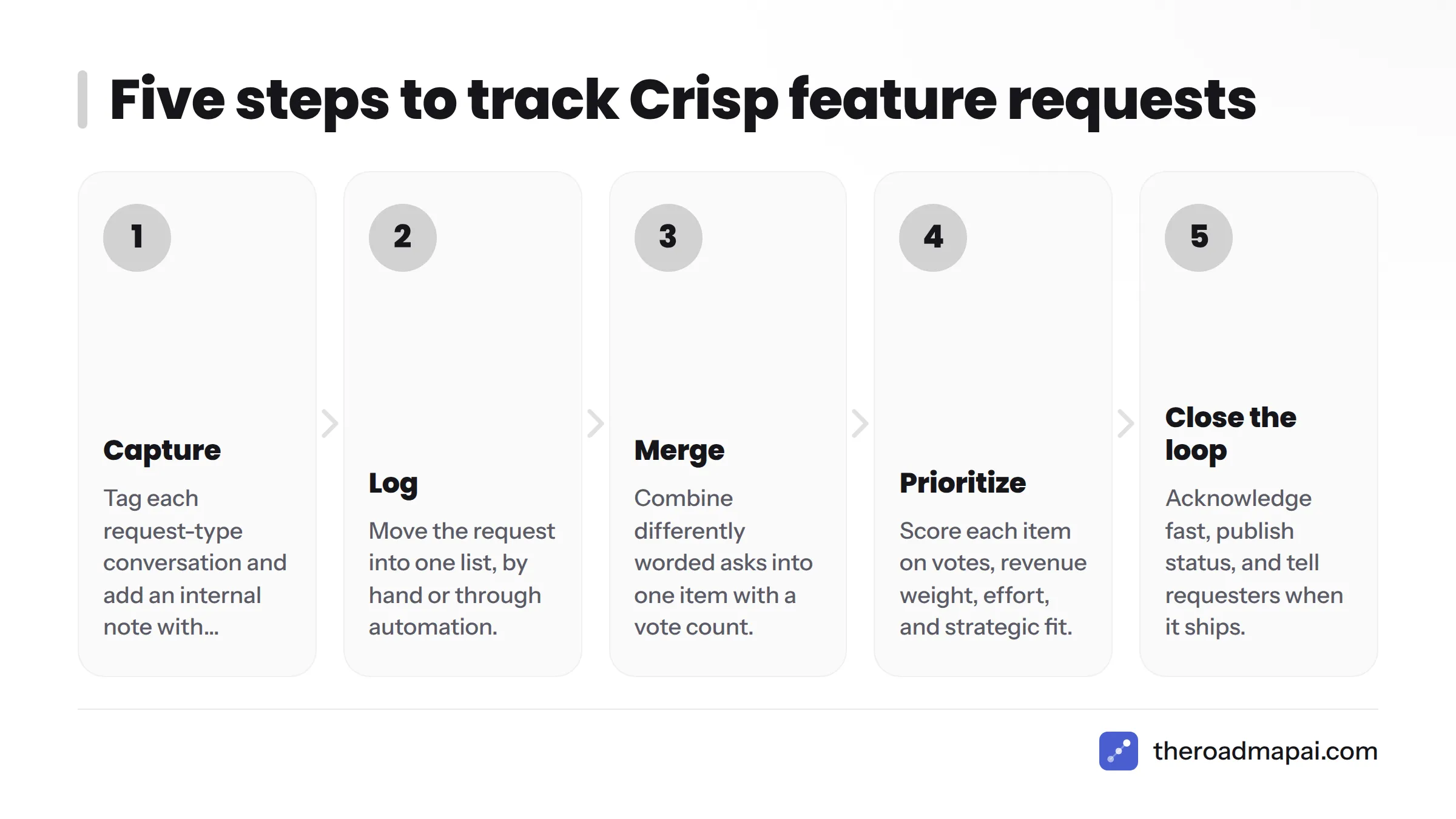
- Capture: Tag each request-type conversation in the Crisp inbox and add an internal note with context.
- Log: Move the request into one list, by hand or through webhooks and automation.
- Merge: Combine differently worded asks into a single item with a vote count.
- Prioritize: Score each item on votes, revenue weight, effort, and strategic fit.
- Close the loop: Acknowledge fast, publish status, and tell requesters when it ships.
First, let's break down why requests keep disappearing.
Why feature requests get lost in Crisp conversations
Live chat is built for resolution, not demand counting
Crisp is a customer messaging platform. Its Inbox lets an operator answer quickly, hand off to a teammate, and mark the conversation resolved. That design fits support well. It fits product discovery badly, because the unit of work is the conversation, not the idea.
One feature idea can show up in twenty conversations with twenty different phrasings. Each gets a polite reply and a resolved status. Nobody sees the pattern, which is why a Crisp shared inbox rarely produces usable feature request tracking on its own.
The cost of unlogged requests
I have watched small teams treat chat requests as noise until a churned customer's exit note says, "I asked for this three times." Unlogged requests hurt in three ways:
- Churn signals go unseen. Repeated asks from one account are an early warning.
- You build blind. Without counts, the loudest voice wins.
- Customers stop asking. When nobody replies with a status, people assume nobody is listening.
The volume behind this is large. Crisp's published AI support report cites 484.8 million conversations across 27,318 companies, according to the company's X feed. Plenty of that is product signal that never reaches a product team.
Feature request, bug, or support question? How to tell
A feature request asks for something that does not exist yet. A bug says something that should work is broken. A support question asks how to do something that already works. Mix the three and your backlog clogs, so classify first. Our guide on how to separate feature requests from support covers the same problem in Intercom.
Classification rubric
| Type | Signal phrases | Example chat message | Where it goes |
|---|---|---|---|
| Feature request | "Can you add," "I wish," "it would be great if," "is there a way to" (and the answer is no) | "Can you add a dark mode to the dashboard?" | Request log |
| Bug | "It's broken," "stopped working," "error," "used to work" | "Export fails with a blank file since yesterday." | Bug tracker, urgent queue |
| Support question | "How do I," "where is," "what does this mean" | "How do I invite a teammate?" | Reply, then link a help article |
| Praise or feedback | "Love," "thanks," "great job" | "Your new onboarding is great." | Log as sentiment, no action |
Decision tree
Ask three questions in order:
- Is something that should work broken? If yes, it is a bug. Stop here.
- Does the thing the user wants already exist? If yes, it is a support question. Answer it, and write a Knowledge Base article if it keeps coming up.
- Does the thing not exist? If yes, it is a feature request. Tag it.
Edge cases
- Workarounds: "I hacked this together with a spreadsheet, but..." is a feature request. The workaround proves the need.
- "It'd be nice if": Soft language still counts. Log it with a low-urgency note.
- Integration asks: "Do you connect with X?" is a request when the answer is no, and a support question when the answer is yes.
- Bug-shaped requests: "The button is in the wrong place" is usually a usability request, not a defect.
Step 1: Capture requests inside Crisp
Build a tag taxonomy
Keep it small. Too many tags and operators stop using them. Start here:
feature-request,bug,question,praise- Theme tags such as
theme-billing,theme-integrations,theme-mobile churn-riskfor accounts that say they may leave
Crisp supports conversation tagging in the Inbox. Check the current Crisp Help Center for how tags behave on your plan before you roll this out to a team.
Add context with internal notes
A tag says what the message is. A note says why it matters. Crisp lets operators leave notes that customers never see, so use a fixed mini-format you can parse later:
Plan: Pro | Use case: weekly client reports | Urgency: blocking | Workaround: manual CSV
Review tagged conversations in one place
Use Inbox filters or saved segments to pull every conversation tagged feature-request, and schedule a weekly review so the list never goes stale. Menus change, so confirm the exact filter and segment options in the current Crisp docs.
Optional: let a chatbot ask the question
Crisp offers a Chatbot Builder for scenarios. You could add a branch that asks, "Is this an idea for something new?" and tags the conversation when the visitor says yes. Verify in the Crisp docs that tagging from a scenario works on your plan before you promise it to your team. To see the operator side first, Crisp's own walkthrough covers the basics:
Step 2: Move requests into a single log
Tags live inside Crisp. Counting demand needs a list that sits outside any one conversation.
Manual path: a spreadsheet schema
A Google Sheets or Airtable base is enough for the first 15 minutes of setup. Use these columns:
| Column | Purpose |
|---|---|
| Request (short title) | One plain-language name for the idea |
| Source | Crisp, Discord, email |
| Customer | Name or account ID |
| Plan tier | Used for revenue weighting |
| Date | First seen |
| Conversation link | Deep link back to the Crisp thread |
| Votes | Count of unique customers asking |
| Status | New, under review, planned, shipped, declined |
Automated path: webhooks and no-code tools
Crisp exposes webhooks and a REST API, documented in the Crisp Developer Hub. A common pattern fires a webhook when a conversation gets a tag, sends it to Zapier or n8n, and appends a row to your log. The Crisp ecosystem already includes a community-built n8n integration, mentioned in Crisp's end-of-2025 product update. Our guide to Zapier feature requests walks through the routing logic, and the official n8n documentation covers webhook triggers.
If you verify webhook payloads, use signature verification so only genuine Crisp events reach your automation.
Developer path
With an engineer on hand, the API lets you read conversations, metadata, and tags, then write them into your own database or tracker. Start with the Developer Hub, test on one workspace, and store only what you need. That last part matters for privacy.
A note on GDPR: Chat transcripts contain personal data. If you serve people in the EU, review the European Commission's data protection guidance, and log the idea and a customer ID rather than the whole transcript.
Step 3: Merge duplicates and count demand
Why different wording hides the real demand
"Dark mode," "night theme," and "my eyes hurt at night" are one request. Count them as three and none of them ranks. Match on keywords alone and you will miss the third.
A naming convention and merge rules
- Name each item by the outcome, not the solution: "Reduce eye strain at night" beats "Add dark mode."
- Merge when the same work would solve both requests.
- Keep a separate item when the need differs, even if the UI looks similar.
- Count unique customers, not messages. One person asking five times is one vote, plus a note on intensity.
- Keep links to every original conversation so you can notify those customers later.
When AI-based merging pays off
Past roughly 50 open requests, merging by hand gets slow. Tools that read context and intent, rather than matching keywords, can group "night theme" with "my eyes hurt." Our overview of AI feedback tools explains how that works. RoadmapAI applies this approach to communities, and nothing goes public until the owner approves it.
For a closer look at purpose-built feature request tools, see how capture, voting, and merging fit together. This is also where Crisp feature voting comes up: Crisp gives you the conversations, but the votes have to live somewhere else.
Step 4: Prioritize without guessing
A simple scoring model
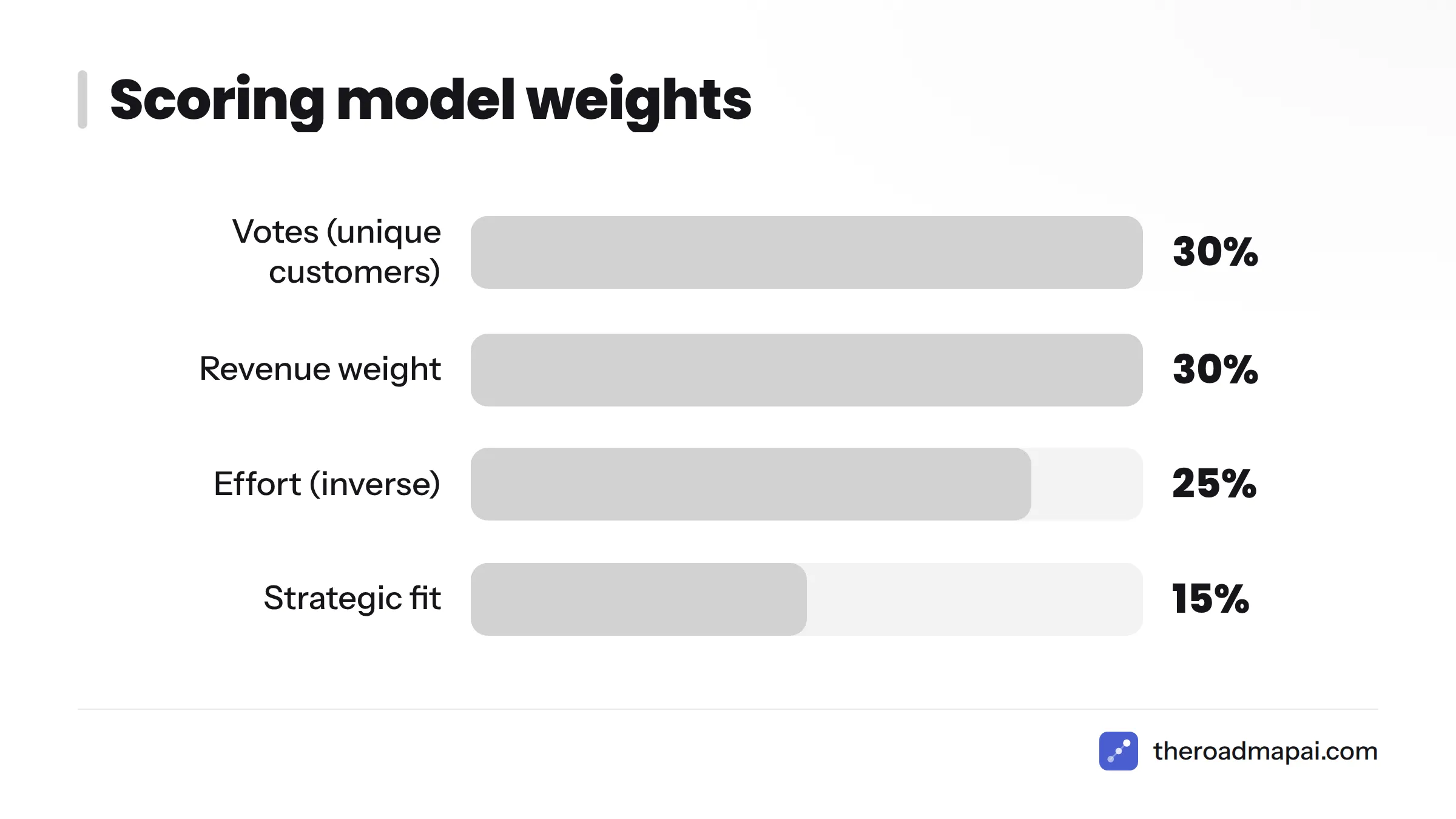
Votes alone mislead. Ten free users asking for something may matter less than one request from your largest account. A weighted score handles that. If you know RICE scoring, which Intercom popularized, this is a lighter version.
| Factor | How to score (1 to 5) | Weight |
|---|---|---|
| Votes (unique customers) | 1 = 1 to 2, 5 = 20 or more | 30% |
| Revenue weight | Based on plan tier of requesters | 30% |
| Effort (inverse) | 5 = days, 1 = quarter or more | 25% |
| Strategic fit | Does it support your direction? | 15% |
Worked example (illustrative data)
| Request | Votes | Revenue | Effort | Fit | Score |
|---|---|---|---|---|---|
| Scheduled report emails | 4 | 5 | 3 | 4 | 4.05 |
| Night theme | 5 | 2 | 4 | 2 | 3.40 |
| Zapier trigger on new ticket | 3 | 4 | 2 | 5 | 3.35 |
The math for the first row: (4 × 0.30) + (5 × 0.30) + (3 × 0.25) + (4 × 0.15) = 1.2 + 1.5 + 0.75 + 0.6 = 4.05. These numbers are invented to show the method. Use your own.
Common prioritization mistakes
- Counting messages instead of customers.
- Treating all tiers equally, or treating the biggest account as the only voice.
- Ignoring effort, which turns your roadmap into a wish list.
- Never declining. A clear "not planned" is kinder than silence.
Should paying customers count for more? Weight them, but do not erase the free tier. Free users are often your future paying base.
Step 5: Close the loop with customers
Acknowledge fast
Customers forgive "no" faster than silence. Save this as a canned reply:
Thanks for the idea. I've logged "[short title]" and added your vote. I can't promise a date, but I'll message you here when the status changes.
Publish a public roadmap and let users vote
A visible status board answers "is anyone listening?" before anyone asks. As far as Crisp's current documentation shows, it does not ship a public voting board or a Crisp roadmap view, so check the docs for updates. Pair your chat with public roadmap software so customers can see what is under review, planned, and shipped, and vote without opening a chat. A public product roadmap also turns scattered Crisp feedback into a Crisp feedback to roadmap loop customers can actually watch.
Notify requesters on ship
When an item ships, message every linked requester:
Good news: "[short title]" is live. You asked for it on [date], and it's now in [where to find it]. Tell me if it misses the mark.
Then post it in your release notes. Dedicated changelog tools make that step repeatable. Customers who get a "you asked, we built it" message tend to mention it to others.
Spreadsheet, Crisp-native tags, or a feedback tool?
Here is how the options compare. I put RoadmapAI first because it is the tool I would pick for communities that live in Discord, but read the limits column honestly.
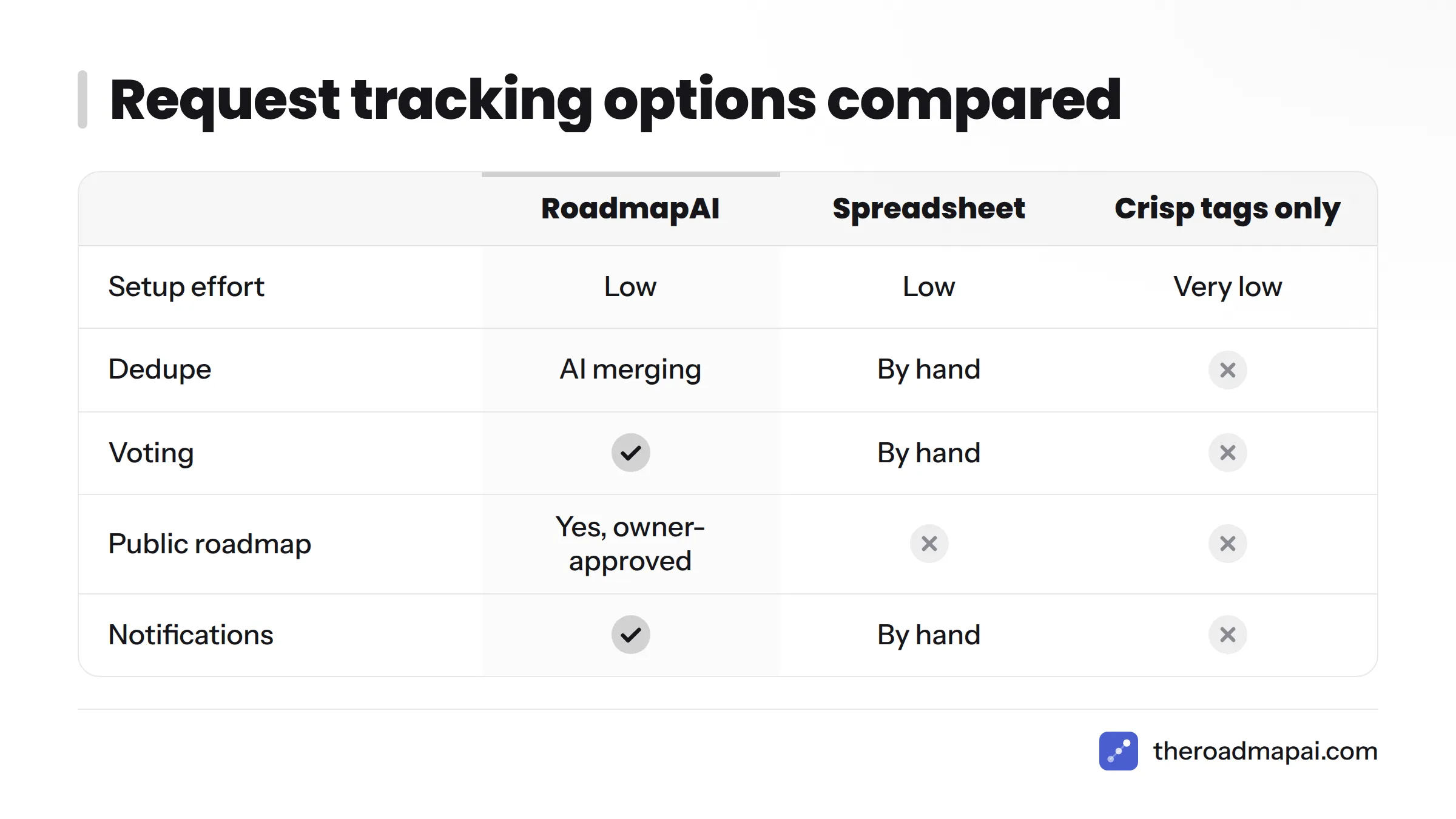
| Option | Setup effort | Dedupe | Voting | Public roadmap | Notifications | Best for | Limits |
|---|---|---|---|---|---|---|---|
| RoadmapAI | Low (add the bot, minutes) | AI merging by context and intent | Yes | Yes, owner-approved before publishing | Yes | Teams with a Discord community who want capture to roadmap | No Crisp-native integration today; Slack, Intercom, and Zendesk are coming soon |
| Manual spreadsheet | Low | By hand | By hand | No | By hand | Under about 30 requests | Breaks down as volume grows |
| Crisp tags only | Very low | None | None | No | None | Starting to classify | Counts live inside conversations, no roadmap |
| Canny or Upvoty style board | Medium | Manual merge tools | Yes | Yes | Yes | Dedicated voting portals | Separate portal; requests must be entered or imported |
| Linear or GitHub Issues | Medium | Manual | Reactions or upvotes | Limited | Limited | Engineering-owned backlogs | Not built for non-technical customer input |
For engineering-side workflows, see our guides on Linear feature requests and GitHub Issues feature requests.
When to graduate from a spreadsheet
Move to a dedicated tool when you hit two or more of these:
- More than 30 to 50 open requests
- More than one person triaging
- Duplicates you can no longer spot by eye
- Customers asking "where's my feature?" weekly
- Requests arriving from more than one channel
Where RoadmapAI fits
RoadmapAI captures requests from Discord communities with AI detection, merges duplicates, and holds everything for owner approval before it goes public. It also offers an MCP server for AI coding tools and imports boards from Canny and Upvoty. Slack, Intercom, and Zendesk integrations are listed as coming soon, and there is no direct Crisp connection. If you run Crisp for support and a Discord server for your community, you can centralize community requests in RoadmapAI and log Crisp requests through a spreadsheet import or a Zapier route. See RoadmapAI pricing for plans and the 7-day free trial.
Collect feedback across Crisp, Discord, Slack and email
Customers do not pick one channel. The same person may mention an idea in Crisp on Monday and in your Discord on Friday. If each channel keeps its own list, you split the votes and Crisp customer feedback never adds up.
Pick one log and send everything there:
- Discord: Use a Discord feedback bot and read how to collect feature requests from Discord without drowning in threads.
- Slack: Learn how to track Slack feature requests with the same tag logic.
- Email: Follow the feedback email to roadmap workflow.
- Other channels: We also cover Telegram, Discourse, and GitHub Discussions.
Use the same tag names everywhere. A request tagged theme-billing in Crisp should land in the same bucket as one tagged theme-billing in Slack.
Want to request a feature from Crisp itself?
If you are a Crisp customer who wants something Crisp does not do, here is the short version of how to request a feature in Crisp.
Where to look
- The Crisp Help Center explains how things work today and how to contact support.
- Crisp's blog and product update posts show what shipped recently and what is teased next.
- In-app support chat is the most direct route.
Channels change, so verify the current feedback route on crisp.chat before relying on any of these.
How to write a request that gets noticed
- State the job, not the button. "I need to send weekly summaries to clients" beats "add a scheduler."
- Describe your current workaround and what it costs you in time.
- Give your plan and team size so the vendor can judge impact.
- Keep it to one idea per message.
- Follow up with real examples, such as a screenshot or a link to the conversation type.
Free templates and checklists
Copy these into your own docs:
- Tag taxonomy:
feature-request,bug,question,praise,churn-risk, plustheme-tags. - Internal note format:
Plan | Use case | Urgency | Workaround. - Request log columns: Request, Source, Customer, Plan, Date, Link, Votes, Status.
- Acknowledgement reply and shipped message: both templates appear in Step 5.
- Scoring sheet: the four-factor model in Step 4, with weights you can change.
- Weekly review checklist: triage new tags, merge duplicates, update votes, move statuses, send ship notices.
Crisp chat feature requests: FAQ
Can I track feature requests directly inside Crisp?
Partly. You can tag conversations, add internal notes, and filter the inbox. Crisp does not give you a vote count or public roadmap in the inbox, so most teams pair it with a separate log.
How do I tag a conversation as a feature request in Crisp?
Open the conversation in the Inbox and add a tag such as feature-request. Confirm current tag controls in the Crisp Help Center, since menus can change.
How do I tell a feature request from a bug in live chat?
If something that used to work is broken, it is a bug. If the user wants something that does not exist, it is a feature request. Use the rubric and decision tree above.
Does Crisp have a built-in feature voting board or public roadmap?
Based on its public documentation, Crisp focuses on messaging and support rather than voting boards. Check the current docs, since features change. A tool like RoadmapAI or a Canny-style board can fill that gap.
How do I export Crisp conversations that contain feature requests?
Use the Crisp API or an automation to pull tagged conversations, or copy key details into your log. Store the idea and a conversation link rather than full transcripts.
Can I use Crisp webhooks or the API to send requests to another tool?
Yes. Crisp documents webhooks and a REST API in its Developer Hub. You can trigger an automation when a conversation is tagged and write a row to your log.
How do I connect Crisp to Zapier or n8n to log feature requests?
Use a webhook as the trigger, then add a step that creates a row in Sheets, Airtable, or your tracker. Follow the Zapier or n8n docs for webhook triggers, and test with one tagged conversation first.
How do I merge duplicate feature requests that use different wording?
Name items by the outcome, merge those solved by the same work, and count unique customers. AI tools that read context can speed this up once you have dozens of items.
How do I count how many customers asked for the same feature?
Keep one row per idea and add each customer once. Link every source conversation so you can verify the count and notify people later.
How should I prioritize feature requests from chat?
Score votes, revenue weight, effort, and strategic fit. RICE and ICE are well-known alternatives if you prefer an established framework.
What should I reply to a customer who asks for a feature?
Thank them, confirm you logged it, avoid promising a date, and say you will follow up when the status changes.
How do I tell customers when their requested feature ships?
Keep the conversation links on the request. When it ships, message each requester and post the update in your changelog.
Can a Crisp chatbot collect feature requests automatically?
It can ask a qualifying question and may be able to tag the result. Verify scenario and tagging options on your plan in the Crisp docs.
Can AI classify Crisp conversations into requests, bugs, and questions?
Yes. AI classification of support conversations is increasingly common, and Crisp itself publishes AI support research. Review the output before acting on it, especially at the start.
Is a spreadsheet enough, and when should I move to a feedback tool?
A spreadsheet works for roughly 30 requests and one person triaging. Move when duplicates, multiple channels, or customer follow-ups start slipping.
How often should I review the request backlog?
Weekly for triage and merging, monthly for prioritization, and at every release for ship notices.
How do I keep customer data compliant with GDPR when logging chat requests?
Log the minimum: the idea, a customer ID, and a link. Set a retention period, and review official EU data protection guidance for your situation.
How do I submit a feature request to Crisp itself?
Use the Crisp Help Center or in-app support, and verify the current channel on crisp.chat. Write the request around the job you need done.
Next steps
Start small. Today, create the four core tags and the log. This week, tag every request-type chat and add notes. Next month, merge, score, and send your first "you asked, we built it" message.
If your community also lives on Discord, try RoadmapAI to capture, merge, and publish requests with owner approval.